• 4.9/5.0
  • 402 Questions
  • Updated on: 25-May-2026
  • Understanding Cisco Cybersecurity Operations Fundamentals (CBROPS)
  • 24025 Prepared

Free Cisco 200-201 Practice Questions 2026 | Understanding Cisco Cybersecurity Operations Fundamentals (CBROPS)


Which items is an end-point application greylist used?

A. Items that have been established as malicious

B. Items that have been established as authorized

C. Items that have been installed with a baseline

D. Items before being established as harmful or malicious

D.   Items before being established as harmful or malicious

Explanation:
A greylist in endpoint applications refers to a list of items that are not yet classified as either good (whitelisted) or bad (blacklisted).
The primary function of a greylist is to hold applications, processes, or files that are under observation due to their unknown status.
These items are neither trusted nor immediately flagged as harmful, allowing security teams to monitor them closely for any suspicious behavior.
By placing items on a greylist, security operations can prevent potential threats without disrupting legitimate processes, awaiting further analysis to determine their true nature.

An employee reports that someone has logged into their system and made unapproved changes, files are out of order, and several documents have been placed in the recycle bin. The security specialist reviewed the system logs, found nothing suspicious, and was not able to determine what occurred. The software is up to date; there are no alerts from antivirus and no failed login attempts. What is causing the lack of data visibility needed to detect the attack?

A. The threat actor used a dictionary-based password attack to obtain credentials.

B. The threat actor gained access to the system by known credentials.

C. The threat actor used the teardrop technique to confuse and crash login services.

D. The threat actor used an unknown vulnerability of the operating system that went undetected.

B.   The threat actor gained access to the system by known credentials.

Explanation: The lack of data visibility needed to detect the attack is caused by the threat actor gaining access to the system by known credentials. This means that the threat actor either obtained the employee’s username and password through phishing, social engineering, or other means, or used a compromised account that had legitimate access to the system. This would explain why there were no suspicious logs, alerts, or failed login attempts, as the threat actor appeared to be a normal user.

What is sliding window anomaly detection?

A. Detect changes in operations and management processes.

B. Identify uncommon patterns that do not fit usual behavior.

C. Define response times for requests for owned applications.

D. Apply lowest privilege/permission level to software

B.   Identify uncommon patterns that do not fit usual behavior.

Explanation: Sliding window anomaly detection is a technique used in cybersecurity to identify unusual patterns or behaviors that deviate from the norm. It involves analyzing segments of data over a period of time, referred to as a ‘window,’ and comparing them against typical patterns. Anomalies are detected when observed behaviors significantly differ from expected patterns, indicating potential security incidents or issues that require further investigation.

How does agentless monitoring differ from agent-based monitoring?

A. Agentless can access the data via API. While agent-base uses a less efficient method and accesses log data through WMI.

B. Agent-based monitoring is less intrusive in gathering log data, while agentless requires open ports to fetch the logs

C. Agent-based monitoring has a lower initial cost for deployment, while agentless monitoring requires resource-intensive deployment.

D. Agent-based has a possibility to locally filter and transmit only valuable data, while agentless has much higher network utilization

D.   Agent-based has a possibility to locally filter and transmit only valuable data, while agentless has much higher network utilization

Explanation

  • Agent-based monitoring: With agent-based monitoring, software agents are installed on the monitored systems or devices. These agents collect data locally, perform filtering or preprocessing of the data, and then transmit the relevant or valuable information to the monitoring system. Agent-based monitoring allows for local processing and filtering, which can reduce network utilization by only transmitting essential data. 
  • Agentless monitoring: Agentless monitoring, on the other hand, does not require software agents to be installed on the monitored systems or devices. Instead, it relies on leveraging existing protocols and interfaces, such as APIs (Application Programming Interfaces) or SNMP (Simple Network Management Protocol), to remotely access and retrieve monitoring data from the target systems. Agentless monitoring generally involves higher network utilization as the monitoring system needs to gather data from remote systems over the network.

What describes the impact of false-positive alerts compared to false-negative alerts?

A. A false negative is alerting for an XSS attack. An engineer investigates the alert and discovers that an XSS attack happened A false positive is when an XSS attack happens and no alert is raised

B. A false negative is a legitimate attack triggering a brute-force alert. An engineer investigates the alert and finds out someone intended to break into the system A false positive is when no alert and no attack is occurring

C. A false positive is an event alerting for a brute-force attack An engineer investigates the alert and discovers that a legitimate user entered the wrong credential several times A false negative is when a threat actor tries to brute-force attack a system and no alert is raised.

D. A false positive is an event alerting for an SQL injection attack An engineer investigates the alert and discovers that an attack attempt was blocked by IPS A false negative is when the attack gets detected but succeeds and results in a breach.

C.   A false positive is an event alerting for a brute-force attack An engineer investigates the alert and discovers that a legitimate user entered the wrong credential several times A false negative is when a threat actor tries to brute-force attack a system and no alert is raised.

Explanation: False positives and false negatives are terms used to describe the accuracy of security alerts. A false positive occurs when a security system incorrectly identifies benign activity as malicious, leading to unnecessary investigation and potential disruption of legitimate activities. Conversely, a false negative happens when a security system fails to detect actual malicious activity, allowing the attackers to proceed undetected. The impact of false positives is generally wasted time and resources investigating non-issues, while the impact of false negatives can be much more severe, potentially leading to undetected breaches and significant damage.
The CBROPS curriculum covers the concepts of false positives and false negatives in the context of security monitoring and alerting systems

An analyst see that this security alert "Default-Botnet-Communication-Detection-By- Endpoint" has been raised from the IPS. The analyst checks and finds that an endpoint communicates to the C&C. How must an impact from this event be categorized?

A. true positive

B. true negative

C. false positive

D. false negative

A.   true positive

Which type of verification consists of using tools to compute the message digest of the original and copied data, then comparing the similarity of the digests?

A. evidence collection order

B. data integrity

C. data preservation

D. volatile data collection

B.   data integrity

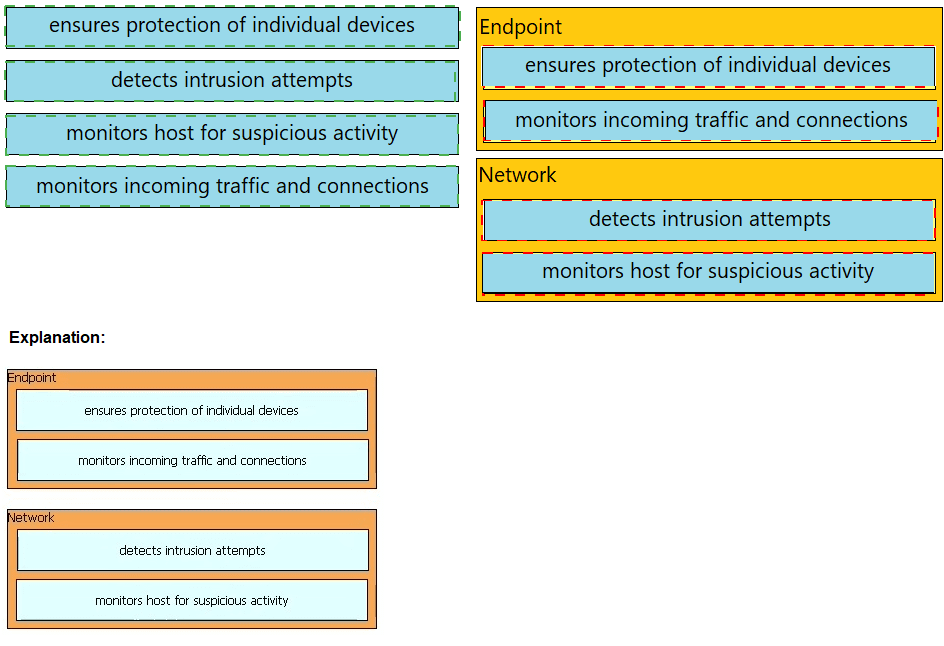
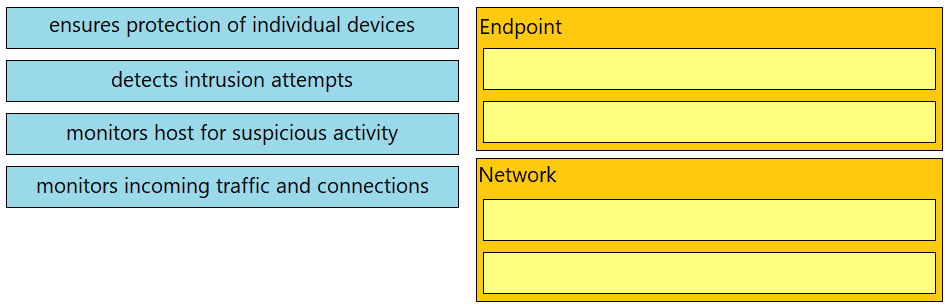
Drag and drop the uses on the left onto the type of security system on the right.

The SOC team has confirmed a potential indicator of compromise on an endpoint. The team has narrowed the executable file's type to a new trojan family. According to the NIST Computer Security Incident Handling Guide, what is the next step in handling this event?

A. Isolate the infected endpoint from the network.

B. Perform forensics analysis on the infected endpoint.

C. Collect public information on the malware behavior.

D. Prioritize incident handling based on the impact.

C.   Collect public information on the malware behavior.

Explanation: According to the NIST Computer Security Incident Handling Guide, the next step in handling an event after confirming a potential indicator of compromise on an endpoint is to collect public information on the malware behavior. This step involves searching for information from various sources, such as antivirus vendors, security blogs, threat intelligence feeds, and online forums, to learn more about the characteristics, capabilities, and impact of the malware. This information can help the SOC team to identify the type, severity, and scope of the incident, as well as to determine the appropriate response actions and mitigation strategies. Isolating the infected endpoint, performing forensics analysis, and prioritizing incident handling are subsequent steps that follow after collecting public information on the malware behavior.

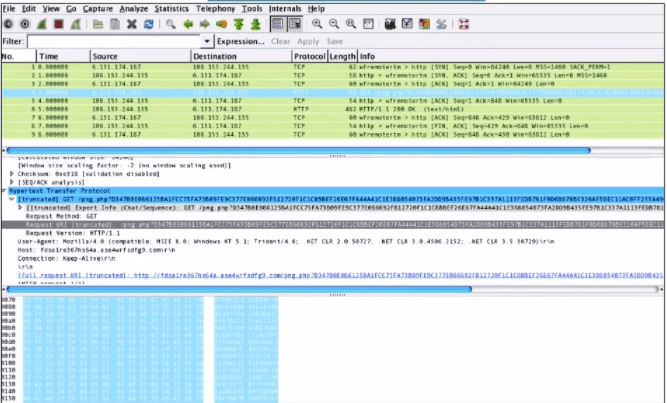
Refer to the exhibit.

What is shown in this PCAP file?

A. Timestamps are indicated with error.

B. The protocol is TCP.

C. The User-Agent is Mozilla/5.0.

D. The HTTP GET is encoded

C.   The User-Agent is Mozilla/5.0.

Explanation: The PCAP file shows a network packet capture of an HTTP GET request from a client to a server. The User-Agent header field identifies the type and version of the client software that generated the request. In this case, the User-Agent is Mozilla/5.0, which indicates that the client is using a Mozilla-based browser or application. The User- Agent can help the server to customize the response based on the client’s capabilities and preferences.

Page 17 out of 41 Pages