- 4.9/5.0
- 277 Questions
- Updated on: 27-Aug-2026
- Implementing Cisco Enterprise Wireless Networks (ENWLSI)
- 22775 Prepared
Free Cisco 300-430 Practice Questions 2026 | Implementing Cisco Enterprise Wireless Networks (ENWLSI)
A customer is deploying Cisco Catalyst Center (formerly DNA Center) to manage a Cisco Catalyst 9800 Series Wireless Controller Cisco CleanAir is used to address wireless interference Which two configurations must be completed from the Cisco Catalyst Center GUI to manage the interferes? (Choose two )
A. Enable Neighbor List Dual Band on the configured WLANs
B. Disable Persistent Device Propagation in the CleanAir configuration model
C. Configure the RX SOP threshold to be high
D. Enable CleanAir Device Reporting in the CleanAir configuration model
E. The CleanAir configuration model must be applied to a wireless network profile
Explanation:
When provisioning Cisco CleanAir via Cisco Catalyst Center (formerly DNA Center) for managed wireless infrastructure (including Cisco Catalyst 9800 Series Controllers and APs):
Enable CleanAir Device Reporting (Option D):
Within the CleanAir profile/configuration model inside Catalyst Center, administrators must explicitly enable CleanAir and CleanAir Device Reporting. This instructs the managed Access Points to actively process RF ASIC data, detect non-Wi-Fi interferers (such as Bluetooth, microwave ovens, cordless phones, and video transmitters), and report interference metrics to the controller and Catalyst Center.
Apply Model to Wireless Network Profile (Option E):
In Catalyst Center's design workflow, RRM and CleanAir settings are encapsulated inside RF profiles or configuration models. To push these parameters to specific wireless controllers and access point groups, the created CleanAir configuration model must be attached/applied to a Wireless Network Profile that maps to the target site location.
Why Other Options Are Incorrect:
A. Enable Neighbor List Dual Band on the configured WLANs:
Neighbor List settings relate to client roaming steering (such as 802.11k neighbor reports), not non-Wi-Fi RF interference detection via CleanAir.
B. Disable Persistent Device Propagation in the CleanAir configuration model:
Persistent Device Propagation (PDP) allows CleanAir to track interfering devices as clients roam across AP cells; disabling it weakens interference tracking rather than enabling management.
C. Configure the RX SOP threshold to be high:
Receiver Start-of-Packet (RX SOP) adjusts AP receiver sensitivity to ignore weak Wi-Fi frames in high-density deployments; it does not configure CleanAir interferer detection or management profiles.
References:
Cisco Catalyst Center Wireless Network Design & Provisioning Guide: Details creating wireless telemetry models and attaching CleanAir configuration profiles to Site-based Wireless Network Profiles to enforce interference detection across managed WLCs.
Refer to the exhibit. A network administrator must automate notifications for
Security Advisories Data reports on the Cisco Catalyst Center v2.3.7 using the
Report notification feature. Preferring a programmable approach over UI/CLI, the
administrator decides to create a webhook via the Cisco DNA Center API to send
real-time HTTP notifications to an external application. The webhook URL
https://example.com/webhook uses HTTPS with a self-signed certificate, which
requires a specific configuration in the payload to ensure the webhook functions
correctly. Which code snippet must be placed onto the box in the code to complete
the Python script that configures the webhook to use the self-signed certificate to
extract the Security Advisories Data report?
A. Option A
B. Option B
C. Option C
D. Option D
Explanation:
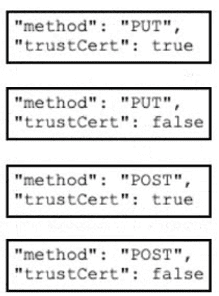
When creating a webhook via the Cisco Catalyst Center (DNA Center) API to send HTTP notifications to an external application, the API call must specify both the HTTP method and the certificate trust behavior. For this scenario, the requirements are:
Method: The correct HTTP method to create a new webhook is POST. The POST method is used to create a new resource (the webhook) on the server.
Certificate Trust: The webhook URL https://example.com/webhook uses a self-signed certificate. By default, Cisco Catalyst Center will reject connections to URLs with untrusted certificates. To bypass this, the trustCert parameter must be set to true, explicitly telling the controller to accept the self-signed certificate and establish the HTTPS connection.
Therefore, the payload must contain "method": "POST" and "trustCert": true for the webhook to be created successfully and function correctly.
Why the others are wrong:
Option A ("method": "PUT", "trustCert": true):
PUT is used to update an existing resource, not create a new one. Creating a new webhook requires POST.
Option B ("method": "PUT", "trustCert": false):
Incorrect for both reasons. PUT is for updates, and trustCert: false would fail because the self-signed certificate would be rejected.
Option D ("method": "POST", "trustCert": false):
While POST is correct for creation, trustCert: false is incorrect because it would cause the API to reject the self-signed certificate, preventing the webhook from establishing an HTTPS connection.
References:
Cisco Catalyst Center API Documentation – Webhook Creation Endpoint (POST /dna/integration/webhook).
Cisco Catalyst Center Developer Guide – trustCert parameter for handling self-signed certificates in HTTPS notifications.
An engineer set up identity-based networking with ISE and configured AAA override on the WLAN. Which two attributes must be used to change the client behavior from the default settings? (Choose two.)
A. DHCP timeout
B. DNS server
C. IPv6 ACL
D. DSCP value
E. multicast address
D. DSCP value
Explanation:
When AAA Override (Identity-Based Networking) is enabled on a WLAN, the Cisco Wireless LAN Controller (WLC) accepts vendor-specific RADIUS attributes returned by Cisco Identity Services Engine (ISE) upon successful authentication. These dynamic attributes override default WLAN settings on a per-client basis:
IPv6 ACL (Option C):
ISE returns the Airespace-IPv6-ACL-Name attribute to assign a specific IPv6 Access Control List dynamically to the client, overriding the standard default ACL set on the WLAN.
DSCP Value (Option D):
ISE returns the Airespace-DSCP attribute to enforce custom Layer 3 Quality of Service (QoS) markings on client traffic, dynamically altering packet prioritization from the default QoS profile defined on the WLAN/Policy Profile.
Why Other Options Are Incorrect:
A. DHCP timeout:
DHCP server options and lease timeouts are negotiated directly between the client device and the network's DHCP server; they are not dynamically pushable RADIUS AAA override parameters.
B. DNS server:
Domain Name System server addresses are assigned via standard DHCP options or IPCP during IP address lease acquisition, not via RADIUS AAA override attributes.
E. multicast address:
Multicast group addresses and delivery profiles are bound globally or at the WLAN/interface configuration level rather than being dynamically assigned per individual client via AAA override attributes.
References:
Cisco Wireless LAN Controller Configuration Guide (AAA Administration - Identity Networking): Documents supported RADIUS VSA attributes for AAA Override, including Airespace-IPv6-ACL-Name and Airespace-DSCP for dynamic policy enforcement.
Cisco Catalyst 9800 Series Configuration Guide (Identity-Based Networking Services): Outlines per-client dynamic authorization capabilities using ISE RADIUS return attributes.
A Cisco 8540 WLC manages Cisco Aironet 4800 Series Aps and sends AoA data to a Cisco CMX 3375 Appliance for Hyperlocation. The load from the WLC is distributed to another virtual CMX server using CMX grouping. The virtual CMX server shows location RSSI data and not Hyperlocation. No AoA metrics are shown on the metrics page of the CMX virtual appliance under System > Metrics > Location Metrics. How must the network administrator resolve this issue?
A. Enable Wireless > Access Points > Global Configuration> Enable Hyperlocation on the WLC.
B. Enable the HALO module on the CMX appliance for the data collection.
C. Allow port 2003 for AoA packets to flow through between the CMX appliances.
D. Use one Hyperlocation-enabled WLC and CMX for AoA data.
Explanation:
The core issue is a fundamental architectural limitation of the Cisco Hyperlocation solution when used with CMX Grouping. While CMX Grouping is designed to load-balance NMSP (Network Mobility Services Protocol) data between multiple CMX servers for RSSI-based location tracking, it cannot be used to distribute AoA (Angle of Arrival) data .
Why option D is correct:
The Hyperlocation/AoA feature is designed to work with a single, designated Hyperlocation-enabled CMX server . If you add a second virtual CMX server and enable Hyperlocation on it, you create a configuration conflict . The system essentially expects a single "primary" CMX instance to process the specialized AoA packets. Load distribution for Hyperlocation is not supported across multiple CMX instances .
Why the other options are wrong:
A. Enable Hyperlocation on the WLC:
While this is a necessary prerequisite for the feature (done under Wireless > Access Points > Global Configuration) , the question states the network is already sending AoA data to a CMX 3375 Appliance, implying this is likely already enabled. The problem is not the WLC setting, but the presence of a second Hyperlocation-enabled CMX server .
B. Enable the HALO module on the CMX appliance:
The "HALO module" refers to a physical component (antenna and radio module) for AP models like the 3600 and 3700 series . It is not a software feature that can be "enabled" on the CMX appliance itself. It is a hardware requirement on the access points .
C. Allow port 2003 for AoA packets:
Port 2003 is indeed the UDP port used for AoA packets to flow from the WLC to the CMX . However, the issue is not network connectivity. The AoA metrics are missing because the virtual server receiving the data is not configured to process it correctly (due to the Hyperlocation conflict), not because the traffic is blocked .
References:
Cisco documentation confirms that a single controller can only have one active Hyperlocation-enabled CMX server .
Hyperlocation diagnostics on CMX include checks for this configuration .
An engineer is configuring wireless guests using Cisco CWA. When a device connects, it must be redirected to the WebAuth, but this was failing. What must be configured for the device to be redirected correctly?
A. Configure the ACL name on the anchor controller
B. Enabled DHCP option 7.
C. Remove the CN entry from the SAN
D. Allow ICMP toward the portal
Explanation:
In a Cisco Central Web Authentication (CWA) architecture using Auto-Anchor mobility (Foreign-Anchor setup for guest traffic):
Traffic Termination on Anchor: Client traffic is EoIP/CAPWAP tunneled from the Foreign controller directly to the Anchor controller located in the DMZ. Therefore, the Anchor controller is responsible for enforcing pre-authentication ACLs and handling Layer 3 HTTP/HTTPS redirection.
Matching ACL Names: RADIUS attributes (such as url-redirect-acl) pushed from Cisco ISE tell the WLC which redirection ACL to apply. For HTTP redirection to take place, the designated ACL name must exist and be configured on the Anchor controller. If the ACL definition is missing on the Anchor controller, the controller cannot intercept HTTP traffic to initiate the WebAuth redirection flow.
Why Other Options Are Incorrect:
B. Enabled DHCP option 7:
DHCP Option 7 specifies a server for the Logging/Syslog protocol and plays no role in web authentication or HTTP redirect mechanisms.
C. Remove the CN entry from the SAN:
Certificates require matching Subject Alternative Names (SAN) and Common Names (CN) for HTTPS portal trust; removing valid CN entries causes certificate trust failures rather than resolving redirection mechanisms.
D. Allow ICMP toward the portal:
While reachability to the web portal is necessary, HTTP/HTTPS redirection is driven by TCP port 80/443 interception; permitting ICMP (ping) is not the underlying requirement to trigger HTTP portal redirection.
References:
Cisco Central Web Authentication with Cisco ISE Deployment Guide: Specifies that in Mobility Anchor deployment scenarios, redirect ACLs pushed via RADIUS override attributes must be defined locally on the Anchor WLC where the client's traffic terminates.
An engineer has configured Cisco Centralized Key Management for an enterprise that has remote branches. The remote offices are connected back to the data center using a VPN connection with low-bandwidth connections. The goal is to improve roaming. Which type of group must be configured?
A. RF
B. Cisco FlexConnect
C. interlace
D. AP
Explanation:
To improve roaming for remote branches connected by low-bandwidth VPN links, Cisco Centralized Key Management (CCKM) must be configured within an AP Group .
CCKM is a fast-roaming mechanism that significantly reduces authentication delay when a client roams between access points . Instead of requiring a full EAP authentication exchange with the RADIUS server—which would be slow and costly over a low-bandwidth VPN—the controller caches the client's Pairwise Master Key (PMK) .
Why the other options are wrong:
B. FlexConnect:
While FlexConnect groups are used to group APs at remote sites for features like local switching and local authentication , the search results indicate that CCKM fast roaming requires an AP Group to be configured for the key cache to be shared . FlexConnect is a deployment mode, not the specific grouping mechanism for CCKM sharing.
A. RF:
RF (Radio Frequency) groups are used for coordinating Radio Resource Management (RRM) algorithms like dynamic channel assignment and transmit power control . They do not play a role in caching client security keys for fast roaming.
C. Interface:
This is not a type of group used in this context. An "interface" is a logical network interface on the WLC or AP, not a grouping mechanism for sharing roaming credentials.
References:
ExamTopics Discussion: CCKM PMK sharing occurs via AP Groups .
Cisco Wireless Configuration Guide: AP Groups share CCKM/PMK cache .
Refer to the exhibit

A wireless engineer has integrated the wireless network with a RADIUS server. Although
the configuration on the RADIUS is correct, users are reporting that they are unable to
connect. During troubleshooting, the engineer notices that the authentication requests are
being dropped. Which action will resolve the issue?
A. Allow connectivity from the wireless controller to the IP of the RADIUS server.
B. Provide a valid client username that has been configured on the RADIUS server.
C. Configure the shared-secret keys on the controller and the RADIUS server.
D. Authenticate the client using the same EAP type that has been set up on the RADIUS server.
Explanation:
The exhibit shows a RADIUS authentication failure with the specific error: "11036 The Message-Authenticator RADIUS attribute is invalid" . This error is a definitive indicator of a shared-secret mismatch .
The Message-Authenticator attribute is a required security feature in RADIUS, used to protect the integrity of Access-Request packets and prevent spoofing attacks. It is created by generating an MD5 hash of the entire RADIUS packet using the shared secret as the key. When the RADIUS server receives the packet, it performs the same calculation. If the calculated hash does not match the hash in the attribute, the server determines the packet has been tampered with or the shared secret is incorrect, and it drops the request . Since the configuration on the RADIUS server is stated to be correct, the mismatch is on the WLC side; the shared secret configured for the RADIUS server must be re-entered or verified to match exactly on both devices.
Why the other options are wrong:
A. Allow connectivity from the WLC to the RADIUS IP:
While connectivity is necessary, the specific error indicates a cryptographic authentication failure, not a network connectivity issue.
B. Provide a valid client username:
An invalid username would produce a different error, such as an "Access-Reject" response from the RADIUS server.
D. Authenticate using the same EAP type:
An unsupported EAP method would typically result in an "Access-Reject" due to policy mismatch, not the specific "Message-Authenticator invalid" error.
References:
Cisco ISE Admin Guide: "Message-Authenticator" attribute validation in RADIUS.
The error code 11036 specifically points to an invalid Message-Authenticator.
An organization is supporting remote workers in different locations. In order to provide wireless network connectivity and services, OfficeExtend has been implemented. The wireless connectivity is working, but users report losing connectivity to their local network printers. Which solution must be used to address this issue?
A. OEAP gateway override
B. OEAP split tunnel
C. WLAN static IP tunneling
D. FlexConnect local switching
Explanation:
Users are losing connectivity to their local network printers because all traffic from the corporate SSID is being tunneled back to the corporate network by default. This prevents the OEAP from communicating directly with devices on the home network.
The OEAP split tunnel feature addresses this by allowing local traffic to be switched locally at the AP while corporate traffic continues to be sent through the CAPWAP tunnel.
Why the other options are wrong:
A. OEAP gateway override:
This is not a standard feature name for enabling local network access. The correct term is split tunneling, which provides the necessary local access capabilities.
C. WLAN static IP tunneling:
This is not a valid feature for this scenario. Tunneling traffic to a static IP does not resolve the need for local network printer discovery.
D. FlexConnect local switching:
While FlexConnect enables local switching in branch office deployments, the documented solution for remote home office printing specifically is split tunneling. The OEAP must support local communication while maintaining corporate SSID operation.
References:
Cisco OEAP Split Tunneling Documentation – Traffic management and classification using ACLs
Cisco OEAP-600 Configuration Guide – Split-tunnel for printer feature enables local printing from corporate clients
A company has a Cisco wireless solution and uses Cisco ISE to authenticate corporate users using 802.1X. Users must be grouped by endpoints, and a policy profile must be added and then assigned to an identity group. What is the configuration path in the Cisco ISE user interface?
A. Policy > Profiling > Profiling Policies > Add
B. Policy > Policy Elements > Profiling > Add
C. Policy > Posture > Posture Profile > Add
D. Policy > Client Provisioning > Client Provisioning Policy > Add
Explanation:
The search results focus heavily on configuring policies like Client Provisioning, Posture, and Authorization, but they clarify how different policy types are organized in the ISE UI. For instance, a Client Provisioning policy is found under Work Center > Client Provisioning, and Authorization Profiles are configured via Work Centers > Policy Elements > Authorization Profiles.
Therefore, to configure a "Profiling" policy, you would navigate to Policy > Profiling. The correct path should be:
Navigate to the Policy menu.
Select Profiling.
Choose Profiling Policies.
Click Add to create a new policy.
Why the other options are wrong:
B. Policy > Policy Elements > Profiling > Add:
This path is incorrect for creating a new policy. The Policy Elements section is typically where you create reusable components like downloadable ACLs or authorization profiles, not where you create the policies that use them.
C. Policy > Posture > Posture Profile > Add:
This path is used for configuring Posture policies, which are for endpoint compliance checks, not for grouping endpoints by profiling.
D. Policy > Client Provisioning > Client Provisioning Policy > Add:
This path is for configuring Client Provisioning policies, which manage the deployment of the Cisco Secure Client and onboarding profiles, not for profiling endpoint attributes.
References:
Cisco ISE documentation indicates that creating reusable policy elements is done under the Policy Elements section, distinguishing it from creating the policies themselves.
The hierarchy for Client Provisioning and Posture policies is different, confirming that the correct path for Profiling is under the Profiling menu directly.
Refer to the exhibit

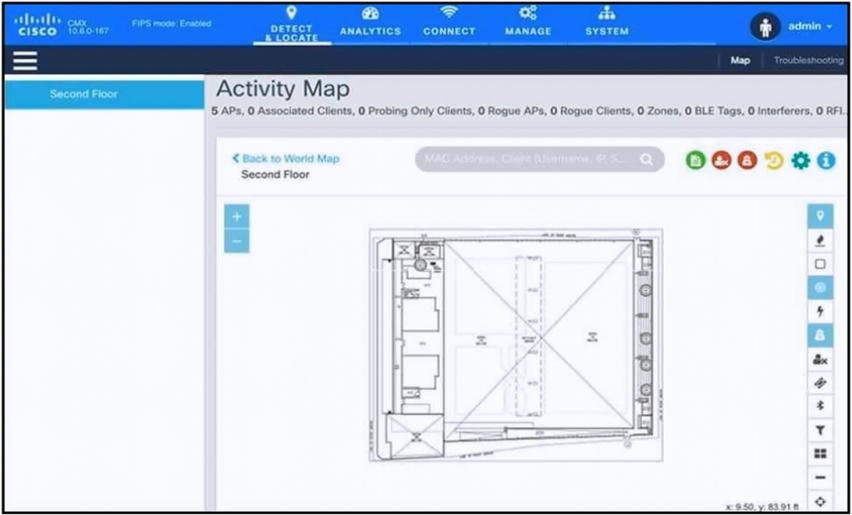
An engineer has deployed the Cisco CMX solution to track and detect the number of users
who visit the office each day. The CMX dashboard is not showing any data. Which action
resolves this issue?
A. Configure Single Sign-On authentication.
B. Add the WLCs to CMX.
C. Copy the exported Maps from CMX server to PI using SCP.
D. Install an evaluation license to CMX server.
Explanation:
The CMX dashboard is not showing any data because the controllers that generate the location data have not been added to the CMX configuration. For CMX to receive and display location and analytics data, the Wireless LAN Controllers must be added as a source . Until the WLCs are added and a successful NMSP tunnel is established, the CMX will have no client data to display .
Why the other options are wrong:
A. Configure Single Sign-On authentication
– SSO is for user authentication and access control, not for establishing the data feed from the WLCs. This does not affect the reception of client data .
C. Copy exported maps from CMX server to PI using SCP
– This is related to importing map data for location visualization, not to enabling the core data flow from the controllers. It would not resolve the "no data" issue .
D. Install an evaluation license to CMX server
– New CMX installations come with 100 evaluation licenses already installed . Even if the evaluation license expires, CMX analytics functions continue to work in the background , so a lack of license would not cause a complete absence of data.
References:
Cisco CMX and Catalyst 9800 WLC configuration guide: Adding WLC to CMX establishes the NMSP data tunnel .
Cisco CMX licensing Q&A: Evaluation licenses are pre-installed and analytics continue working after expiry .
| Page 10 out of 28 Pages |