- 4.9/5.0
- 277 Questions
- Updated on: 27-Aug-2026
- Implementing Cisco Enterprise Wireless Networks (ENWLSI)
- 22775 Prepared
Free Cisco 300-430 Practice Questions 2026 | Implementing Cisco Enterprise Wireless Networks (ENWLSI)
An engineer configures a Cisco Aironet 600 Series OfficeExtend AP for a user who works remotely. What is configured on the Cisco WLC to allow the user to print a printer on his home network?
A. split tunneling
B. SE-connect
C. FlexConnect
D. AP failover priority
Explanation:
A Cisco OfficeExtend AP (OEAP) extends the corporate WLAN to a remote location via a secure CAPWAP tunnel back to the Wireless LAN Controller . By default, all client traffic from the OEAP is tunneled centrally to the corporate network. This means local home network devices, such as a printer, become unreachable.
The Split Tunneling feature resolves this by intelligently directing traffic . It uses ACLs to classify traffic based on packet content . Traffic destined for the corporate network is sent through the secure tunnel to the WLC, while traffic destined for the home network (like a print job) is "split" off and switched locally at the AP . This feature must be enabled on the WLC and applied to the specific WLAN or Remote LAN the user is connected to .
Why the others are wrong:
B. SE-connect:
This mode configures an AP as a dedicated spectrum analyzer for RF interference detection, not for traffic management.
C. FlexConnect:
While OEAPs operate in FlexConnect mode , this term describes the AP's operational capability. FlexConnect does not automatically enable local access; the split tunnel policy must be explicitly configured on the WLAN.
D. AP failover priority:
This is a high-availability feature that determines backup controller connections. It is unrelated to traffic forwarding or local network access.
References
Cisco Catalyst 9800 Series Configuration Guide – OEAP Split Tunneling configuration .
Cisco 300-430 ENWLSI Official Certification Guide – Chapter on FlexConnect and OEAP.
An engineer must configure a Cisco WLC to support Cisco Aironet 600 Series OfficeExtend APs. Which two Layer 2 security options are supported in this environment? (Choose two.)
A. Static WEP + 802.1X
B. WPA+WPA2
C. Static WEP
D. CKIP
E. 802.1X
E. 802.1X
Explanation:
WPA+WPA2 (Option B):
Cisco Aironet 600 Series OfficeExtend APs (OEAPs) natively support WPA and WPA2 enterprise/personal encryption modes. WPA2 with AES encryption is the standard Layer 2 security mechanism used to secure corporate WLAN SSIDs broadcasted remotely at employee home offices.
802.1X (Option E):
802.1X enterprise authentication (using EAP methods like PEAP, EAP-FAST, or EAP-TLS) is fully supported over OEAP deployments for secure user and device level authentication. The 802.1X payload is tunneled back securely over CAPWAP to the centralized WLC and RADIUS infrastructure.
Why Other Options Are Incorrect:
A. Static WEP + 802.1X:
Combining static WEP keys with 802.1X framework is a legacy/non-standard deployment mode that is not supported on OEAP models.
C. Static WEP:
While legacy WLC code permitted Static WEP with restrictions (disabling 802.11n speeds), it is a deprecated and heavily insecure protocol that is not recommended or primary in ENWLSI exam profiles compared to 802.1X and WPA/WPA2.
D. CKIP:
Cisco Key Integrity Protocol (CKIP) is an obsolete, Cisco-proprietary TKIP precursor designed for early legacy hardware. It is unsupported on the 600 Series OEAP platform.
References:
Cisco Aironet 600 Series OfficeExtend Access Point Data Sheet: Lists native support for 802.11i, WPA, WPA2, 802.1X authentication framework, and AES/TKIP encryption.
Cisco Wireless LAN Controller Configuration Guide: Outlines supported WLAN Layer 2 security modes for OEAP endpoints, specifically highlighting WPA/WPA2 and 802.1X EAP protocols.
A corporation has recently implemented a BYOD policy at their HQ. Which two risks should the security director be concerned about? (Choose two.)
A. network analyzers
B. malware
C. lost and stolen devices
D. keyloggers
E. unauthorized users
C. lost and stolen devices
Explanation:
Malware Risks (Option B):
In Bring Your Own Device (BYOD) environments, personal smartphones, tablets, and laptops lack strict corporate software controls. Users may download unverified applications, visit un-scrubbed sites, or fail to keep their operating systems patched. If an infected personal device connects to the corporate wireless network, it can introduce malware that propagates across internal subnets.
Lost and Stolen Devices (Option C):
Personal mobile devices leave corporate premises regularly and are highly vulnerable to physical theft or loss. If a device contains saved corporate credentials, active session tokens, sensitive email caches, or corporate certificates—and lacks Mobile Device Management (MDM) remote-wipe capabilities—a stolen device poses a direct path for unauthorized data exposure and credential compromise.
Why Other Options Are Incorrect
A. network analyzers:
Packet capture tools and network analyzers monitor raw wireless or wired frames. While a rogue device can run sniffing software, enterprise wireless infrastructure mitigates this through WPA2/WPA3-Enterprise encryption, which generates unique per-user pairwise keys (PTK) that prevent unauthorized users from eavesdropping on other clients' traffic.
D. keyloggers:
While software or hardware keyloggers are a endpoint security threat, they are an OS-level/endpoint threat rather than a risk inherent to the deployment of a BYOD WLAN architecture.
E. unauthorized users:
In a properly implemented Cisco BYOD architecture (utilizing Cisco ISE, Onboarding Portals, 802.1X, and EAP-TLS digital certificates), unauthorized users are authenticated and denied access at the network edge before gaining corporate access.
References
Cisco BYOD Design Guide / ISE Onboarding: Identifies device loss/theft and non-compliant unmanaged endpoints carrying malicious code/malware as the primary security risks associated with personal devices accessing enterprise LAN/WLAN assets.
An engineer must create an account to log in to the CLI of an access point for troubleshooting. Which configuration on the WLC will accomplish this?
A. ReadWrite User Access Mode
B. Global Configuration Enable Password
C. SNMP V3 User
D. Allow New Telnet Sessions
https://www.cisco.com/c/en/us/td/docs/wireless/controller/7-
4/configuration/guides/consolidated/b_cg74_CONSOLIDATED/b_cg74_CONSOLIDATED_
chapter_01101011.html
Explanation:
To create a local management account for logging into an access point's CLI, the Wireless LAN Controller (WLC) uses the config mgmtuser add command. The critical element for granting full troubleshooting capability is setting the user's access mode to read-write . This creates a user account with the necessary privileges to execute debug and configuration commands .
Why the others are wrong:
B. Global Configuration Enable Password:
This sets the privileged EXEC (enable) password for access points but does not create a user account with a username and password for login. It is a separate security credential for entering privileged mode after initial login.
C. SNMP V3 User:
This is used for network management protocols like SNMP polling and trap receiving, not for interactive CLI or console access to an AP. A user account for CLI access is distinct from an SNMPv3 user profile .
D. Allow New Telnet Sessions:
This feature simply enables or disables the Telnet service on the controller itself. It does not manage user credentials or their assigned privileges for AP access .
References:
Cisco Wireless Controller Command Reference – config mgmtuser add syntax
Cisco Wireless Controller Configuration Guide – Local Management User configuration
Cisco WLC Configuration Guide – Global Credentials for Access Points
A corporation is spread across different countries and uses MPLS to connect the offices. The senior management wants to utilize the wireless network for all the employees. To ensure strong connectivity and minimize delays, an engineer needs to control the amount of traffic that is traversing between the APs and the central WLC. Which configuration should be used to accomplish this goal?
A. FlexConnect mode with OfficeExtend enabled
B. FlexConnect mode with local authentication
C. FlexConned mode with central switching enabled
D. FlexConnect mode with central authentication
Explanation:
The requirement is to minimize traffic traversing the MPLS WAN link between remote APs and the central WLC. The only way to achieve this is by configuring the APs in FlexConnect mode with local switching enabled.
When local switching is enabled, client data traffic (such as web browsing, file transfers, and application data) is switched locally at the remote site and does not traverse the CAPWAP tunnel to the central WLC. This significantly reduces WAN bandwidth consumption and minimizes latency for end users, which is critical for a multinational corporation using MPLS where WAN links are expensive and bandwidth-limited.
Why the others are wrong:
A. FlexConnect mode with OfficeExtend enabled:
OfficeExtend is designed for home-office remote workers using a residential broadband connection. It enables split tunneling but is not the appropriate solution for a corporate MPLS-connected branch office. This feature does not address WAN traffic optimization in a corporate context.
B. FlexConnect mode with local authentication:
While local authentication reduces authentication traffic over the WAN, it does not address the primary issue of data traffic traversing the MPLS link. Additionally, local authentication bypasses central AAA policies and ISE integration, which is undesirable for most enterprises.
D. FlexConnect mode with central authentication:
This option does not specify the data switching method. If central switching is the default (which it often is), then all data traffic still traverses the WAN link. Central authentication alone does not solve the bandwidth problem.
References:
Cisco 300-430 ENWLSI Official Certification Guide – Chapter on FlexConnect and Local Switching.
Cisco FlexConnect Deployment Guide – Local vs. Central Switching comparison.
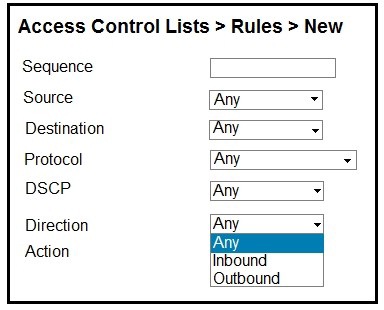
Refer to the exhibit.
An engineer is creating an ACL to restrict some traffic to the WLC CPU. Which selection
must be made from the direction drop-down list?
A. It must be Inbound because traffic goes to the WLC.
B. Packet direction has no significance; it is always Any.
C. It must be Outbound because it is traffic that is generated from the WLC.
D. To have the complete list of options, the CPU ACL must be created only by the CLI
Explanation:
When creating a CPU ACL (also known as a "Control Plane ACL") on a Cisco Wireless LAN Controller, the Direction parameter specifies the traffic flow relative to the CPU. The exhibit shows the ACL configuration page with "Inbound" and "Outbound" as options.
The correct selection is Inbound because CPU ACLs filter traffic that is destined to the CPU of the WLC. This includes management traffic (SSH, SNMP, HTTP/HTTPS), control plane protocols (CAPWAP, LWAPP, EAP), and other packets that require CPU processing for forwarding decisions or security functions.
When you select Inbound, the ACL is applied to traffic as it enters the controller's CPU from the network interfaces (both wired and wireless). This is the standard and recommended method for protecting the WLC's CPU from malicious traffic, DoS attacks, and unauthorized access attempts. The ACL permits or denies packets based on source/destination IP, protocol, port, and DSCP values before the CPU has to process them, thereby reducing CPU load.
How the ACL processes traffic:
Inbound (to CPU): Filters packets that are arriving at the WLC and are destined for the CPU (management interfaces, control plane, etc.). This is the primary use case.
Outbound (from CPU): Filters packets that are generated by the WLC CPU and being sent out to the network (e.g., responses, CAPWAP control messages). This is rarely used and typically not required for CPU protection.
Why the others are wrong:
B. Packet direction has no significance; it is always Any:
Direction is critically important in CPU ACLs. The ACL evaluates the traffic flow direction, and you must specify Inbound or Outbound to properly apply the rules. There is no "Any" direction option for CPU ACLs.
C. It must be Outbound because it is traffic that is generated from the WLC:
This is incorrect because CPU ACLs are primarily used to restrict traffic entering the CPU (inbound) to protect the controller. While outbound CPU ACLs exist, they are for limiting traffic generated by the CPU itself, which is not the scenario described.
D. To have the complete list of options, the CPU ACL must be created only by the CLI:
The GUI fully supports CPU ACL creation. The Direction field is available in both GUI and CLI. The complete list of options is available in both interfaces; the CLI is not required to see all options.
References:
Cisco Wireless Controller Configuration Guide – CPU Access Control Lists.
Cisco 300-430 ENWLSI Official Certification Guide – Chapter on Security: CPU ACLs.
Cisco WLC Command Reference – config acl cpu command syntax and Direction parameter.
Branch wireless users report that they can no longer access services from head office but can access services locally at the site. New wireless users can associate to the wireless while the WAN is down. Which three elements (Cisco FlexConnect state, operation mode, and authentication method) are seen in this scenario? (Choose three.)
A. A. authentication-local/switch-local
B. WPA2 personal
C. authentication-central/switch-central
D. lightweight mode
E. standalone mode
F. WEB authentication
B. WPA2 personal
E. standalone mode
Explanation:
FlexConnect State — Standalone Mode (Option E):
When a FlexConnect Access Point loses its CAPWAP control plane connection to the central WLC (head office WAN outage), it transitions into Standalone Mode. While in standalone mode, the AP processes traffic locally instead of relying on the controller.
Operation Mode — authentication-local/switch-local (Option A):
In order to function during a WAN failure, the WLAN must be configured for Local Switching and Local Authentication. This allows data frames to be bridged directly to the local site LAN (giving users access to local resources) and forces authentication processing onto the AP itself.
Authentication Method — WPA2 Personal (Option B):
Since 802.1X enterprise authentication typically relies on a central RADIUS server across the WAN, pre-existing or new client 802.1X authentications would fail during WAN down conditions unless configured locally. WPA2 Personal (PSK) uses pre-shared keys handled directly by the AP locally, allowing new wireless clients to successfully authenticate and associate while the WAN link is down.
Why Other Options Are Incorrect:
C. authentication-central/switch-central:
Central switching routes all user traffic through the CAPWAP tunnel to the WLC at HQ. If the WAN is down, central switching breaks client connectivity entirely.
D. lightweight mode:
While FlexConnect APs are lightweight APs overall, when the CAPWAP tunnel drops, the operational mode shifts specifically to standalone mode to handle local survival.
F. WEB authentication:
Central WebAuth requires reachability back to the controller's internal portal or an external ISE node across the WAN. Without local fallback configuration, central web authentication fails when the WAN is down.
References:
Cisco FlexConnect Configuration Guide: Details FlexConnect standalone mode operations, local switching vs. central switching behaviors during WAN outages, and supported local authentication mechanisms (e.g., Local 802.1X, WPA2-PSK/Personal).
Where is Cisco Hyperlocation enabled on a Cisco Catalyst 9800 Series Wireless Controller web interface?
A. Policy Profile
B. AP Join Profile
C. Flex Profile
D. RF Profile
Explanation:
On the Cisco Catalyst 9800 Series Wireless Controller, Cisco Hyperlocation is enabled within the AP Join Profile.
To configure it via the web interface, you navigate to Configuration > Tags & Profiles > AP Join. When you create or edit an AP Join Profile, you will find a Hyperlocation tab under the AP section. From this tab, you can check the Enable Hyperlocation box and configure related parameters like detection thresholds and NTP server settings for high-accuracy client tracking.
Why the others are wrong:
A. Policy Profile:
Policy Profiles primarily define WLAN-specific policies such as VLAN mapping and Quality of Service (QoS). They are not used to enable the global Hyperlocation feature for access points.
C. Flex Profile:
Flex Profiles are used to configure FlexConnect-specific settings for APs in remote locations, such as local switching and ACLs. They do not contain the Hyperlocation configuration options.
D. RF Profile:
RF Profiles are dedicated to radio frequency settings, like transmit power control (TPC), dynamic channel assignment (DCA), and data rates. Hyperlocation is a location service and is not configured here.
References:
Cisco Catalyst 9800 Series Wireless Controller Software Configuration Guide – Configuring Cisco Hyperlocation (GUI procedure).
ExamTopics 300-430 discussion, confirming the location of the Hyperlocation settings.
The IT manager is asking the wireless team to get a report for all guest user associations during the past two weeks. In which two formats can Cisco Prime save this report? (Choose two.)
A. CSV
B. PDF
C. XLS
D. DOC
E. plain text
B. PDF
Explanation:
Reporting Capabilities in Cisco Prime Infrastructure:
Cisco Prime Infrastructure allows administrators to generate historical data reports—including guest access statistics, client association logs, and compliance audits—for specific custom timeframes (such as two weeks).
Export and Delivery Formats:
When running scheduled or ad-hoc reports in Prime Infrastructure, reports can be saved, exported, or automatically emailed in CSV (Comma-Separated Values for spreadsheet processing) or PDF (Portable Document Format for formal presentation and archival).
Why Other Options Are Incorrect:
C. XLS:
While raw report data exported in CSV format can easily be opened in Microsoft Excel, Cisco Prime Infrastructure exports structured spreadsheets specifically as .csv rather than standard .xls or .xlsx workbook formats.
D. DOC:
Cisco Prime Infrastructure does not support exporting report outputs to Microsoft Word (.doc/.docx) document formats.
E. plain text:
Unformatted plain text (.txt) is not an export option for graphical and tabular reports generated by Cisco Prime.
References
Cisco Prime Infrastructure User Guide (Reports & Dashboard Chapter): Specifies that scheduled or executed report instances can be viewed, saved, and exported directly in CSV and PDF formats.
What is an important consideration when implementing a dual SSID design for BYOD?
A. After using the provisioning SSID, an ACL that used to make the client switch SSIDs forces the user to associate and traverse the network by MAC filtering.
B. If multiple WLCs are used, the WLAN IDs must be exact for the clients to be provisioned and traverse the network correctly.
C. SSIDs for this setup must be configured with NAC State-RADIUS NAC for the clients to authenticate with Cisco ISE, or with NAC State-ISE NAC for Cisco ISE to associate the client.
D. One SSID is for provisioning and the other SSID is for gaining access to the network. The use of an ACL should not be enforced to make the client connect to the REAL SSID after provisioning.
Explanation:
A common design for a BYOD (Bring Your Own Device) onboarding solution uses a dual-SSID approach to simplify the enrollment process.
Provisioning SSID: This is an open or partially open network used solely for the initial onboarding of a new device[citation:7]. Its purpose is to allow the client to connect and download the necessary configuration profile or certificates.
Access SSID: After provisioning, the device is configured to connect to this secure, production SSID (e.g., using WPA2-Enterprise) to gain full access to corporate resources.
A key consideration is the client's connection experience. While a common technique is to use a downloadable ACL to restrict the provisioning SSID to just the ISE/onboarding server, an ACL should not be enforced to force the client to switch to the new, real SSID[citation:7]. The configuration profile installed during provisioning handles this automatically; the client is configured to forget or deprioritize the open provisioning SSID and connect to the secure access SSID. Using an ACL to enforce this is not a supported or stable method for managing this transition and can cause connectivity issues after a client successfully roams. The network should be configured so that when the client disconnects from the provisioning SSID after receiving its certificate, it will naturally connect to the permanent access SSID based on its newly configured profile[citation:7].
Why the others are wrong:
A. After using the provisioning SSID, an ACL that used to make the client switch SSIDs forces the user to associate and traverse the network by MAC filtering.
This is incorrect. ACLs are used to restrict traffic on the provisioning SSID to the onboarding portal, not to force an SSID switch. The client moves to the new SSID because it is configured to do so in its profile. MAC filtering is not a standard method for handling the SSID transition.
B. If multiple WLCs are used, the WLAN IDs must be exact for the clients to be provisioned and traverse the network correctly.
This is not required for the provisioning process. The client is not reliant on the internal WLAN ID of the controller. The transition between SSIDs is driven by the client's configuration profile, not by a specific WLAN ID across the mobility group.
C. SSIDs for this setup must be configured with NAC State-RADIUS NAC for the clients to authenticate with Cisco ISE, or with NAC State-ISE NAC for Cisco ISE to associate the client.
This is incorrect. The concept of "NAC State" as described is not a valid configuration method for SSIDs. The client's authentication method is based on the Layer 2/3 security settings of the SSID, not a specific "NAC state" toggle.
References:
Cisco Wireless LAN Controller Configuration Guide – BYOD and Onboarding Designs[citation:7].
| Page 3 out of 28 Pages |