- 4.9/5.0
- 277 Questions
- Updated on: 27-Aug-2026
- Implementing Cisco Enterprise Wireless Networks (ENWLSI)
- 22775 Prepared
Free Cisco 300-430 Practice Questions 2026 | Implementing Cisco Enterprise Wireless Networks (ENWLSI)
What is the default IEEE 802.1x AP authentication configuration on a Cisco Catalyst 9800 Series Wireless Controller?
A. EAP-PEAP with 802.1x port authentication
B. EAP-TLS with 802.1x port authentication
C. EAP-FAST with CAPWAP DTLS + port authentication
D. EAP-FAST with CAPWAP DTLS
Explanation:
On the Cisco Catalyst 9800 Series Wireless Controller, the default 802.1X AP authentication configuration uses EAP-FAST with CAPWAP DTLS. This is the factory-default setting for securing the CAPWAP control plane between the AP and the WLC. When an AP joins the controller for the first time, it attempts to authenticate using EAP-FAST over the CAPWAP DTLS tunnel. This configuration is established through the AP Join Profile, where the AP Authorization setting defaults to EAP-FAST and DTLS is enabled for encryption.
This default ensures that APs authenticate securely during the join process, protecting against rogue APs and man-in-the-middle attacks.
Why the others are wrong
A. EAP-PEAP with 802.1x port authentication:
EAP-PEAP is an alternative authentication method for APs but is not the default. The default is EAP-FAST. Additionally, "802.1x port authentication" refers to wired switch port security, not to AP authentication to the WLC.
B. EAP-TLS with 802.1x port authentication:
EAP-TLS is also a valid method but not the default. It requires digital certificates, whereas EAP-FAST uses PACs. The default is EAP-FAST.
C. EAP-FAST with CAPWAP DTLS + port authentication:
This option incorrectly adds "port authentication," which is a separate wired switch feature. The default uses only EAP-FAST and CAPWAP DTLS for the AP-to-WLC tunnel.
References:
Cisco Catalyst 9800 Series Wireless Controller Software Configuration Guide – AP Authorization Settings.
Cisco 300-430 ENWLSI Official Certification Guide – Chapter on AP and WLC Security.
An engineer must track guest traffic flow using the WLAN infrastructure. Which Cisco CMX feature must be configured and used to accomplish this tracking?
A. analytics
B. connect and engage
C. presence
D. detect and locate.
Explanation:
The engineer's goal is to track guest traffic flow, which involves gathering data on how guest devices move, dwell, and are distributed throughout a venue. Within Cisco Connected Mobile Experiences (CMX), the service designed for this specific purpose is the Detect and Locate service .
The Detect and Locate service is the core location engine within CMX. It gathers real-time location data from the wireless infrastructure by detecting mobile devices (including non-associated devices) and forwarding their signal information to the Mobility Services Engine (MSE) for analysis . This granular location information is the foundational data used to build the traffic flow reports and analytics that the engineer requires.
Why the others are wrong:
A. analytics:
This is the visualization and reporting component that interprets and displays the data collected by the Detect and Locate service. It is the end result, not the mechanism for tracking the traffic .
B. connect and engage:
This service is focused on guest access, captive portals, and sending targeted notifications or promotions to visitors. It does not perform the core function of tracking device movement or traffic flow .
C. presence:
The Presence service is a more basic form of location analytics. It determines whether a device is simply "in" or "out" of a defined site, providing aggregate visitor counts and dwell time, but it does not offer the detailed traffic flow analysis that is the requirement in this scenario .
References:
Exam discussion 300-430 topic 1 question 63 .
Cisco CMX Analytics Configuration Guide – Presence Analytics .
An engineer configures the wireless LAN controller to perform 802.1x user authentication. Which configuration must be enabled to ensure that client devices can connect to the wireless, even when WLC cannot communicate with the RADIUS?
A. pre-authentication
B. local EAP
C. authentication caching
D. Cisco Centralized Key Management
Explanation:
The requirement is to ensure client devices can still connect via 802.1X authentication even when the WLC cannot communicate with the external RADIUS server. This is a classic high-availability scenario where the WLC acts as a backup authentication server.
Local EAP enables the Wireless LAN Controller to perform EAP authentication locally without contacting an external RADIUS server . When configured, the WLC maintains a local database of user credentials and can authenticate clients directly if the RADIUS server becomes unreachable. This provides failover capability, ensuring business continuity for wireless authentication even during WAN outages or RADIUS server failures.
The local EAP feature supports EAP methods such as PEAP, EAP-TLS, and EAP-FAST, with the WLC acting as the EAP server. When RADIUS communication is restored, authentication can seamlessly revert to the external server.
Why the others are wrong:
A. pre-authentication: This is not a standard feature for 802.1X failover scenarios. Pre-authentication typically refers to mechanisms used in fast roaming (like OKC or 802.11r) to reduce authentication delays, not for RADIUS failover.
C. authentication caching:
While authentication caching (or "cached RADIUS") can store credentials temporarily, it is not the primary method for ensuring client connectivity during RADIUS outages. It has limitations and is not as reliable as Local EAP for this purpose.
D. Cisco Centralized Key Management (CCKM):
CCKM is a fast roaming protocol that reduces authentication time for roaming clients. It is unrelated to RADIUS failover or maintaining connectivity when the RADIUS server is unavailable.
References:
Cisco 300-430 ENWLSI Exam Topics – Section 6.4: Implement Identity-Based Networking.
Cisco Wireless Controller Configuration Guide – Local EAP authentication configuration.
A wireless engineer needs to implement client tracking. Which method does the angle of arrival use to determine the location of a wireless device?
A. received signal strength
B. triangulation
C. time distance of arrival
D. angle of incidence
Explanation:
The "angle of arrival" (AoA) method, as implemented in Cisco's Hyperlocation technology, determines a client device's location by measuring the angle of incidence of Wi-Fi signals . Specialized access points with a hyperlocation module and antenna use this technique . The AP measures the angle at which a client's signal arrives and, in combination with similar measurements from other APs, uses triangulation to calculate the precise location . This provides accuracy within one meter, significantly outperforming traditional received signal strength indicator (RSSI) methods, which are only accurate to within 5–8 meters .
In the exam's context, AoA is implemented through Cisco's Hyperlocation feature and is associated with both angle of incidence measurement and triangulation.
Why the others are wrong:
A. received signal strength:
This is an older location method used for standard RSSI-based tracking, not the primary technique for AoA .
B. triangulation:
While triangulation is used in conjunction with AoA for location calculation, it is not the method of measurement itself .
C. time distance of arrival:
This refers to a different technique that measures signal timing differences, not the angle-based AoA method .
D. angle of incidence:
This is the correct measurement technique used by AoA, but the question asks which method AoA uses to determine location; the overall calculation relies on triangulation of AoA data from multiple APs .
References:
Cisco Hyperlocation solution uses Angle-of-Arrival (AoA) of Wi-Fi signals to determine location, with AoA using phase measurements for triangulation .
Hyperlocation requires APs with hyperlocation modules and halo antennas to detect the angle of incidence .
An engineer must implement Cisco Identity-Based Networking Services at a remote site using ISE to dynamically assign groups of users to specific IP subnets. If the subnet assigned to a client is available at the remote site, then traffic must be offloaded locally, and subnets are unavailable at the remote site must be tunneled back to the WLC. Which feature meets these requirements?
A. learn client IP address
B. FlexConnect local authentication
C. VLAN-based central switching
D. central DHCP processing
Explanation:
VLAN-based central switching is a FlexConnect feature that allows the access point (AP) to make intelligent forwarding decisions based on the VLAN assigned to a client by ISE during authentication .
Here's how it solves your problem:
Dynamic Assignment: ISE authenticates the user and returns a specific VLAN ID (e.g., via the Tunnel-Private-Group-ID attribute) . This is the "dynamic group to specific IP subnet" part of your requirement.
Intelligent Forwarding: The FlexConnect AP checks if this assigned VLAN is locally available on its trunk port .
If Available: The AP performs local switching. The user's data traffic is offloaded directly to the local network at the remote site, which minimizes WAN usage and latency .
If Not Available: The AP performs central switching. The traffic is tunneled back to the WLC over CAPWAP, ensuring connectivity even for subnets that don't exist at the remote location .
Why the Others Are Incorrect:
A. learn client IP address:
This feature is typically used for centrally switched WLANs to help the controller learn client IP addresses. It does not control whether traffic is switched locally or centrally .
B. FlexConnect local authentication:
While this allows authentication to occur locally if the WAN link is down, it does not control the data path. The decision to tunnel or offload traffic is handled by the VLAN-based switching feature .
D. central DHCP processing:
This feature forces DHCP packets to be processed centrally by the WLC. It ensures consistent IP address assignment but does not dictate that all subsequent user data traffic be centrally switched .
References:
Cisco FlexConnect Configuration Guides detail that VLAN-based central switching enables per-packet decisions based on AAA-overridden VLANs, applicable only to locally switched WLANs .
An engineer wants the wireless voice traffic class of service to be used to determine the queue order for packets received, and then have the differentiated services code point set to match when it is resent to another port on the switch. Which configuration is required in the network?
A. Platinum QoS configured on the WLAN
B. WMM set to required on the WLAN
C. mls qos trust dscp configured on the controller switch port
D. mls qos trust cos configured on the controller switch port
Explanation:
The scenario requires maintaining the wireless voice traffic's Class of Service (CoS) value to determine its queue priority and then mapping that to the appropriate DSCP value when the traffic leaves the switch port. This is a standard QoS requirement for preserving end-to-end markings in a wireless network.
Why the others are wrong:
A. Platinum QoS configured on the WLAN:
This defines the policy on the WLC (e.g., setting the WLAN to Platinum to automatically mark traffic as DSCP EF). It ensures the correct marking is applied inside the controller but does not configure the switch to trust and preserve those markings when the packets arrive from the WLC.
B. WMM set to required on the WLAN:
WMM is a wireless standard that extends QoS to the 802.11 wireless link (using 802.11e UP values). While essential for wireless QoS, it does not govern how the wired switch port treats the traffic. The question is specifically about the switch's behavior.
C. mls qos trust dscp configured on the controller switch port:
This is a common point of confusion. While it is a valid command, Cisco guidance specifically differentiates the configuration for the WLC uplink versus the AP switch ports. AP uplink ports are configured with mls qos trust dscp, but the WLC uplink port is configured with mls qos trust cos. The traffic from the WLC arrives with a CoS value, and trusting that CoS is the specific recommended method.
References:
Cisco Wireless IP Phone 7921G Deployment Guide: "Configure the Cisco Unified Wireless LAN Controller for trust COS".
Cisco Catalyst 3750/3560 QoS Documentation:The mls qos trust cos command trusts CoS values for queue classification and DSCP mapping
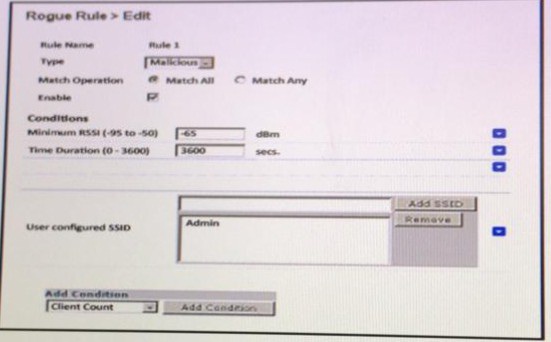
Refer to the exhibit.

Explanation:
The exhibit shows two critical pieces of evidence indicating that the AP is compromised or spoofed:
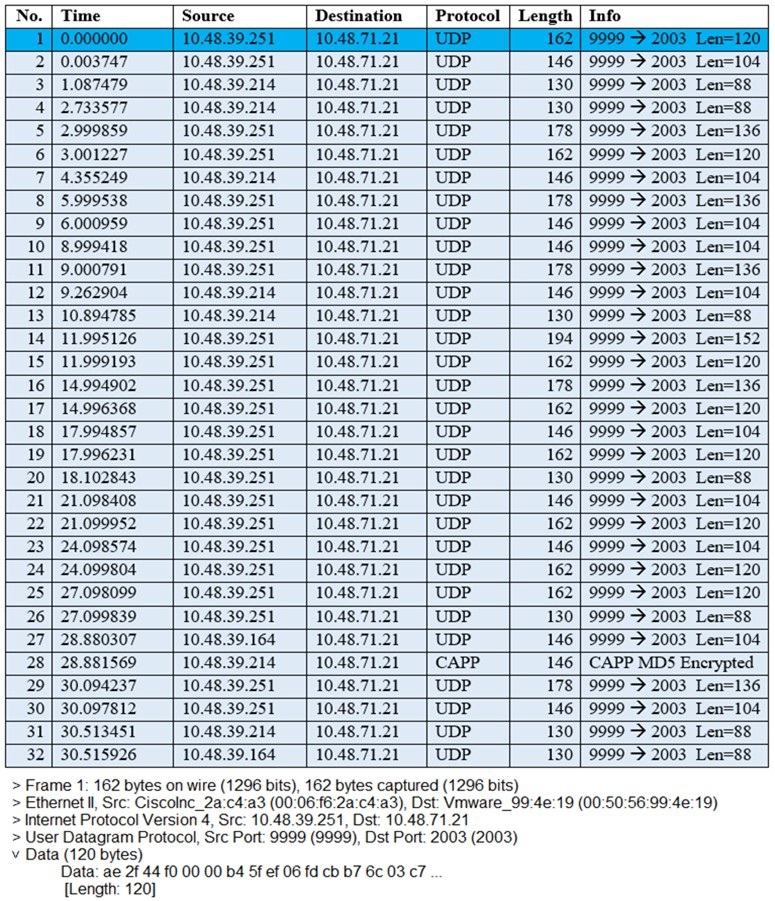
Wireshark Capture Analysis: The capture shows UDP packets being sent from multiple source IPs (10.48.39.251, 10.48.39.214, 10.48.39.164) to destination 10.48.71.21 on port 2003. This is unusual traffic behavior for a legitimate AP. Additionally, frame 28 shows a CAPWAP MD5 Encrypted packet, but the other UDP traffic on port 9999→2003 suggests possible tunneling or data exfiltration. This type of traffic pattern is indicative of a rogue or compromised AP that is forwarding unauthorized data.
Rogue Rule Configuration: The rogue rule configuration shows a condition with -65 dBm RSSI and a time duration of -3650 secs. The negative time duration value is clearly invalid and suggests either misconfiguration or a compromised system attempting to bypass detection mechanisms. The rule also includes "Client Count" as a condition and "User configured SSID" set to Admin.
When an AP is compromised or spoofed:
It may send traffic to unauthorized destinations (as shown in the capture)
It may attempt to evade detection by manipulating rogue rules
It may impersonate legitimate APs to capture client traffic
It may establish unauthorized tunnels to external servers
What to look for in such scenarios:
Multiple APs sending identical UDP flows to the same suspicious destination
CAPWAP traffic interspersed with unauthorized UDP traffic
Invalid configuration values (negative time durations)
Source IPs not matching expected AP management addresses
Why the others are wrong
A. This is an ad hoc client:
Ad hoc clients typically show direct client-to-client communication without an AP in between. The traffic in the exhibit shows multiple sources communicating to a single destination, which is more consistent with AP behavior than ad hoc mode.
C. This is a misconfigured AP:
While misconfiguration is possible, the specific combination of suspicious UDP traffic patterns and manipulated rogue rule conditions strongly suggests malicious activity rather than simple configuration errors.
D. This is a rogue AP:
While a rogue AP could be involved, the evidence specifically points to a compromised or spoofed legitimate AP because:
The AP is sending CAPWAP MD5 Encrypted frames (frame 28), indicating it is still attempting to communicate with the WLC
It is simultaneously sending suspicious UDP traffic, suggesting the AP itself has been compromised
References:
Cisco Rogue AP Detection and Classification Guide – Signs of compromised APs.
Cisco 300-430 ENWLSI Official Certification Guide – Chapter on Wireless Security Threats.
Cisco WLC Rogue Rule Configuration – Conditions and detection mechanisms.
A Cisco WLC has been added to the network and Cisco ISE as a network device, but
authentication is failing
Which configuration within the network device configuration should be verified?
A. SNMP RO community
B. device interface credentials
C. device ID
D. shared secret
Explanation:
For the WLC to successfully authenticate users with Cisco ISE via RADIUS, both devices must be configured with the exact same shared secret key. The shared secret is a password used to encrypt and secure the RADIUS communication between the network access device (the WLC) and the ISE server. A mismatch is a common cause of authentication failures, as the ISE will reject RADIUS requests from a device that cannot correctly encrypt the packets with the matching secret.
When a WLC is added to ISE as a network device, the shared secret is configured in the RADIUS Authentication Settings section. The exact same shared secret must be configured on the WLC when you add the ISE as a RADIUS server. If these keys do not match, the authentication process will fail.
Why the others are wrong
A. SNMP RO community:
This is used for SNMP polling and monitoring purposes, not for authenticating wireless clients via RADIUS.
B. device interface credentials:
This option is not a standard configuration parameter for a RADIUS network device in ISE.
C. device ID:
While a Device ID might be used for other protocols (like TrustSec or TACACS+), it is not the primary cause of a failing RADIUS authentication for 802.1X user connections.
References
Cisco ISE Admin Guide: The shared secret is the key configured on the network device using the radius-host command.
Cisco Configuration Guides: Adding a WLC to ISE requires setting the shared secret correctly for RADIUS authentication.
Refer to the exhibit.
The image shows a packet capture that was taken at the CLI of the Cisco CMX server. It
shows UDP traffic from the WLC coming into the server. What does the capture prove?
A.
The Cisco CMX server receives NetFlow data from the WLC.
B.
The Cisco CMX server receives NMSP traffic from the WLC.
C.
The Cisco CMX server receives SNMP traffic from the WLC.
D.
The Cisco CMX server receives Angle-of-Arrival data from the WLC
Explanation:
The provided packet capture shows UDP traffic being sent to destination port 2003. This is the definitive indicator of the protocol in use.
Cisco's documentation for Hyperlocation and CMX explicitly states that Angle-of-Arrival (AoA) data is sent from the Wireless LAN Controller (WLC) to the CMX server using UDP destination port 2003 . The capture also shows the source port as 9999, which matches the documented behavior for these AoA messages .
The purpose of this traffic is to provide precise location data. The AP generates the AoA information, encapsulates it within CAPWAP, and sends it to the WLC. The WLC then forwards this data to the CMX server over UDP port 2003 for processing .
Why the others are wrong
A. The Cisco CMX server receives NetFlow data from the WLC:
NetFlow exports are typically sent to a collector on ports like 2055 (UDP) . The capture shows traffic on port 2003, which is not used for NetFlow.
B. The Cisco CMX server receives NMSP traffic from the WLC:
NMSP (Network Mobility Services Protocol) is the primary control protocol between the WLC and CMX. Cisco documentation confirms that NMSP traffic uses TCP port 16113, not UDP port 2003 . The traffic in the capture is UDP, clearly distinguishing it from NMSP.
C. The Cisco CMX server receives SNMP traffic from the WLC:
SNMP traffic (traps or polling) uses well-known UDP ports 161 and 162 . The destination port in the capture is 2003, which is not associated with SNMP communication between these devices.
References
Cisco Hyperlocation Deployment Guide specifies that AoA messages are sent from the WLC to CMX using UDP destination port 2003 with a source port of 9999 .
Cisco CMX Configuration Guide confirms that NMSP uses TCP 16113 .
CMX Facebook Wi-Fi allows access to the network before authentication. Which two elements are available? (Choose two.)
A. Allow HTTP traffic only before authentication and block all the traffic.
B. Allow all the traffic before authentication and intercept HTTPS only.
C. Allow HTTPs traffic only before authentication and block all other traffic.
D. Allow all the traffic before authentication and intercept HTTP only.
E. Allow SNMP traffic only before authentication and block all the traffic
D. Allow all the traffic before authentication and intercept HTTP only.
Explanation:
Option C Configuration:
When configuring pre-authentication Access Control Lists (ACLs) for Cisco CMX Facebook Wi-Fi, administrators can restrict pre-login network capabilities so that only secure encrypted web traffic is permitted to establish communication with Facebook's OAuth servers and landing portals, while blocking all other unverified IP traffic.
Option D Configuration:
Alternatively, the pre-authentication ACL can be configured to permit all traffic by default except standard HTTP web requests. By denying/intercepting raw HTTP traffic, the WLC/CMX infrastructure intercepts the user's initial unencrypted HTTP browser request and redirects it to the Facebook check-in page for authentication before granting unrestricted internet access.
Why Other Options Are Incorrect
A. Allow HTTP traffic only before authentication and block all the traffic:
Allowing only unencrypted HTTP blocks necessary HTTPS handshakes required by Facebook's secure check-in portal, preventing the authentication flow from completing.
B. Allow all the traffic before authentication and intercept HTTPS only:
Intercepting HTTPS requires active man-in-the-middle SSL interception, which causes severe browser security certificate warnings/errors for clients prior to authentication.
E. Allow SNMP traffic only before authentication and block all the traffic:
SNMP is a management protocol used between network devices and monitoring systems; it plays no role in client guest access or captive portal redirection.
Reference
Cisco CMX Connect and Engage Configuration Guide (Facebook Wi-Fi Chapter): Explicitly lists pre-authentication ACL rules, specifying options to either permit HTTPS traffic exclusively prior to authentication or permit general traffic while intercepting HTTP traffic for portal redirection.
| Page 4 out of 28 Pages |