- 4.9/5.0
- 277 Questions
- Updated on: 12-Oct-2026
- Implementing Cisco Enterprise Wireless Networks (ENWLSI)
- 22775 Prepared
Free Cisco 300-430 Practice Questions 2026 | Implementing Cisco Enterprise Wireless Networks (ENWLSI)
An engineer is configuring multicast for two WLCs. The controllers are in different physical locations and each handles around 500 wireless clients. How should the CAPWAP multicast group address be assigned during configuration?
A. Each WLC must be assigned a unique multicast group address.
B. Each WLC management address must be in the same multicast group.
C. Both WLCs must be assigned the same multicast group address.
D. Each WLC management address must be in a different multicast group.
Explanation:
When configuring multicast for two Wireless LAN Controllers in different locations, each controller must be assigned a unique CAPWAP multicast group address. The CAPWAP multicast group address is used by the controller to forward multicast traffic to its associated APs in a single stream, reducing CPU load .
If both controllers share the same group address, APs from one controller will receive multicast traffic from the other controller . While the AP will discard packets from a foreign controller based on the source management address, this still creates unnecessary network traffic and congestion . Assigning unique addresses prevents this cross-controller traffic duplication, localizing multicast traffic to each controller's associated APs . The multicast address is typically chosen from the 239.0.0.0/8 range .
Why the others are wrong:
B. Each WLC management address must be in the same multicast group:
Incorrect. The management address is a unicast IP used as the source for multicast packets, not an address assigned to a multicast group .
C. Both WLCs must be assigned the same multicast group address:
This is the exact behavior that should be avoided as it causes unnecessary traffic duplication .
D. Each WLC management address must be in a different multicast group:
This incorrectly conflates the management interface IP (unicast) with the CAPWAP multicast group address (multicast) .
References:
Cisco WLC Configuration Guide: "If you have multiple controllers, configure different group address for different controllers" .
Controller-based Wireless LAN Fundamentals: "The current recommendation is to define a unique multicast group address per WLC in the mobility domain" .
An engineer is troubleshooting a Cisco CMX high-availability deployment and notices that the primary and backup Cisco CMX servers are both considered primary. Which command must the engineer run on the backup server?
A. cmxha convert backup
B. cmxha backup convert
C. cmxha secondary convert
D. cmxha convert secondary
Explanation:
The problem described (both primary and backup Cisco CMX servers reporting as primary) indicates a misconfiguration in the high availability (HA) state, and the fix is to correctly designate one of the servers as the backup.
Cisco CMX's command-line interface provides the cmxha secondary command for all secondary server-related operations. Its specific syntax is cmxha secondary { convert | info }. The convert subcommand is what makes the current system function as the backup server, which resolves the issue of an incorrect state.
This command should be executed on the server intended to be the secondary node to properly establish its role in the HA pair. Once converted, it will function as the backup to the primary server.
Why the others are wrong:
A. cmxha convert backup and B. cmxha backup convert:
These are not valid CLI commands. Cisco documentation for CMX HA uses primary and secondary as keywords (e.g., cmxha primary convert, cmxha secondary info), not backup.
C. cmxha secondary convert:
This reverses the order of the syntax. The official documentation consistently uses the format cmxha secondary { convert | info }, making cmxha convert secondary the correct sequence to designate the system's role.
References:
Cisco CMX Command Reference Guide: cmxha secondary command syntax and usage.
Cisco CMX High Availability Configuration Guide: Command procedures for configuring HA roles.
An engineer implemented AP Authorization with Cisco ISE utilizing AP MAC addresses as local users in Cisco ISE. Everything has been working fine until recently. It has been noticed that APs that reboot are temporarily disconnected from the network and cannot rejoin the controller. Which action completes the implementation?
A. Remove APs from the exclusion list, due to authentication failures.
B. Disable the Cisco ISE password policy that disables accounts for unchanged passwords.
C. Install a valid EAP certificate on Cisco ISE for the APs.
D. Upgrade Cisco ISE to a newer version due to bugs.
Explanation:
The APs are failing to rejoin the controller after a reboot because their accounts in Cisco ISE are being disabled. The issue stems from using AP MAC addresses as local user accounts in ISE for AP Authorization. These static credentials never change. Because the ISE password policy enforces a periodic password change (e.g., after a set number of days if not changed), these accounts become disabled, leading to authentication failures and blocking the APs from re-joining the controller . The solution is to disable the password expiry policy for these specific user accounts in ISE .
Why the others are wrong:
A. Remove APs from the exclusion list:
The exclusion list is for clients that behave badly (e.g., too many failed attempts), not for a simple authorization failure due to a disabled account.
C. Install a valid EAP certificate:
APs are using MAC address authentication ("MAC as username/password") for authorization, not a certificate-based EAP method like EAP-TLS .
D. Upgrade Cisco ISE:
The issue is not a bug but a documented behavior of ISE's local user password policies .
References:
Cisco AP Authorization Guide: The password policy must be lowered as the MAC address (used as password) never changes .
Cisco ISE Administrator Guide: Account Disable Policy for users whose passwords are not changed .
An engineer is deploying a virtual MSE. The network has 3000 APs and needs 7000 IPS licenses. To which size server does the engineer scale it?
A. virtual
B. standard
C. high end
D. low end
Explanation:
Virtual MSE Sizing Requirements:
Cisco Mobility Services Engine (MSE) virtual appliances are deployed using specific capacity templates (Low End, Standard, and High End) based on the scale of managed Access Points (APs) and tracking licenses (such as wIPS or Context Aware CAS licenses).
Scaling Criteria Thresholds:
Low End: Supports up to 500 APs / 2,000 licenses.
Standard: Supports up to 2,000 APs / 5,000 licenses.
High End: Supports up to 5,000 APs and 10,000 wIPS/CAS licenses.
Because the network requirements (3,000 APs and 7,000 IPS licenses) exceed the upper boundaries of a Standard MSE instance (2,000 APs / 5,000 licenses), the deployment must be scaled up to a High End virtual server profile to handle the resource demands.
Why Other Options Are Incorrect:
A. virtual:
"Virtual" indicates the deployment mechanism (OVA/VMware deployment), not the resource/sizing profile required for the appliance.
B. standard:
Standard mode tops out at 2,000 APs and 5,000 licenses; deploying standard mode for 3,000 APs and 7,000 licenses will cause severe performance bottlenecks and license registration failures.
D. low end:
Low End mode is designed for branch/small office setups and caps out at 500 APs and 2,000 licenses.
References:
Cisco MSE Virtual Appliance Configuration Guide: Outlines OVA scaling specs and resource allocation tables (vCPU, RAM, Disk Space) for Low-End, Standard, and High-End deployment tiers based on tracked AP and endpoint/license density.
A wireless engineer completed the configuration of QoS on the WLC and the policy map on the switch that the WLC is connected. During testing, the engineer realizes that the markings are preserved in an incorrect way in the end-to-end traffic flow. What is missing from the configuration?
A. NetFlow
B. class map
C. ACL
D. port channel
Explanation:
In Modular QoS CLI (MQC) configuration on Cisco switches, QoS policy enforcement relies on a three-tier hierarchy:
Class Map (class-map): Identifies and classifies incoming traffic flows by matching specific criteria—such as DSCP markings, CoS values, or access lists.
Policy Map (policy-map): Defines the specific actions (e.g., trust, remark, prioritize, or shape) applied to the traffic classes defined within the class map.
Service Policy (service-policy): Binds the policy map to a specific ingress or egress interface.
If the engineer created a policy map on the switch without binding it to a properly defined class map (or without configuring matching parameters inside the class map), the switch cannot classify traffic correctly. As a result, the incoming DSCP/CoS packet markings from the Wireless LAN Controller (WLC) default to standard best-effort processing or get rewritten unexpectedly, corrupting end-to-end QoS preservation.
Why Other Options Are Incorrect:
A. NetFlow:
NetFlow is a monitoring and visibility tool used for IP traffic flow collection and analysis; it plays no active role in preserving or modifying QoS packet markings.
B. port channel:
Port Channel aggregates physical links for redundancy and load balancing. While a policy map can be applied to a port channel, missing a port channel itself does not cause QoS marking preservation errors.
C. ACL:
Access Control Lists can be used inside a class map to match specific IP addresses or ports, but the class map itself is the required structural MQC component that feeds traffic into the policy map.
References:
Cisco Quality of Service Configuration Guide (Modular QoS CLI): Details the required relationship between Class Maps (class-map) and Policy Maps (policy-map) when classifying and preserving DSCP/CoS markings across switch interfaces.
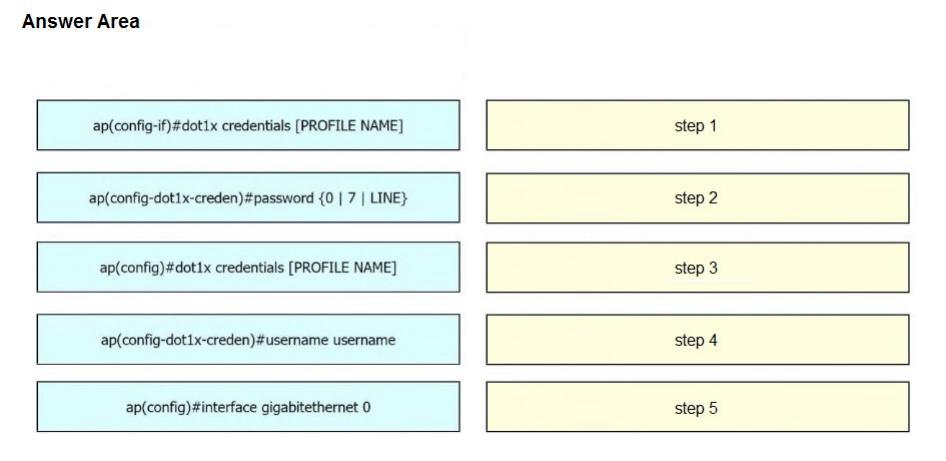
A network engineer must get an autonomous AP to authenticate to the upstream switch via
IEEE 802.1 X. Drag and drop the commands from the left onto the right to complete the
configuration.
Explanation:
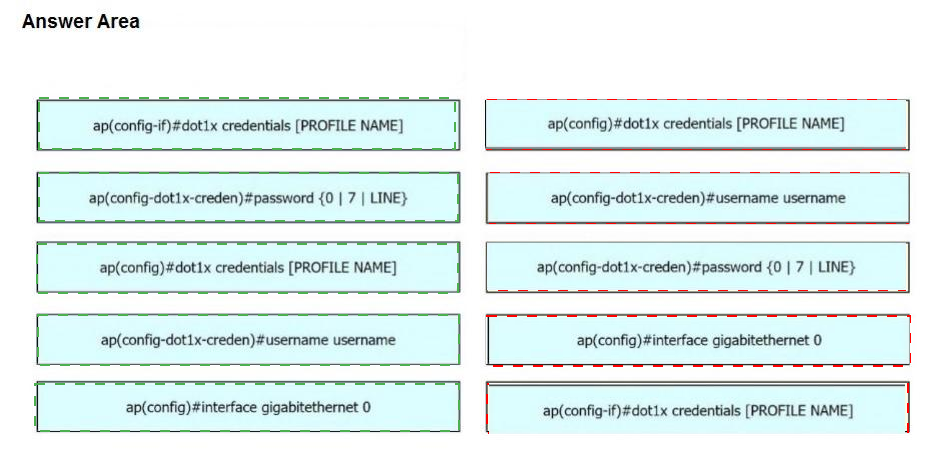
To enable an autonomous AP to authenticate to an upstream switch via 802.1X, you must first create a credentials profile that stores the username and password the AP will use as a supplicant. The correct order of configuration is:
Create the credentials profile using dot1x credentials [PROFILE NAME] in global configuration mode. This enters the credential configuration submode.
Set the username using username username in the credential submode.
Set the password using password {0 | 7 | LINE} in the credential submode (where 0 means plaintext, 7 means encrypted, and LINE is the actual password).
Enter interface configuration mode for the GigabitEthernet 0 port using interface gigabitethernet 0.
Apply the credentials profile to the interface using dot1x credentials [PROFILE NAME] under the interface.
Why the other sequence is wrong:
The other sequence reverses the order of username/password configuration and incorrectly tries to apply the credentials before they are fully defined. Credentials must be created and the username/password configured before the profile is applied to the interface.
References:
Cisco IOS Configuration Guide – 802.1X Supplicant Configuration for Autonomous APs.
Cisco 300-430 ENWLSI Official Certification Guide – Chapter on AP Authentication to Wired Infrastructure.
A customer managing a large network has implemented location services. Due to heavy load, it is needed to load balance the data coming through NMSP from the WLCs. Load must be spread between multiple CMX servers to help optimize the data flow for APs. Which configuration in CMX meets this requirement?
A. cmxctl config feature flags nmsplb.cmx-ap-grouping true
B. cmxctl config feature flags nmsplb.cmxgrouping true
C. cmxctl config feature flags nmsplb.cmx-loadbalance true
D. cmxctl config feature flags nmsplb.cmx-rssi-distribute true
Explanation:
The nmsplb service in CMX is the load balancer responsible for distributing Network Mobility Services Protocol (NMSP) messages to location services . To enable load balancing of NMSP traffic across multiple CMX servers, the nmsplb.cmxgrouping feature flag must be set to true .
Cisco's official documentation specifies the exact command sequence:
Enable the CMX Grouping feature using cmxctl config feature flags nmsplb.cmxgrouping true .
Restart CMX using cmxctl restart .
Verify the feature is enabled using cmxctl config featureflags and checking the value for nmsplb.cmxgrouping .
This configuration spreads NMSP load across multiple CMX servers, optimizing data flow for APs in large networks with heavy location services traffic .
Why Other Options Are Incorrect:
A. nmsplb.cmx-ap-grouping true:
This is an incorrect command string and does not correspond to any documented CMX feature flag for NMSP load balancing .
C. nmsplb.cmx-loadbalance true:
While the name sounds relevant, it is not the correct documented command for enabling CMX grouping load balancing .
D. nmsplb.cmx-rssi-distribute true:
This is not the correct command for enabling NMSP load balancing across CMX servers .
References:
Cisco CMX Command Reference Guide – cmxctl config feature flags nmsplb.cmxgrouping
Cisco Support Documentation – Optimize CMX Performance
Exam discussions for 300-430 ENWLSI
Which EAP method can an AP use to authenticate to the wired network?
A. EAP-GTC
B. EAP-MD5
C. EAP-TLS
D. EAP-FAST
Explanation:
For an Access Point (AP) to authenticate to a wired network switch using 802.1X, it acts as a supplicant and must support the EAP methods configured on the switch's RADIUS server. Cisco APs support EAP-FAST, EAP-PEAP, and EAP-TLS for 802.1X supplicant authentication . However, EAP-TLS is widely supported and considered the most secure option for this scenario . It uses digital certificates for mutual authentication, eliminating the security risks associated with passwords and providing strong identity verification. Cisco Wave 2 and Wi-Fi 6 APs natively support EAP-TLS for 802.1X authentication with switch ports .
Why Other Options Are Incorrect:
A. EAP-GTC:
While this is a valid EAP method, it is not standard for AP supplicant authentication to wired networks and carries a password in a generic way, making it less commonly used than EAP-TLS .
B. EAP-MD5:
VThis method only authenticates the AP to the server and does not provide mutual authentication, making it insecure and not recommended for the primary method in modern networks .
D. EAP-FAST:
Although supported and the default method for some Cisco APs, Cisco's best practice and many deployment guides specifically reference EAP-TLS as the preferred method due to its stronger security posture, especially for the more secure alternatives .
References:
Cisco Documentation: AP 802.1X Supplicant configuration supports EAP-FAST, EAP-TLS, and EAP-PEAP .
EAP-TLS is the recommended method for high-security environments .
A company has a Cisco wireless network with Cisco ISE. The company wants to allow employees to use their personal mobile devices on the wireless network. The company wants to allow access to the network only if the devices meet certain criteria. To meet the requirement, the company asked a network engineer to create a native supplicant profile. Which two fields must be configured when the profile is created? (Choose two.)
A. Allowed Protocol (PEAP/TLS)
B. Allowed Protocol (Ms-CHAPv2/ EAP-FAST)
C. SSID Name
D. WLC Name
E. Allowed Protocol (LEAP/ EAP-TTLS)
C. SSID Name
Explanation:
When creating a Native Supplicant Profile (NSP) in Cisco Identity Services Engine (ISE) for BYOD onboarding, the profile provisions wireless settings directly to client operating systems (such as Windows, macOS, Android, or iOS).
SSID Name (Option C):
Defines the exact wireless network name (Service Set Identifier) that the client device must target and save to its local wireless profile.
Allowed Protocol (PEAP/TLS) (Option A):
Specifies the EAP authentication protocol allowed for securing communication between the client's native supplicant and the authentication server (such as PEAP-MSCHAPv2 for password-based access or EAP-TLS for certificate-based access).
Why Other Options Are Incorrect:
B. Allowed Protocol (Ms-CHAPv2/ EAP-FAST):
MS-CHAPv2 is an inner authentication method used within protocols like PEAP, rather than a top-level outer EAP protocol option selected during NSP configuration. EAP-FAST is not a standard protocol configuration parameter for general native supplicant profiles.
D. WLC Name:
The wireless controller name is an internal network infrastructure parameter; mobile device native supplicants only require the target network's broadcasted SSID to initiate connections.
E. Allowed Protocol (LEAP/ EAP-TTLS):
LEAP is an obsolete, insecure Cisco proprietary protocol and is not used in modern Cisco ISE Native Supplicant Profiles.
References:
Cisco Identity Services Engine Administrator Guide (Configuring Native Supplicant Profiles): Specifies the mandatory parameters required when building an NSP, which include the target SSID Name, Connection Type, and Allowed Protocol (PEAP or EAP-TLS).
A wireless administrator receives this information to complete a CMX deployment in high
availability by using version 10.6 to gather analytics.
IP address of the primary server
IP address of the secondary server
failover mode to be configured as automatic
root password of the secondary server
email ID for NOC notifications
Enabling high availability fails when these parameters are used. Which action resolves the
issue?
A. Insert the cmxadmin password of the secondary server.
B. Use IP protocol 4242 for the controller to reach the CMX server.
C. Place primary and secondary servers in different subnets.
D. Enable the virtual IP address of the primary server.
Explanation:
The HA configuration fails because the provided information is missing the cmxadmin password of the secondary server. This is a mandatory parameter for establishing the HA pair .
The Cisco CMX HA setup process explicitly requires this credential. For example, during the CLI configuration process, the system will prompt for it directly with the question, "Please enter the cmxadmin user password for secondary:" . The setup will not proceed without it, which directly matches the described issue.
Why the others are wrong:
B. Use IP protocol 4242:
Port 4242 is used for CMX HA web services , but the issue is a missing authentication credential, not a networking port problem. The correct credential must be provided for the setup to proceed.
C. Place primary and secondary servers in different subnets:
This is incorrect. A key requirement for Cisco CMX HA is that the primary and secondary servers must be in the same subnet so that the virtual IP (VIP) can be switched between them during a failover .
D. Enable the virtual IP address:
While a VIP is typically used for HA, it is a configuration parameter, not a feature that is "enabled" on the primary server. The fundamental failure is the missing authentication credential, which occurs before the VIP can even be configured .
References:
Cisco CMX Configuration Guide – HA requires the secondary IP address and the cmxadmin user password for the secondary server .
Cisco CMX CLI Guide – Enabling HA requires entering the cmxadmin password for the secondary .
| Page 9 out of 28 Pages |