- 4.9/5.0
- 287 Questions
- Updated on: 12-Oct-2026
- Implementing and Configuring Cisco Identity Services Engine (SISE) v4.0 (300-715 SISE)
- 22875 Prepared
Free Cisco 300-715 Practice Questions 2026 | Implementing and Configuring Cisco Identity Services Engine (SISE) v4.0 (300-715 SISE)
A network administrator is currently using Cisco ISE to authenticate devices and users via 802 1X There is now a need to also authorize devices and users using EAP-TLS. Which two additional components must be configured in Cisco ISE to accomplish this'? (Choose two.)
A. Network Device Group
B. Serial Number attribute that maps to a CA Server
C. Common Name attribute that maps to an identity store
D. Certificate Authentication Profile
E. EAP Authorization Profile
D. Certificate Authentication Profile
Explanation:
The network already uses 802.1X authentication. To additionally support EAP-TLS authorization (determining access rights based on certificate attributes), ISE must extract certificate fields and map them to identity stores. Two components are mandatory: a Certificate Authentication Profile (CAP) to define which certificate fields to parse, and mapping of the Common Name (CN) to an identity store for lookup.
Correct Options:
C. Common Name attribute that maps to an identity store
The CN extracted from the client certificate (e.g., host/PC123.domain.com or user@domain.com) must be mapped to an identity store such as Active Directory or internal endpoints. ISE uses this mapped identity to apply authorization policies (e.g., allow domain-joined machines or specific users). Without this mapping, EAP-TLS authentication succeeds but authorization cannot differentiate users.
D. Certificate Authentication Profile
The CAP defines which fields to extract from the certificate (CN, SAN, Issuer, etc.) and how to use them for identity resolution. It also enables binary comparison with AD certificates if needed. CAP is mandatory for any EAP-TLS or certificate-based authentication in ISE.
Incorrect Options:
A. Network Device Group –
NDGs classify network access devices (switches, WLCs) for policy assignment. They are unrelated to extracting or mapping certificate attributes for EAP-TLS authorization.
B. Serial Number attribute that maps to a CA Server –
Certificate serial numbers are typically not used for end-user/device authorization mapping. Serial number is for CA revocation checking, not for identity store lookup.
E. EAP Authorization Profile –
This is not a standard ISE object. ISE uses Authorization Profiles (for VLAN, ACL, DACL) and Authentication Profiles (CAP is one type). "EAP Authorization Profile" is a distracter term.
Reference:
Cisco ISE Administrator Guide – "Certificate Authentication Profile" and "External Identity Sources – Certificate Mapping"
A network security administrator wants to integrate Cisco ISE with Active Directory. Which configuration action must the security administrator take to accomplish the task?
A. Remove Cisco ISE user account from the domain.
B. Remove the ISE machine account from the domain.
C. Join Cisco ISE to the Active Directory domain.
D. Search Active Directory to see if admin user account exists.
Explanation:
For Cisco ISE to authenticate and authorize users against Active Directory (AD), it must establish a trust relationship with the AD domain. This requires joining ISE to the domain as a computer object, similar to how a Windows workstation joins AD.
Correct Option:
C. Join Cisco ISE to the Active Directory domain.
Joining ISE to the AD domain creates a computer account in AD and establishes a secure Kerberos trust. This allows ISE to query AD users/groups, perform LDAP lookups, and validate credentials. The join operation requires AD domain admin credentials and enables the ISE node to participate in Kerberos authentication, including machine authentication and certificate mapping.
Incorrect Options:
A. Remove Cisco ISE user account from the domain –
Removing a user account is counterproductive and unrelated to establishing ISE-AD integration. ISE does not use a dedicated user account; it uses a machine account.
B. Remove the ISE machine account from the domain –
Removing the machine account breaks the trust relationship. If ISE was previously joined, removal would disable AD integration. ISE must remain joined to function correctly.
D. Search Active Directory to see if admin user account exists –
Searching AD to verify an admin account is a prerequisite step before joining, but it is not the actual configuration action that accomplishes the integration. The join operation itself is required.
Reference:
Cisco ISE Administrator Guide – "Configure Active Directory – Joining ISE to the Domain"
Cisco SISE 300-715 Official Cert Guide, Chapter: "External Identity Sources – Active Directory Join Process"
An administrator is troubleshooting an endpoint that is supposed to bypass 802 1X and use MAB. The endpoint is bypassing 802.1X and successfully getting network access using MAB. however the endpoint cannot communicate because it cannot obtain an IP address.
What is the problem?
A. The DHCP probe for Cisco ISE is not working as expected.
B. The 802.1 X timeout period is too long.
C. The endpoint is using the wrong protocol to authenticate with Cisco ISE.
D. An AC I on the port is blocking HTTP traffic
Explanation:
The endpoint successfully bypasses 802.1X and MAB authenticates successfully, so authentication is not the issue. However, the endpoint cannot obtain an IP address. If the 802.1X timeout period is too long, the switch port remains in an unauthorized state (blocking all traffic except EAP) for an extended period, preventing DHCP from reaching the client.
Correct Option:
B. The 802.1X timeout period is too long.
When 802.1X is enabled on a port, the switch waits for the dot1x timeout tx-period (or timer reauth-period) before falling back to MAB. If this timeout is set too long (e.g., 30+ seconds), the port stays in "unauthorized" state during that period, blocking DHCP traffic. Even though MAB eventually succeeds, the client may have already failed DHCP discovery attempts. Reducing the timeout accelerates the MAB fallback.
Incorrect Options:
A. The DHCP probe for Cisco ISE is not working as expected –
DHCP probe failure affects endpoint profiling (device identification), but does not prevent the endpoint from obtaining an IP address. The DHCP process between client and DHCP server is independent of ISE probes.
C. The endpoint is using the wrong protocol to authenticate with Cisco ISE –
The exhibit explicitly states the endpoint is bypassing 802.1X and successfully using MAB. Therefore, the correct protocol (MAB) is being used and authentication succeeds.
D. An ACL on the port is blocking HTTP traffic –
HTTP (TCP 80) is unrelated to DHCP (UDP 67/68). Blocking HTTP does not affect IP address assignment. Even if an ACL blocked DHCP, MAB success would still permit DHCP if the port returns to authorized state.
Reference:
Cisco Catalyst Switch Configuration Guide – "802.1X Timers and MAB Fallback"
Cisco SISE 300-715 Official Cert Guide, Chapter: "Configuring MAB – Timeout Considerations"
What happens when an internal user is configured with an external identity store for authentication, but an engineer uses the Cisco ISE admin portal to select an internal identity store as the identity source?
A. Authentication is redirected to the internal identity source.
B. Authentication is redirected to the external identity source.
C. Authentication is granted.
D. Authentication fails.
Explanation:
In Cisco ISE, each user identity is linked to a specific identity store (internal or external). If a user is defined in an external store (e.g., Active Directory) but the authentication policy explicitly selects the internal store (ISE local database), ISE will look for the user internally, not find them, and thus fail the authentication.
Correct Option:
D. Authentication fails.
ISE's authentication process strictly follows the identity source defined in the authentication policy rule. When the policy points to the internal identity store, ISE searches only its local database for the user. Since the user exists only in the external identity store, no match is found, and authentication fails with "user not found." ISE does not automatically fall back or redirect to another store unless configured with multiple identity sources in a specific sequence.
Incorrect Options:
A. Authentication is redirected to the internal identity source –
ISE does not "redirect" after a policy decision. The policy explicitly selects the internal store; there is no automatic redirection to another store.
B. Authentication is redirected to the external identity source –
The policy overrides the user's original store association. ISE does not automatically switch to the external store just because the user exists there.
C. Authentication is granted –
Granting authentication without validating credentials against the correct store would be a security bypass. ISE never grants access without successful credential verification.
Reference:
Cisco ISE Administrator Guide – "Authentication Policies – Identity Source Sequence"
Cisco SISE 300-715 Official Cert Guide, Chapter: "Configuring Authentication Policies – Identity Store Precedence"
In a standalone Cisco ISE deployment, which two personas are configured on a node? (Choose two )
A. publisher
B. administration
C. primary
D. policy service
E. subscriber
D. policy service
Explanation:
In a standalone Cisco ISE deployment, a single physical node runs multiple personas simultaneously. Unlike distributed deployments with separate PAN, MnT, and PSN nodes, the standalone node combines Administration (for configuration/monitoring) and Policy Service (for RADIUS/TACACS/pxGrid) personas on one server.
Correct Options:
B. Administration
The Administration persona manages system configuration, policy creation, logs, and monitoring via the ISE GUI and API. It includes the Policy Administration Node (PAN) and Monitoring & Troubleshooting (MnT) functions. A standalone node always runs this persona.
D. Policy Service
The Policy Service persona handles all RADIUS, TACACS+, and pxGrid requests. It evaluates authentication and authorization policies. In standalone mode, this persona runs alongside Administration on the same node.
Incorrect Options:
A. Publisher –
Publisher is a persona in a distributed multi-node deployment where one node is Publisher (primary PAN) and others are Subscribers. Standalone has no Publisher/Subscriber relationship.
C. Primary –
"Primary" is a role within personas (e.g., Primary PAN, Primary MnT) but not a separate persona. In standalone, there is no secondary node, so "primary" is not a designated persona.
E. Subscriber –
Subscriber nodes exist only in distributed deployments to replicate configuration from the Publisher. A standalone node has no Subscriber persona.
Reference:
Cisco ISE Deployment Guide – "Standalone vs. Distributed Deployment – Personas"
What are two components of the posture requirement when configuring Cisco ISE posture? (Choose two)
A. updates
B. remediation actions
C. Client Provisioning portal
D. conditions
E. access policy
D. conditions
Explanation:
In Cisco ISE posture policies, a "posture requirement" defines a specific health check rule that endpoints must pass. Each requirement consists of two mandatory components: conditions (what to check, e.g., antivirus version) and remediation actions (what to do if the condition fails, e.g., prompt update or redirect to a remediation portal).
Correct Options:
B. Remediation actions
Remediation actions define the steps an endpoint must take when a posture condition is not met. Examples include launching a script, displaying a web notification, redirecting to a compliance portal, or automatically updating antivirus definitions. Without remediation, non-compliant endpoints have no guided path to compliance.
D. Conditions
Conditions are the actual checks performed on the endpoint, such as "registry key exists," "process is running," "file version matches," or "service is enabled." Conditions evaluate compliance status (compliant/non-compliant). Each requirement must have at least one condition.
Incorrect Options:
A. Updates –
Updates are part of ISE's software patching, not a component of a posture requirement. Posture policies reference update timestamp checks (e.g., "AV definition not older than 7 days"), but "updates" itself is not a requirement component.
C. Client Provisioning portal –
This portal delivers the AnyConnect posture agent or NAC Agent to endpoints. It is a separate configuration under Client Provisioning policies, not a component inside a posture requirement.
E. Access policy –
Access policies (authorization policies) use posture assessment results (compliant/non-compliant) to grant or deny network access. Access policy is separate from the posture requirement definition itself.
Reference:
Cisco ISE Administrator Guide – "Posture Policies – Configuring Posture Requirements"
Cisco SISE 300-715 Official Cert Guide, Chapter: "Posture Services – Requirements and Remediation"
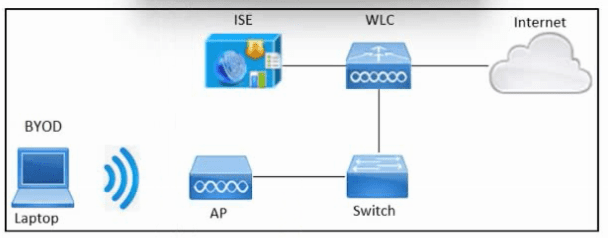
Refer to the exhibit. An engineer must configure BYOD in Cisco ISE. A single SSID must
be used to allow BYOD devices to connect to the network. These configurations have been
performed on Wireless LAN Controller already:
RADIUS server
BYOD-Dot1x SSID
Which two configurations must be done in Cisco ISE to meet the requirement? (Choose two.)
A. FlexConnect ACL
B. External identity source
C. Authentication policy
D. Redirect ACL
E. Profiling policy
D. Redirect ACL
Explanation:
For single‑SSID BYOD, devices initially connect via open or dot1x authentication. ISE must redirect unregistered devices to a guest portal for onboarding using a Redirect ACL (sent via RADIUS Access‑Accept). Additionally, an Authentication policy must be configured to differentiate between BYOD registration flow and post‑onboarding access.
Correct Options:
C. Authentication policy
ISE needs an authentication policy to determine how to process BYOD requests. Typically, this includes MAB for unregistered devices (redirection to portal) and EAP‑TLS for provisioned devices with certificates. Multiple rules based on endpoint identity group (e.g., BYOD_Registered vs. Unknown) are defined here.
D. Redirect ACL
The Redirect ACL is a downloadable ACL (dACL) applied by the WLC. It permits DNS, DHCP, and ISE portal traffic while redirecting all other HTTP(S) traffic to the BYOD portal. This ACL must be defined on ISE (under Policy → Results → Authorization → Downloadable ACLs) and referenced in the authorization profile for unregistered devices.
Incorrect Options:
A. FlexConnect ACL –
FlexConnect ACLs are used on Cisco WLCs for branch office deployments with local switching. They are not a required configuration on ISE for BYOD. The scenario does not mention FlexConnect.
B. External identity source –
While BYOD may use an external identity store (e.g., AD) for user authentication, it is not strictly required for the single‑SSID BYOD flow. The question asks for two configurations must be done on ISE — Authentication Policy and Redirect ACL are mandatory.
E. Profiling policy –
Profiling helps classify endpoints (e.g., detect iOS vs. Android) but is not mandatory for basic BYOD functionality. The core requirements are authentication policy to handle the flow and redirect ACL to enforce portal redirection.
Reference:
Cisco ISE BYOD Deployment Guide – "Single SSID Onboarding"
Cisco SISE 300-715 Official Cert Guide, Chapter: "BYOD – Authentication Policy and Redirect ACL"
An engineer is configuring a new Cisco ISE node. Context-sensitive information must be shared between the Cisco ISE and a Cisco ASA. Which persona must be enabled?
A. Administration
B. Policy Service
C. pxGrid
D. Monitoring
Explanation:
Context-sensitive sharing between Cisco ISE and a Cisco ASA (e.g., Security Group Tag (SGT) exchange, adaptive policy updates) requires pxGrid. pxGrid enables real-time publishing and subscribing of session, endpoint, and SGT data between ISE and other platforms like ASA running TrustSec or pxGrid client services.
Correct Option:
C. pxGrid
The pxGrid (Platform Exchange Grid) persona allows ISE to securely share contextual information (SGT, device profiles, session state) with Cisco ASA (running pxGrid client capabilities) and other security products. For ASA to receive SGT mapping or perform dynamic policy updates based on ISE context, pxGrid must be enabled on the ISE node and the ASA must be registered as a pxGrid client.
Incorrect Options:
A. Administration –
The Administration persona provides GUI access, policy configuration, and monitoring. It does not handle real-time context sharing with ASA. Administration is for management plane functions, not data exchange.
B. Policy Service –
The Policy Service persona handles RADIUS and TACACS authentication/authorization. It does not natively share context (e.g., SGTs) with ASA; that requires pxGrid. RADIUS alone cannot push SGT-to-IP mappings dynamically.
D. Monitoring –
The Monitoring persona (MnT) collects logs and alerts. It does not participate in live context exchange with ASA. MnT is passive for reporting and troubleshooting, not active policy sharing.
Reference:
Cisco ISE Administrator Guide – "pxGrid: Platform Exchange Grid – Use Cases with Cisco ASA"
Cisco SISE 300-715 Official Cert Guide, Chapter: "pxGrid Architecture and Personas"
Which CLI command must be configured on the switchport to immediately run the MAB process if a non-802.1X capable endpoint connects to the port?
A. authentication order mab dot1x
B. authentication fallback
C. dot1x pae authenticator
D. access-session port-control auto
Explanation:
By default, a switchport performs 802.1X authentication first and only falls back to MAB after a timeout. To immediately run MAB for non-802.1X capable endpoints (e.g., printers, IP phones), the authentication order command must specify MAB before dot1x.
Correct Option:
A. authentication order mab dot1x
This command configures the switch to attempt MAB first, followed by 802.1X if MAB fails or times out. For a non-802.1X capable endpoint, the switch immediately sends a MAB RADIUS request without waiting for 802.1X timeouts, drastically improving authentication speed. The default order is dot1x mab (dot1X first).
Incorrect Options:
B. authentication fallback –
This command is incomplete. The correct syntax is authentication fallback mab, but it only enables MAB as a fallback after 802.1X times out. It does not "immediately" run MAB; the switch still waits for 802.1X first.
C. dot1x pae authenticator –
This enables the port as an 802.1X authenticator but has no effect on MAB order. MAB may still work but only after dot1x timeout, not immediately.
D. access-session port-control auto –
This enables 802.1X authentication (auto mode) but does not change the authentication order. Without authentication order mab dot1x, dot1x still runs first.
Reference:
Cisco Catalyst Switch Command Reference – authentication order
Cisco SISE 300-715 Official Cert Guide, Chapter: "Configuring MAB – Authentication Order"
A network engineer is configuring guest access and notices that when a guest user registers a second device for access, the first device loses access What must be done to ensure that both devices for a particular user are able to access the guest network simultaneously?
A. Configure the sponsor group to increase the number of logins.
B. Use a custom portal to increase the number of logins
C. Modify the guest type to increase the number of maximum devices
D. Create an Adaptive Network Control policy to increase the number of devices
Explanation:
In Cisco ISE guest access, each guest user account is associated with a "guest type" that defines account limits, including the maximum number of devices allowed simultaneously. When a second device is registered, the first loses access because the default guest type typically allows only one device per account.
Correct Option:
C. Modify the guest type to increase the number of maximum devices
Guest types (e.g., Contractor, Daily Guest, Weekly Guest) contain a setting called "Maximum devices per account" or "Simultaneous logins." Increasing this value (e.g., from 1 to 2 or more) allows a single guest user to register multiple devices and keep all of them active concurrently. This is configured under Guest Access → Guest Types → Select Guest Type → Edit → Portal Access → Maximum devices.
Incorrect Options:
A. Configure the sponsor group to increase the number of logins –
Sponsor groups control sponsor permissions (e.g., who can create accounts), not per-guest device limits. Modifying sponsor groups does not affect how many devices a guest can register.
B. Use a custom portal to increase the number of logins –
Custom portals change the appearance and behavior of the guest portal (e.g., fields, logos), but the device limit is enforced by the guest type, not by the portal itself. Using a custom portal alone does not change the limit.
D. Create an Adaptive Network Control policy to increase the number of devices –
Adaptive Network Control (ANC) is used for endpoint quarantine, bypass, or port shutdown based on security events. It has no role in guest device limit configuration.
Reference:
Cisco ISE Administrator Guide – "Guest Access – Configuring Guest Types – Maximum Devices"
Cisco SISE 300-715 Official Cert Guide, Chapter: "Guest Services – Guest Types and Device Limits"
| Page 2 out of 29 Pages |