• 4.9/5.0
  • 459 Questions
  • Updated on: 27-Aug-2026
  • Implementing Cisco Enterprise Network Core Technologies (350-401 ENCOR)
  • 24595 Prepared

Free Cisco 350-401 Practice Questions 2026 | Implementing Cisco Enterprise Network Core Technologies (350-401 ENCOR)


Topic 1: Exam Pool A

Refer to the exhibit.
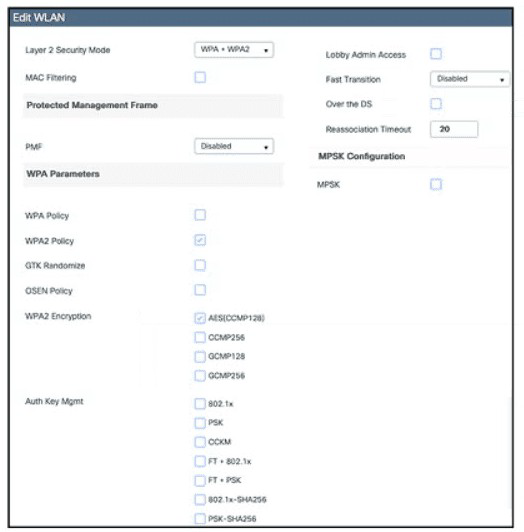
Which action must be taken to configure a WLAN for WPA2-AES with PSK and allow only 802.11r-capable clients to connect?

A. Enable PSK and FT + PSK.

B. Enable Fast Transition and FT + PSK.

C. Enable Fast Transition and PSK.

D. Change Fast Transition to Adaptive Enabled and enable FT * PSK.

B.   Enable Fast Transition and FT + PSK.

โœ… Explanation:

To configure a WLAN for WPA2-AES with PSK and allow only 802.11r-capable clients to connect, the engineer must enable both the Fast Transition feature and the FT + PSK Authentication Key Management (AKM) setting. Here's why:

Fast Transition (802.11r) must be enabled globally on the WLAN to activate the feature.

FT + PSK is the specific AKM method that provides both the necessary security for a PSK-based network and the fast roaming capability. By selecting only this option and deselecting the standard PSK AKM, the WLC ensures that only clients that support 802.11r can authenticate.

This configuration ensures that legacy clients which do not support 802.11r and would attempt to use the standard PSK method are effectively blocked from connecting.

Why other options are incorrect:

A. Enable PSK and FT + PSK.
This would allow both 802.11r-capable clients (using FT+PSK) and non-802.11r clients (using standard PSK) to connect, which violates the requirement to allow only 802.11r-capable clients to connect.

C. Enable Fast Transition and PSK.
This enables the Fast Transition feature globally but would still allow non-802.11r clients (using standard PSK) to connect. Additionally, to use Fast Transition, the FT + PSK AKM must be selected, not just the standard PSK method.

D. Change Fast Transition to Adaptive Enabled and enable FT + PSK.
"Adaptive" Fast Transition allows both 802.11r and non-802.11r clients to connect, which contradicts the requirement to allow only 802.11r-capable clients.

๐Ÿ”— References

Cisco Wireless Configuration Guide: Selecting only the FT + PSK AKM restricts the WLAN to 802.11r-capable clients only, while non-802.11r clients are rejected.

Cisco Community Best Practices: Enabling Fast Transition with FT + PSK is the correct approach to ensure only 802.11r-capable clients can connect.

Refer to the exhibit. 
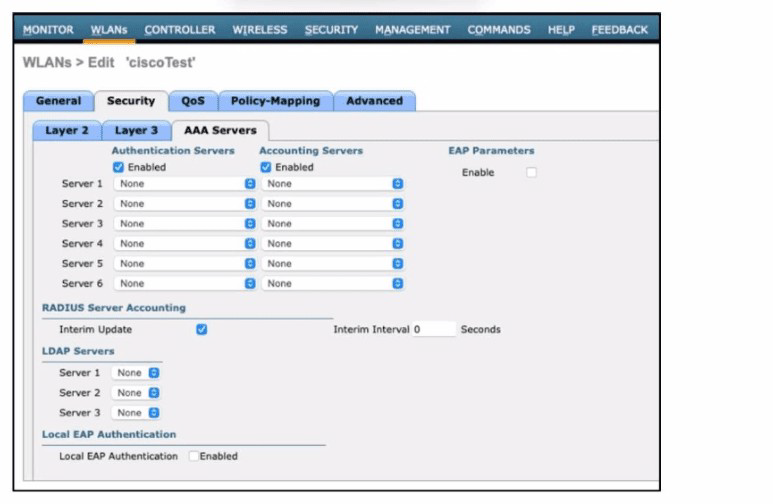
An engineer must configure a Cisco WLC with WPA2 Enterprise mode and avoid global server lists. Which action is required?

A. Enable EAP parameters.

B. Apply CISCO ISE default settings.

C. Disable the RADIUS server accounting interim update.

D. Select a RADIUS authentication server.

D.   Select a RADIUS authentication server.

โœ… Explanation:

To configure WPA2 Enterprise mode on a Cisco WLC, a RADIUS authentication server must be configured. The exhibit shows that "Server 1" through "Server 6" under "Authentication Servers" are all set to "None," meaning no RADIUS server has been assigned. WPA2 Enterprise uses 802.1X authentication, which requires a RADIUS server to validate user credentials.

To avoid using global server lists, the engineer must select a specific RADIUS authentication server for this WLAN. This overrides the global list and applies a dedicated server to this WLAN's authentication process.

Why other options are incorrect:

A. Enable EAP parameters.
This enables the internal EAP authentication on the WLC itself, which is used for local authentication (e.g., with internal database) and is not relevant when using a RADIUS server. This would also bypass the requirement to avoid global server lists.

B. Apply CISCO ISE default settings.
This would apply global default settings, which is the opposite of what is requiredโ€”the engineer must avoid global server lists and instead select a specific RADIUS server for this WLAN.

C. Disable the RADIUS server accounting interim update.
This is an optional accounting setting that does not affect the authentication process. Disabling interim updates is not required to configure WPA2 Enterprise or avoid global server lists.

๐Ÿ”— References

Cisco WLC Configuration Guide: States that configuring RADIUS authentication servers is required for WPA2 Enterprise.

Cisco Wireless Design Guide: Explains that WPA2 Enterprise requires a RADIUS server for 802.1X authentication, and specific servers can be assigned at the WLAN level to avoid global lists.
What is a benefit of implementing stateful switchover?

A. modularity

B. resiliency

C. flexibility

D. scalability

B.   resiliency

Explanation:

Stateful Switchover (SSO) is a Cisco high-availability feature that provides resiliency by enabling a fast, stateful failover between redundant hardware components (typically Route Processors or Supervisor Engines). It works by establishing one processor as the active unit and another as a fully initialized standby unit, and then continuously synchronizing critical state and configuration information between them . This "hot standby" capability is the core of its resiliency benefit.

In the event of a failure, the standby processor can take over immediately. Because it has a mirror image of all protocols and user session information, the switchover has minimal to no impact on forwarding traffic, maintaining network availability . This is a significant improvement over older redundancy modes that required a full reboot of the system and led to network instability like routing flaps .

Why other options are incorrect:

A. modularity:
This is incorrect. Modularity refers to the design principle of breaking a system into independent components. SSO is a high-availability feature, not a system architecture that provides modularity.

C. flexibility:
This is incorrect. Flexibility refers to the ability to adapt to different configurations or requirements. While SSO is a configurable feature, its primary benefit is not flexibility, but resiliency and improved network availability.

D. scalability:
This is incorrect. Scalability refers to the ability of a system to handle increased load by adding resources. While SSO can be deployed at network edge points, its purpose is not to scale performance but to provide redundancy and reliability .

๐Ÿ”— References:

Cisco Catalyst 6500 Release 15.0SY Software Configuration Guide: "SSO maintains stateful feature information, user session information is maintained during a switchover, and line cards continue to forward network traffic with no loss of sessions, providing improved network availability"

Cisco High Availability White Paper: "Cisco Nonstop Forwarding (NSF) with Stateful Switchover (SSO) provides increased network service availability and protection against unplanned downtime"

Which type of roaming event occurs when a client roams across multiple mobility groups?

A. Layer 3

B. Layer 7

C. Layer 1

D. Layer 2

A.   Layer 3

โœ… Explanation:

A Layer 3 roaming event occurs when a wireless client roams across Access Points (APs) that are connected to different Wireless LAN Controllers (WLCs) and, crucially, the client moves to a different IP subnet .

When a client roams between different mobility groups, it inherently involves controllers in different subnets, as mobility groups are logical groups of controllers that share client data . The controllers in different mobility groups do not share client context, meaning the client is effectively roaming across different Layer 3 subnets . In this scenario, the client's IP address is preserved through an anchor-foreign controller relationship, but the roaming event itself is classified as Layer 3 .

Why other options are incorrect:

B. Layer 7:
This refers to the application layer of the OSI model. Wireless roaming events are defined by network layer (Layer 3) and data link layer (Layer 2) characteristics. Roaming is not described by application layer events.

C. Layer 1:
This is the physical layer, which deals with the physical transmission of raw bit streams over a medium. A roaming event is determined by network topology changes, not by physical layer characteristics.

D. Layer 2:
A Layer 2 roaming event occurs when a client roams between controllers that are on the same IP subnet, typically within the same mobility group . Since the question specifies roaming "across multiple mobility groups," this implies different subnets, making it a Layer 3 roam.

๐Ÿ”— References:

Cisco Documentation: Inter-subnet (Layer 3) roaming occurs when controllers have interfaces on different IP subnets .

Cisco Learning Network: A client roaming between APs on different WLCs with different subnets is defined as an inter-controller L3 roam .

What is a characteristic of omnidirectional antennas?

A. It includes dish antennas.

B. It has high gain.

C. It provides the most focused and narrow beamwidth.

D. It includes dipole antennas.

D.   It includes dipole antennas.

โœ… Explanation:

The most fundamental and defining characteristic of an omnidirectional antenna is that it includes dipole antennas or is based on the dipole design. The standard reference for an omnidirectional antenna is the half-wave dipole, which forms the basis for understanding its properties. The Cisco ANT-5G-OMNI-OUT-N antenna, for example, is explicitly specified as a dipole type.

By design, an omnidirectional antenna radiates energy equally well in all directions within a single plane, creating a 360-degree coverage pattern. This makes dipole-based antennas a common choice for applications like mobile communications, Wi-Fi access points, and broadcast transmissions where broad, uniform coverage is needed.

Why other options are incorrect:

A. It includes dish antennas.
This is incorrect. Dish antennas are highly directional, not omnidirectional. They are classified as directional antennas because they focus energy into a narrow beam to achieve high gain over long distancesโ€”the opposite of the wide, even coverage provided by omnidirectional antennas.

B. It has high gain.
This is generally incorrect. A standard dipole omnidirectional antenna has a relatively low gain of about 2.1โ€“2.15 dBi. While collinear arrays or other designs can achieve higher gain (sometimes up to 5 dBi or more), this is achieved by compromising the antenna's vertical beamwidth, and "high gain" is not a defining characteristic of omnidirectional antennas as a class.

C. It provides the most focused and narrow beamwidth.
This is incorrect. An omnidirectional antenna provides a relatively wide beamwidth, typically between 78 and 96 degrees in the elevation plane for a standard dipole design, allowing it to radiate evenly across a wide area. The most focused and narrow beamwidth is a defining characteristic of highly directional antennas like dish antennas.

๐Ÿ”— References

PCTEL Knowledge Hub: Explains that a dipole is the foundational omnidirectional antenna, with a gain of about 2.15 dBi and an elevation-plane beamwidth of 78 degrees.

Cambridge University Press: Describes the basic omnidirectional dipole antenna as having a gain of 2.1 dBi.

In a Cisco SD-Access network architecture, which access layer cabling design is optimal for the underlay network?

A. Switches are cross-finned at the same layer and have a single connection to each upstream distribution device

B. Switches are connected to each upstream distribution and core device.

C. Switches are connected to each upstream distribution device.

D. Switches are cross-linked to devices at the same layer and at the upstream and downstream devices.

C.   Switches are connected to each upstream distribution device.

โœ… Explanation:

In a Cisco SD-Access network, the optimal access layer cabling design for the underlay is to connect each access switch to every upstream distribution device . This is a direct requirement of the Layer 3 routed access model, which is foundational for the SD-Access underlay .

Traditional campus networks often use a Layer 2 access design where access switches are connected to distribution switches, creating a loop. This loop is "broken" by Spanning Tree Protocol (STP), which blocks redundant links and limits bandwidth. A routed access design, however, treats each uplink from the access switch to the distribution layer as a Layer 3 routed interface (with an IP address). This allows you to run a dynamic routing protocol (like OSPF or IS-IS) on all uplinks simultaneously. Because routing protocols inherently support multiple equal-cost paths, this design provides both load balancing and fast failover without the limitations of STP . By connecting each access switch to every upstream distribution device, the network achieves a loop-free, highly resilient topology that is simple to manage and scale.

Why other options are incorrect:

A. Switches are cross-linked at the same layer and have a single connection to each upstream distribution device:
This describes an older design that introduces a Layer 2 loop at the access layer. The cross-links between switches require STP to block redundant paths, reducing available bandwidth and making the design more complex. In SD-Access, redundancy and loop prevention are handled at Layer 3 through the routed access model, not through cross-links .

B. Switches are connected to each upstream distribution and core device:
While redundancy is beneficial, connecting access switches directly to the core violates hierarchical design principles. This creates a flat architecture that is difficult to secure, troubleshoot, and scale. The distribution layer serves as a boundary to aggregate access traffic and apply policies before it reaches the core.

D. Switches are cross-linked to devices at the same layer and at the upstream and downstream devices:
This design is overly complex and creates multiple redundancy paths that would require a complex STP configuration to manage. This defeats the simplicity and performance goals of the SD-Access underlay, which is designed to be a "clean" routed network .

๐Ÿ”— References:

Cisco SD-Access Solution Design Guide: The underlay implementation uses a well-designed Layer 3 foundation known as a routed access design, where switches are connected to upstream devices using Layer 3 links


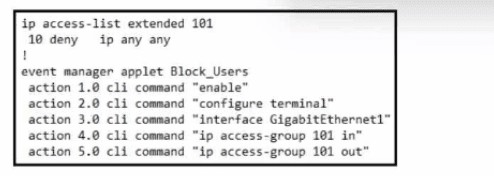
Refer to the exhibit. An engineer builds an EEM script to apply an access list. Which statement must be added to complete the script?

A. event none

B. action 6.0 cli command "ip access-list extended 101"

C. action 2.1 cli command "ip access-list extended 101"

D. action 3.1 cli command "ip access-list extended 101"

B.   action 6.0 cli command "ip access-list extended 101"

โœ… Explanation:

The script's current sequence creates the access list but does not configure its actual rules. To complete the script, you must add a command that defines the access list. Option B adds an action that moves into the ACL configuration mode and extends access list 101, allowing you to set the permit/deny rules. As the script doesn't currently have a command to configure the access list, this is necessary.

Why other options are incorrect:

A. event none
This is not a valid EEM action. event is used to define the trigger for the script, not as an action within the script body.

C. action 2.1 cli command "ip access-list extended 101"
This would place the command within the configure terminal context but before the interface GigabitEthernet1 command is executed. This would create the access list but then not apply it to the correct interface.

D. action 3.1 cli command "ip access-list extended 101"
While this would create the ACL, it is not the most appropriate placement. Option B is clearer and more logically structured.

๐Ÿ”— References

Cisco EEM Reference Manual: States that EEM action cli statements are executed in sequential order to configure the device.
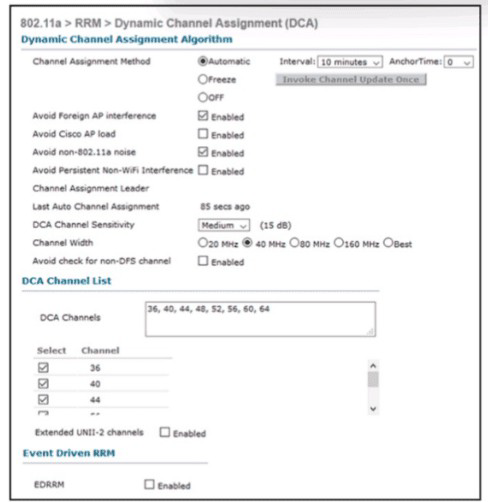

Refer to the exhibit An engineer is troubleshooting an issue with non-Wi-Fi interference on the 5-GHz band The engineer has enabled Cisco CleanAir and set the appropriate traps, but the AP does not change the channel when it detects significant interference Which action will resolve the issue?

A. Enable the Avoid Persistent Non-WiFi Interference option

B. Disable the Avoid Foreign AP Interference option.

C. Change the DCA Sensitivity option to High

D. Enable the Event Driven Radio Resource Management option

A.   Enable the Avoid Persistent Non-WiFi Interference option

โœ… Explanation:

The exhibit shows that the "Avoid Persistent Non-WiFi Interference" option is currently enabled (checked). However, the scenario describes a situation where the AP does not change the channel when it detects significant non-Wi-Fi interference. This indicates that while the Avoid Persistent Non-WiFi Interference option is enabled, it may not be working effectively.

For the AP to automatically change the channel upon detection of significant non-Wi-Fi interference, the Event-Driven RRM (EDRRM) feature must be enabled. The exhibit shows that EDRRM is already enabled. Since the AP is not changing the channel as expected, the likely issue is that the Event-Driven RRM is not triggering as it should. Enabling the "Avoid Persistent Non-WiFi Interference" option specifically allows Event-Driven RRM to act on non-Wi-Fi interference events.

Why other options are incorrect:

B. Disable the Avoid Foreign AP Interference option.
This option is related to interference from other access points, not non-Wi-Fi interference. Disabling it would not resolve the issue with non-Wi-Fi interference detection and channel change.

C. Change the DCA Sensitivity option to High.
DCA Sensitivity affects how the algorithm reacts to changes in the RF environment, particularly for Wi-Fi interference and load. It does not directly control the Event-Driven RRM response to non-Wi-Fi interference events.

D. Enable the Event Driven Radio Resource Management option.
The exhibit shows that EDRRM is already enabled. Enabling it again would not change its behavior.

๐Ÿ”— References:

Cisco Configuration Guide: "When a CleanAir capable AP detects interference, it sends a trap to the controller. The controller can then trigger an Event-Driven RRM (EDRRM) channel change. To enable this behavior, the 'Avoid Persistent Non-WiFi Interference' option must be enabled."

Which two nodes comprise a collapsed core in a two-tier Cisco SD-Access design? (Choose two.)

A. edge nodes

B. distribution nodes

C. extended nodes

D. core nodes

E. border nodes

B.   distribution nodes
E.   border nodes

โœ… Explanation:

In a two-tier collapsed core design, the traditional three-tier hierarchy (Core, Distribution, Access) is simplified. The core and distribution layers are merged into a single physical and logical layer. In the context of a Cisco SD-Access fabric, the collapsed core/distribution layer is typically where the fabricโ€™s border and control plane nodes are placed .

This means that within this design, the switches that form the collapsed core are assigned the border node (BN) role, as they provide the connection from the fabric to the outside world , and the distribution nodes, as they serve as the aggregation point for the access layer . The result is that the roles of distribution and border node are combined on the same physical switches .

Why other options are incorrect:

A. edge nodes:
Edge nodes are the access switches in the SD-Access fabric where end devices (PCs, printers, phones) connect. They sit at the bottom of the hierarchy, not in the collapsed core .

C. extended nodes:
Extended nodes are a specific role for small switches that extend the fabric's reach but do not perform all the functions of a standard edge node. They are also not part of the core architecture .

D. core nodes:
In a two-tier collapsed core design, the core and distribution layers are merged. There is no separate "core node" distinct from the distribution layer. The distribution layer takes on the core's functions .

๐Ÿ”— References:

DC Lessons SD-Access Design Consideration:Discusses the small site reference model where "Collapsed core switches can be uses for both Border node and Control plane node" .

Net Craftsmen Navigating Around SD-Access: Explains the role mapping, stating that in a two-tier topology, "the distribution switches generally link to the rest of the network, and so they will probably act as SDA 'border nodes (BNโ€™s)'" .

Why does the vBond orchestrator have a public IP?

A. to enable vBond to learn the public IP of WAN Edge devices that are behind NAT gateways or in private address space

B. to facilitate downloading and distribution of operational and security patches

C. to allow for global reachability from all WAN Edges in the Cisco SD-WAN and to facilitate NAT traversal

D. to provide access to Cisco Smart Licensing servers for license enablement

C.   to allow for global reachability from all WAN Edges in the Cisco SD-WAN and to facilitate NAT traversal

โœ… Explanation:

The vBond's public IP is fundamental to the Cisco SD-WAN architecture for two main reasons:

Global Reachability: As the first point of contact for the WAN Edges, the vBond must be accessible from all transport networks, including the public internet and MPLS links . This allows routers across the globe to securely connect and join the fabric from the moment they are powered on .

NAT Traversal (NAT-T): A primary technical reason for the public IP is to function as a Session Traversal Utilities for NAT (STUN) server . WAN Edge routers are often deployed behind NAT gateways with private, non-routable IP addresses. When a router connects to the vBond, the vBond can see the router's post-NAT public IP address and port, and it relays this information back to the router. This discovery process enables the edge routers to build secure IPsec tunnels with each other, even when they are behind different NAT devices .

Why other options are incorrect:

A. to enable vBond to learn the public IP of WAN Edge devices that are behind NAT gateways or in private address space
While the vBond does learn the public IPs of edge devices (as part of the STUN discovery process), this describes a mechanism, not the fundamental reason . The primary architectural purpose is to provide global reachability and orchestrate the entire NAT traversal process. Option C is a more complete and accurate description .

B. to facilitate downloading and distribution of operational and security patches
This is incorrect. The vBond is an orchestrator, not a distribution server for software or security updates . The vManage console is responsible for managing software upgrades and distributing security policies to the edge routers .

D. to provide access to Cisco Smart Licensing servers for license enablement
This is incorrect. The vBond does not manage licensing. License enablement and verification are handled by the vManage console, which communicates with Cisco's Smart Licensing servers. The vBond is not involved in this workflow .

Page 12 out of 46 Pages