- 4.9/5.0
- 459 Questions
- Updated on: 27-Aug-2026
- Implementing Cisco Enterprise Network Core Technologies (350-401 ENCOR)
- 24595 Prepared
Free Cisco 350-401 Practice Questions 2026 | Implementing Cisco Enterprise Network Core Technologies (350-401 ENCOR)
Topic 1: Exam Pool A
A. Option A
B. Option B
C. Option C
D. Option D
Explanation:
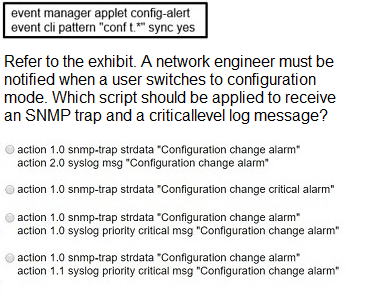
The Cisco Embedded Event Manager (EEM) applet is triggered when a user enters configuration mode via the conf t command. The requirement is to generate both an SNMP trap and a critically level log message. For the log message to be sent at critical level, the syslog action must include the priority critical keyword. Additionally, the order of action labels (e.g., 1.0 and 1.1) is irrelevant as EEM executes actions sequentially based on the label numbering. Option D correctly configures two separate actions:
action 1.0 snmp-trap strdata "Configuration change alarm" – sends an SNMP trap with the specified string.
action 1.1 syslog priority critical msg "Configuration change alarm" – generates a syslog message at critical severity.
This meets the requirement of receiving both an SNMP trap and a critical-level log message.
Why other options are incorrect:
A. Option A – This is missing the priority critical keyword, so the syslog message would be sent at the default severity (usually informational), not at critical level. This violates the requirement.
B. Option B – This only generates an SNMP trap and does not produce any syslog message. Without the syslog action, the critical-level log requirement is not fulfilled.
C. Option C– While this uses the priority critical keyword, it incorrectly applies it to the snmp-trap action. The priority critical parameter is only valid for the syslog action, not for snmp-trap. This would cause a syntax error and the applet would fail to execute properly.
References:
Cisco IOS Embedded Event Manager Command Reference: "syslog priority critical – Specifies the severity level of the syslog message"
Cisco EEM Configuration Guide: "The snmp-trap action generates an SNMP trap; the syslog action generates a syslog message with optional priority"
Which technology is the Cisco SD-Access control plane based on?
A. IS-IS
B. LISP
C. Cisco TrustSec
D. VXLAN
Explanation:
Cisco SD-Access is built on a fabric architecture that separates network functions into distinct planes. The control plane in SD-Access is based on LISP (Locator/ID Separation Protocol). LISP is responsible for mapping endpoint identifiers (EIDs) to routing locators (RLOCs), enabling the fabric to track endpoint locations as devices move across the network. When an endpoint connects to an Edge Node, its location is registered with the control plane. When another device needs to communicate with that endpoint, the control plane provides the correct mapping, allowing traffic to be forwarded to the current location without relying on traditional Layer 2 flooding or MAC address learning. LISP is the foundational protocol that enables host mobility, scalability, and segmentation in the SD-Access fabric.
Why other options are incorrect:
A. IS-IS:
This is a routing protocol used in the underlay network to provide reachability between fabric devices (typically OSPF or IS-IS). It is not the control plane protocol for the overlay SD-Access fabric.
C. Cisco TrustSec:
This provides the policy plane in SD-Access, using Scalable Group Tags (SGTs) for group-based segmentation and policy enforcement. It does not handle endpoint-to-location mapping.
D. VXLAN: This is the data plane encapsulation protocol used in SD-Access. It provides overlay segmentation using VNIs but does not handle control plane functions.
References:
Cisco SD-Access Solution Design Guide: "The control plane is based on LISP, which provides endpoint-to-location mapping"
ENCOR 350-401 Official Cert Guide, Chapter 23: "LISP provides the control plane for SD-Access, handling EID-to-RLOC mapping and host mobility"
Which two operations are valid for RESTCONF? (Choose two)
A. PULL
B. ADD
C. HEAD
D. REMOVE
E. GET
F. PUSH
E. GET
Explanation:
RESTCONF is an HTTP-based protocol defined in RFC 8040 that uses standard HTTP methods to provide Create, Read, Update, Delete (CRUD) operations on YANG-defined data . The protocol supports a specific set of HTTP methods: OPTIONS, HEAD, GET, POST, PATCH, PUT, and DELETE .
E. The GET method is used to retrieve data and metadata about a resource. When a client sends a GET request, the server returns the requested configuration data, state data, or both in the response body using either XML or JSON encoding .
C. The HEAD method is identical to GET except that the server only returns the response headers without the message body. It is supported for all resources that support the GET method and is commonly used to verify whether a resource exists or to check metadata (such as content type or last-modified time) without retrieving the full data payload .
Why other options are incorrect:
A. PULL: This is not an HTTP method and is not supported by RESTCONF. RESTCONF uses standard HTTP methods only. "PULL" typically refers to a data retrieval pattern, not a protocol operation .
B. ADD: This is not a valid HTTP method. The create operation in RESTCONF is performed using the POST method (for creating resources) or PUT (for creating or replacing a resource) .
D. REMOVE: This is not a valid HTTP method. The delete operation in RESTCONF is performed using the DELETE method .
F. PUSH:This is not an HTTP method and is not supported by RESTCONF. "Push" typically refers to server-sent events or notifications, which are not standard RESTCONF operations .
References:
RFC 8040 - RESTCONF Protocol: Specifies the standard methods supported: OPTIONS, HEAD, GET, POST, PATCH, PUT, and DELETE
CCNP and CCIE Enterprise Core ENCOR 350-401 Official Cert Guide: Lists supported operations as "DELETE, GET, HEAD, OPTIONS, PATCH, POST, PUT"
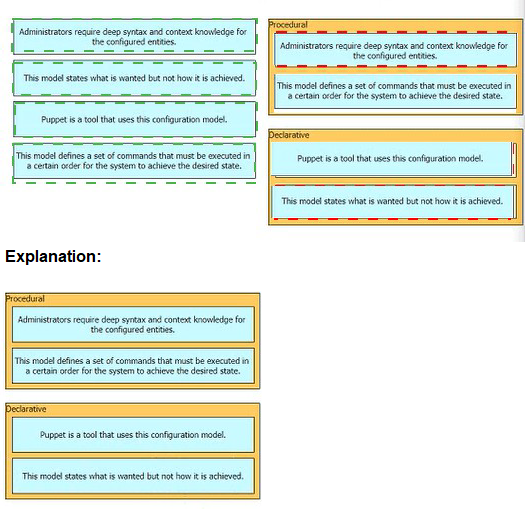
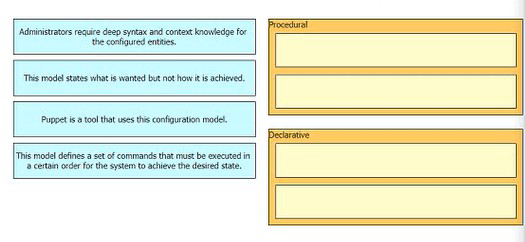
Drag anti drop the characteristics from the ten onto the configuration models on the right.
Which AP mode analyzes the spectrum to detect sources of interference?
A. Monitor
B. Rogue detector
C. SE-Connect
D. Sniffer
Explanation:
The Access Point (AP) mode that is specifically designed to analyze the spectrum and detect sources of RF interference is the Monitor mode.
Cisco's Spectrum Expert™ Wi-Fi solution integrates with the wireless network to deliver real-time spectrum intelligence. It detects, classifies, and locates sources of interference in the 2.4-GHz and 5-GHz bands.
To perform a full spectrum analysis across multiple channels, you must configure the AP in Monitor mode. This dedicates the AP's radios to monitoring and analyzing the RF environment, enabling the network administrator to identify sources of interference like analog cordless phones, wireless video cameras, or microwave ovens.
Why other options are incorrect:
B. Rogue detector:
In this mode, the AP radios are disabled, and the AP monitors the LAN to detect on-wire rogue activity. It does not perform spectrum analysis.
C. SE-Connect:
This mode provides a dedicated connection for spectrum analysis software like Cisco Spectrum Expert or Chanalyzer. While it is used for spectrum analysis, it is the SE-Connect mode that facilitates the connection, but the core function of analyzing the spectrum to detect interference is accomplished by the Monitor mode AP.
D. Sniffer:
In this mode, the AP operates in promiscuous mode to capture all Wi-Fi traffic on a particular channel. These packets are tunneled to the controller and forwarded to a machine running packet analyzer software like Wireshark for deep packet analysis. It is used for troubleshooting network activity, not for detecting RF interference.
References:
Cisco Wireless Controller Configuration Guide: "You need to configure the AP in the monitor mode to view all spectrum analysis..."
Cisco Wireless Controller Configuration Guide, Release 8.8: "Monitor: In this mode, the AP radios are dedicated to monitoring the Wi-Fi channel for RRM and rogue detection"
With IGMPv2, which multicast group address does the IGMP querier use to send query messages to all hosts on the LAN?
A. 239.0.0.2
B. 224.0.0.1
C. 239.0.0.1
D. 224.0.0.2
Explanation:
In IGMPv2, the querier uses the link-local multicast address 224.0.0.1 to send general query messages to all multicast-capable hosts on the local network segment . This address is well-known as the "all systems on this subnet" group .
Why other options are incorrect
A. 239.0.0.2: This falls within the range of administratively scoped IPv4 multicast addresses (239.0.0.0/8) and is not used for IGMP query messages. The querier does not send general queries to this address.
C. 239.0.0.1: Also within the administratively scoped range (239.0.0.0/8), this is not a standard destination for IGMP general queries.
D. 224.0.0.2: This is the "all routers on this subnet" address . It serves different purposes in IGMP, primarily as the destination for Leave Group messages sent by hosts when they want to stop receiving traffic from a multicast group .
References
Cisco Security documentation clearly states that address 224.0.0.1 is assigned to all systems on a subnet .
Official configuration guides confirm that general queries are sent to 224.0.0.1
Which protocol is used by vmanage to push centralized policies to vsmart controllers?
A. NETCONF
B. TLS
C. STUN
D. OMP
Explanation:
Cisco vManage uses NETCONF (Network Configuration Protocol) to push centralized policies, configurations, and templates to vSmart controllers . vManage serves as the management plane for the SD-WAN solution, and NETCONF/YANG is the protocol it uses to communicate with other components . When a policy is defined through the vManage GUI and activated, it is pushed via a NETCONF transaction to the vSmart controller, where it appears in the running-configuration . Once vSmart receives the policy, it redistributes it to WAN Edge routers using the Overlay Management Protocol (OMP) . vSmart acts as the centralized control plane, implementing control policies, traffic engineering, and topology decisions, while vManage is the interface for creating and storing all policy versions .
Why other options are incorrect:
B. TLS:
TLS (or DTLS) provides the secure transport layer for encrypting control plane communication between all SD-WAN components . It is the underlying security protocol, not the configuration protocol used to push policies.
C. STUN:
STUN (Session Traversal Utilities for NAT) is used for NAT traversal and initial discovery between WAN Edge routers and the vBond orchestrator . It does not handle policy distribution.
D. OMP: OMP (Overlay Management Protocol) is the control plane protocol used between vSmart controllers and WAN Edge routers . While vSmart uses OMP to distribute policies to WAN Edge devices, vManage does not use OMP to communicate with vSmart—NETCONF is used for that purpose .
References:
Cisco Catalyst IR1800 Configuration Guide: "vManage is the management plane... It uses netconf/YANG to talk to vEdge devices"
Cisco Catalyst SD-WAN Manager documentation: "vManage communicates with vSmart to push policies"
A wireless administrator must create a new web authentication corporate SSID that will be using ISE as the external RADIUS server. The guest VLAN must be specified after the authentication completes. Which action must be performed to allow the ISE server to specify the guest VLAN?
A. Set RADIUS Profiling.
B. Set AAA Policy name.
C. Enable Network Access Control State.
D. Enable AAA Override.
Explanation:
The AAA Override feature is specifically designed to allow the wireless LAN controller to accept and apply attributes returned by the RADIUS server (ISE) on a per-client basis . In this scenario, enabling AAA Override on the WLAN is the critical action that allows ISE to specify the guest VLAN by returning the appropriate Tunnel-Private-Group-ID (VLAN ID) in the RADIUS Access-Accept message.
Why other options are incorrect
A. Set RADIUS Profiling:
This is a feature on ISE used to classify endpoints based on their attributes (e.g., device type). While profiling can be used to determine which policy to apply, the setting on the WLC that enables VLAN assignment is AAA Override, not profiling itself.
B. Set AAA Policy name:
This option is vague and doesn't specify an enabling feature. Simply naming an AAA policy does not instruct the controller to accept the RADIUS VLAN attribute; without AAA Override, the controller will ignore it and assign the default VLAN.
C. Enable Network Access Control State:
While NAC State is often enabled alongside AAA Override for Central Web Authentication flows, it is the AAA Override feature that enables dynamic VLAN assignment. NAC triggers the web authentication process but doesn't, by itself, instruct the controller to override the default VLAN.
References
Cisco Configuration Guides: Documents for both AireOS and 9800 controllers explicitly state: "Enable Allow AAA Override... enables you to apply VLAN tagging to individual clients based on the returned RADIUS attributes from the AAA server" .
Cisco WLC CLI: The command to configure this feature is aaa-override under the WLAN or policy profile
A network administrator is preparing a Python script to configure a Cisco IOS XEbased device on the network. The administrator is worried that colleagues will make changes to the device while the script is running. Which operation of the NC client manager prevents colleagues from making changes to the devices while the script is running?
A. m.freeze(config-running')
B. m.freeze(target-running')
C. m.lock(config='running')
D. m.lock(target-running')
Explanation:
The ncclient Python library is used to establish NETCONF sessions with network devices like Cisco IOS XE to perform configuration operations such as edit-config or copy-config. When a script needs to make changes, it is critical to prevent other users or applications from modifying the device simultaneously, which could lead to a conflict. The correct method to achieve this is the lock operation.
According to the ncclient documentation, the lock method takes a mandatory parameter named target, which specifies the configuration datastore to be locked. When a lock is successfully applied to the running datastore, only the owner of the lock can perform edit-config and copy-config operations; other NETCONF sessions attempting to modify the configuration will be blocked. The lock is typically used within a context manager (with statement) to ensure it is automatically released when the operation completes.
The correct syntax is m.lock(target='running') because target is the valid parameter name, and 'running' is the name of the standard configuration datastore to be locked.
Why other options are incorrect:
A. m.lock(config='running'):
Incorrect. The lock method does not accept a parameter named config. The parameter is specifically target, as shown in the official ncclient API and examples. Using this syntax would raise a TypeError as the method would not recognize the argument.
C. m.freeze(target='running'):
Incorrect. There is no method named freeze in the ncclient Manager class for locking a datastore. This method does not exist in the library.
D. m.freeze(config='running'):
Incorrect. This combines two errors—the freeze method does not exist, and the config parameter is not valid for the lock operation even if it did.
References:
ncclient Official Documentation: The lock method uses the target parameter to specify the datastore name (e.g., running).
Cisco IOS XE Programmable Configuration Guide: Confirms that the NETCONF
Which message type is valid for IGMPv3?
A. leave group
B. hello
C. graft
D. source-specific membership report
Explanation:
IGMPv3 represents a significant evolution from previous versions by introducing source filtering—the ability for a host to report interest in receiving multicast traffic from specific source addresses, or from all but specific source addresses, sent to a particular multicast group . This capability was developed to support Source-Specific Multicast (SSM) .
According to the official IETF specification (RFC 9776), IGMPv3 defines only two primary message types of concern to the protocol itself: the Membership Query (0x11) and the Version 3 Membership Report (0x22) . However, the specification acknowledges that an IGMPv3 implementation must also support three additional message types for backward compatibility with previous IGMP versions: IGMPv1 Membership Report (0x12), IGMPv2 Membership Report (0x16), and IGMPv2 Leave Group (0x17) .
The source-specific membership report is a type of IGMPv3 Membership Report that contains source filtering information. It includes Group Record fields that allow hosts to specify:
MODE_IS_INCLUDE: The host wants to receive data only from the listed source addresses
MODE_IS_EXCLUDE: The host wants to receive data from all sources except those listed
These reports are sent to the destination address 224.0.0.22, which represents all IGMPv3-capable multicast routers on the network segment .
Why other options are incorrect:
A. leave group: This message type (0x17) is explicitly defined in IGMPv2, not IGMPv3. IGMPv3 does not define a separate Leave message—instead, hosts use Membership Report messages with specific Group Record types (such as CHANGE_TO_INCLUDE_MODE with an empty source list) to signal that they are leaving a group . While some implementations may treat a "Leave group" as a subtype of the IGMPv3 Membership Report, the independent "leave group" message type is a characteristic of IGMPv2 .
B. hello: This is not an IGMP message type. "Hello" messages are associated with routing protocols such as OSPF and EIGRP for neighbor discovery, not with IGMP. IANA's official IGMP Type Numbers registry does not list "hello" as a valid message type.
C. graft:
According to IANA's official IGMP Type Numbers registry, "Graft" is a valid message type (Type 0x06) . However, it is used by the PIM-DM (Protocol Independent Multicast - Dense Mode) routing protocol, not by IGMP. The graft message is sent by a PIM router to rejoin a pruned branch in the multicast distribution tree. It is not an IGMP host-to-router message.
References:
RFC 9776 (IGMPv3):Defines the two primary IGMPv3 message types: Membership Query and Version 3 Membership Report, and specifies support for source filtering
Cisco Configuration Guide:
Explains IGMPv3 Membership Reports contain source information for SSM, supporting INCLUDE and EXCLUDE filter modes
| Page 4 out of 46 Pages |