- 4.9/5.0
- 721 Questions
- Updated on: 25-May-2026
- Implementing and Operating Cisco Security Core Technologies (SCOR 350-701)
- 27215 Prepared
Free Cisco 350-701 Practice Questions 2026 | Implementing and Operating Cisco Security Core Technologies (SCOR 350-701)
Topic 1: Exam Pool A
An engineer configured a new network identity in Cisco Umbrella but must verify that traffic is being routed through the Cisco Umbrella network. Which action tests the routing?
A.
Ensure that the client computers are pointing to the on-premises DNS servers.
B.
Enable the Intelligent Proxy to validate that traffic is being routed correctly.
C.
Add the public IP address that the client computers are behind to a Core Identity.
D.
Browse to http://welcome.umbrella.com/ to validate that the new identity is working.
What is a difference between Cisco AMP for Endpoints and Cisco Umbrella?
A. Cisco AMP for Endpoints is a cloud-based service, and Cisco Umbrella is not.
B. Cisco AMP for Endpoints prevents connections to malicious destinations, and C malware.
C. Cisco AMP for Endpoints automatically researches indicators of compromise ..
D. Cisco AMP for Endpoints prevents, detects, and responds to attacks before and against Internet threats.
Explanation:
This option correctly captures the core function of AMP for Endpoints, which is endpoint protection. Let's break down the full comparison to understand the difference.
D) is CORRECT.
Cisco AMP for Endpoints is installed directly on endpoints (computers, servers). It provides:
Prevention: Blocks known malicious files and exploits.
Detection: Uses behavioral analysis and global threat intelligence to detect suspicious activity.
Response: Its key feature is retrospective security. It can go back in time to see every file and process, allowing it to detect and remediate a threat that initially evaded detection after it has been discovered.
Why the other options are incorrect:
A) Cisco AMP for Endpoints is a cloud-based service, and Cisco Umbrella is not.
This is INCORRECT. Both have a strong cloud component. AMP for Endpoints can be managed via a cloud console, and its intelligence is cloud-derived. Cisco Umbrella is a cloud-native service and is the definition of a Security as a Service (SaaS) offering.
B) Cisco AMP for Endpoints prevents connections to malicious destinations, and Cisco Umbrella blocks malware. This is BACKWARDS and INCORRECT.
Cisco Umbrella is a secure internet gateway that prevents connections to malicious destinations by blocking DNS resolutions of known-bad domains and IPs before a connection is even made.
Cisco AMP for Endpoints is an advanced antivirus/EDR solution that blocks malware from executing on the device and analyzes file behavior.
C) Cisco AMP for Endpoints automatically researches indicators of compromise.
This is INCORRECT. The automatic research of Indicators of Compromise (IoCs) on a global scale is the primary function of Cisco Talos, Cisco's threat intelligence organization. Talos provides the intelligence that powers both AMP and Umbrella, but the products themselves consume this intelligence; they are not the primary researchers.
Core Difference Summary:
Cisco Umbrella: Operates at the DNS and network layer. It's the first line of defense, blocking requests to malicious sites before malware is ever downloaded.
Cisco AMP for Endpoints: Operates at the endpoint layer. It's the last line of defense, analyzing and blocking files that have reached the device, and providing deep visibility and response capabilities.
Reference:
Cisco Security Portfolio Architecture: The official architecture positions Umbrella as the "first line of defense" in the network and AMP for Endpoints as the "last line of defense" on the endpoint.
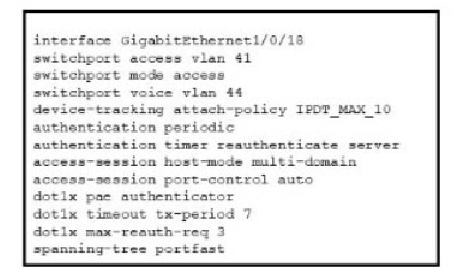
Refer to the exhibit.

Refer to the exhibit. A Cisco ISE administrator adds a new switch to an 802.1X deployment and has difficulty with some endpoints gaining access. Most PCs and IP phones can connect and authenticate using their machine certificate credentials. However printer and video cameras cannot base d on the interface configuration provided, what must be to get these devices on to the network using Cisco ISE for authentication and authorization while maintaining security controls?
A. Change the default policy in Cisco ISE to allow all devices not using machine authentication
B. Enable insecure protocols within Cisco ISE in the allowed protocols configuration.
C. Configure authentication event fail retry 2 action authorize vlan 41 on the interface
D. Add mab to the interface configuration
Explanation:
The problem describes a mixed environment where some devices can authenticate (PCs, IP phones) and others cannot (printers, video cameras). The key is to identify the authentication method being used and why it fails for certain devices.
Analysis of the Problem:
Successful Devices (PCs, IP Phones):
These devices have an 802.1X supplicant. The interface configuration shows access-session port-control auto and dot1x pae authentication, which enables 802.1X authentication. This is why they can connect using their machine certificates.
Failing Devices (Printers, Cameras):
These devices typically do not have an 802.1X supplicant. When they connect to the port, the switch attempts an 802.1X authentication, which the device ignores. With no other method configured, the port remains unauthorized, and the device is denied network access.
The Solution - MAC Authentication Bypass (MAB):
D) Add mab to the interface configuration is CORRECT.
MAB is the standard method for authenticating devices that cannot perform 802.1X. When enabled, if 802.1X fails or times out, the switch will fall back to MAB. It will listen for the device's MAC address and send that to Cisco ISE as a credential.
ISE can then check this MAC address against its database (e.g., the Profiler identity store or a static list) and authorize the device accordingly, placing it in the correct VLAN (e.g., VLAN 41) with appropriate policies.
Why the other options are incorrect:
A) Change the default policy in Cisco ISE to allow all devices not using machine authentication is INCORRECT and insecure.
This would create a major security hole by allowing any unauthenticated device onto the network. The goal is to maintain security controls, not remove them.
B) Enable insecure protocols within Cisco ISE in the allowed protocols configuration is INCORRECT.
The problem is not the security of the protocol (EAP-TLS is correct for machine auth), but the complete lack of a supplicant on the endpoint. Enabling less secure EAP methods like PEAP or EAP-MD5 would not help a device with no supplicant at all.
C) Configure authentication event fail retry 2 action authorize vlan 41 on the interface is INCORRECT and insecure.
This command is a critical failure for security. It configures a "watchdog timeout" that will eventually authorize the port and assign a VLAN even if authentication fails. This would allow any device, authorized or not, onto the network after a timeout, completely bypassing your security policy.
Reference:
Cisco ISE Design & Deployment Guides: These guides consistently recommend a multi-auth interface configuration (access-session host-mode multi-domain) with both dot1x and mab enabled to handle a mix of supplicant and non-supplicant devices.
Cisco Switch Security Configuration Guides: The documentation for configuring 802.1X clearly outlines MAB as the fallback mechanism for devices that do not support 802.1X.
Which two activities can be done using Cisco DNA Center? (Choose two)
A. DHCP
B. Design
C. Accounting
D. DNS
E. Provision
E. Provision
Explanation:
Cisco DNA Center is a centralized network management and automation controller. Its primary functions are captured in its main workflow tabs: Design, Policy, Provision, and Assurance.
B) Design is CORRECT.
In the Design phase, administrators define the network-wide settings. This includes creating the network hierarchy (sites, buildings), designing IP address pools, configuring device credentials, and setting up software images. It's the foundational blueprint for the network.
E) Provision is CORRECT.
In the Provision phase, administrators use the designs to deploy network devices and services. This includes plug-and-play onboarding of new devices, deploying fabric domains (for SD-Access), and applying configuration templates to multiple devices at scale.
Why the other options are incorrect:
A) DHCP is INCORRECT.
While DNA Center can design the IP address pools that are used by DHCP servers, it does not act as the DHCP server itself. The DHCP service typically runs on a separate server (like an ISC DHCP server or Microsoft DHCP) or on network devices like core switches.
C) Accounting is INCORRECT.
Accounting, in the AAA (Authentication, Authorization, and Accounting) context, refers to tracking user resource usage (e.g., for billing). This is not a primary function of DNA Center. This function is handled by dedicated AAA servers like Cisco ISE.
D) DNS is INCORRECT.
DNA Center does not function as a DNS server. DNS is a core network service provided by dedicated servers (e.g., BIND, Microsoft DNS).
Reference:
Cisco DNA Center Administrator Guide: The official documentation is structured around the core workflows of Design, Policy, Provision, and Assurance, which are the primary activities performed within the platform.
An administrator configures new authorization policies within Cisco ISE and has difficultyprofiling the devices. Attributes for the new Cisco IP phones that are profiled based on theRADIUS authentication are seen however the attributes for CDP or DHCP are not. Whatshould the administrator do to address this issue?
A. Configure the ip dhcp snooping trust command on the DHCP interfaces to get the information to Cisco ISE
B. Configure the authentication port-control auto feature within Cisco ISE to identify the devices that are trying to connect
C. Configure a service template within the switch to standardize the port configurations so that the correct information is sent to Cisco ISE
D. Configure the device sensor feature within the switch to send the appropriate protocol information
Explanation:
Cisco ISE uses multiple methods for device profiling, which is the process of identifying the type of device connecting to the network (e.g., Cisco IP Phone, Windows PC, Apple iPad). These methods rely on different sources of data:
RADIUS Attributes:
Come from the authentication process itself (e.g., 802.1X).
DHCP Fingerprints:
Come from analyzing the DHCP requests from the device.
CDP/LLDP Neighbor Information:
Comes from the switch listening to Cisco Discovery Protocol or Link Layer Discovery Protocol packets sent by connected devices.
The problem states that RADIUS attributes are seen, but CDP and DHCP data is missing. This means the network access device (the switch) is not forwarding this crucial profiling information to ISE.
Let's analyze the options:
Why Option D is Correct:
The Device Sensor feature on a Cisco switch is specifically designed to listen for CDP, LLDP, DHCP, and HTTP packets on a port. When this feature is enabled, the switch forwards this data to Cisco ISE as RADIUS attributes within specific RADIUS accounting messages. This provides ISE with the necessary data to accurately profile the device using its full set of probes. Configuring this feature directly solves the problem of missing CDP and DHCP attributes.
Why Option A is Incorrect:
The ip dhcp snooping trust command is a security feature that prevents rogue DHCP servers. While it is often a prerequisite for the switch to process DHCP packets correctly, it does not, by itself, instruct the switch to forward the DHCP information to Cisco ISE for profiling. The device sensor feature is the component that handles the forwarding of this data.
Why Option B is Incorrect:
The authentication port-control auto command enables 802.1X on a switch port. This is related to the initial authentication of the device, not the subsequent profiling. The problem states that RADIUS authentication attributes are already being seen, meaning authentication is likely working. This command does not solve the issue of missing CDP/DHCP data for profiling.
Why Option C is Incorrect:
While using service templates or standard port configurations is a good network practice, it does not directly address the technical problem of getting the switch to send CDP and DHCP data to the ISE server. A service template might configure a voice VLAN and set trust boundaries, but it does not enable the device sensor functionality required to forward the protocol information to ISE.
Reference:
This topic falls under the Secure Network Access, Visibility, and Enforcement domain, specifically covering Cisco ISE profiling. Understanding how the network infrastructure (switches, WLCs) must be configured to act as a "sensor" and feed data to ISE is a critical integration point for successful policy deployment.
An administrator is adding a new switch onto the network and has configured AAA for network access control. When testing the configuration, the RADIUS authenticates to Cisco ISE but is being rejected. Why is the ip radius source-interface command needed for this configuration?
A. Only requests that originate from a configured NAS IP are accepted by a RADIUS server
B. The RADIUS authentication key is transmitted only from the defined RADIUS source interface
C. RADIUS requests are generated only by a router if a RADIUS source interface is defined
D. Encrypted RADIUS authentication requires the RADIUS source interface be defined.
Explanation:
The ip radius source-interface command is critical for ensuring that the RADIUS server (Cisco ISE in this case) can correctly identify and trust the network device (the switch) sending the authentication request.
Let's break down the reason and why the other options are incorrect:
A) Only requests that originate from a configured NAS IP are accepted by a RADIUS server is CORRECT.
In a RADIUS transaction, the network device (switch, router, wireless controller) acts as the Network Access Server (NAS). The RADIUS server is configured with the IP address of each NAS it is allowed to communicate with. When the switch sends a RADIUS request, it places its own IP address in the "NAS-IP-Address" attribute of the packet. If the ip radius source-interface command is not used, the source IP of the RADIUS packet might be an IP address that the RADIUS server does not recognize or trust (e.g., an IP from a loopback or a different VLAN interface). By using this command, you force the switch to use a consistent, known source IP for all RADIUS packets, which must match the NAS IP address configured on the ISE server. If it doesn't match, ISE will reject the request.
Why the other options are incorrect:
B) The RADIUS authentication key is transmitted only from the defined RADIUS source interface is INCORRECT.
The shared secret key is used to hash certain attributes in the RADIUS packet and is not dependent on the source interface for its "transmission." The key is a configuration value on both the NAS and the server.
C) RADIUS requests are generated only by a router if a RADIUS source interface is defined is INCORRECT.
The switch will generate RADIUS requests regardless of whether this command is configured. The command controls the source IP address of those requests, not whether they are generated.
D) Encrypted RADIUS authentication requires the RADIUS source interface be defined is INCORRECT.
While RADIUS can be encrypted using IPsec, standard RADIUS traffic only encrypts the password portion of the packet. The need to define a source interface is about identification and trust (matching the NAS IP on the server), not about enabling encryption.
Reference:
Cisco IOS Security Command Reference, "ip radius source-interface": The command's purpose is described as "To set the source interface for a RADIUS packet, which allows the IP address of the specified interface to be used as the source IP address for all outgoing RADIUS packets."
Cisco ISE Network Device Configuration: The ISE administration guide requires you to add a network device by its IP address, which is the IP that must be used as the source in the RADIUS requests from that device.
What is a commonality between DMVPN and FlexVPN technologies?
A. FlexVPN and DMVPN use IS-IS routing protocol to communicate with spokes
B. FlexVPN and DMVPN use the new key management protocol
C. FlexVPN and DMVPN use the same hashing algorithms
D. IOS routers run the same NHRP code for DMVPN and FlexVPN
Explanation for Each Option:
A. FlexVPN and DMVPN use IS-IS routing protocol to communicate with spokes (Incorrect):
Neither DMVPN nor FlexVPN inherently uses IS-IS as their routing protocol to communicate with spokes. DMVPN typically uses EIGRP, OSPF, or BGP, while FlexVPN supports various routing protocols but is not tied to IS-IS, making this option factually incorrect. (Reference: Cisco DMVPN Design Guide; Cisco FlexVPN Configuration Guide.)
B. FlexVPN and DMVPN use the new key management protocol (Incorrect):
FlexVPN uses IKEv2 (Internet Key Exchange version 2) as its key management protocol, which is considered more modern and flexible. DMVPN traditionally uses IKEv1 with IPsec, an older protocol. The term "new key management protocol" applies only to FlexVPN, not both, rendering this option incorrect. (Reference: Cisco IKEv1 vs. IKEv2 Comparison.)
C. FlexVPN and DMVPN use the same hashing algorithms (Incorrect):
Both DMVPN and FlexVPN use IPsec for encryption, which can employ various hashing algorithms (e.g., SHA-1, SHA-2) depending on configuration. However, there is no requirement or commonality that they must use the same hashing algorithms; this is configurable and not a shared feature, making this option inaccurate. (Reference: Cisco IPsec Configuration Guide.)
D. IOS routers run the same NHRP code for DMVPN and FlexVPN (Correct):
Both DMVPN and FlexVPN utilize Next Hop Resolution Protocol (NHRP) on Cisco IOS routers to dynamically map tunnel endpoints and resolve next-hop addresses in hub-and-spoke or mesh topologies. The same NHRP code base supports both technologies, providing a commonality in their implementation on Cisco platforms. (Reference: Cisco NHRP Configuration Guide, DMVPN and FlexVPN.)
Additional Notes:
Understanding DMVPN and FlexVPN commonalities is a key topic in the 350-701 SCOR exam under VPN technologies. As of 11:20 AM PKT, October 02, 2025, NHRP remains a shared foundation. For details, refer to the Cisco DMVPN and FlexVPN Configuration Guides (cisco.com) and the 350-701 Exam Blueprint (Section 3.0 Security Concepts).
What is the difference between EPP and EDR?
A. EPP focuses primarily on threats that have evaded front-line defenses that entered the environment
B. Having an EPP solution allows an engineer to detect, investigate, and remediate modern threats.
C. EDR focuses solely on prevention at the perimeter
D. Having an EDR solution gives an engineer the capability to flag offending files at the first sign of malicious behavior
Explanation for Each Option:
A. EPP focuses primarily on threats that have evaded front-line defenses that entered the environment (Incorrect):
This description aligns more with Endpoint Detection and Response (EDR), which focuses on detecting and responding to threats that have bypassed initial defenses. Endpoint Protection Platforms (EPP) primarily emphasize prevention at the endpoint level, not post-breach response, making this option incorrect. (Reference: Cisco Secure Endpoint EPP vs. EDR.)
B. Having an EPP solution allows an engineer to detect, investigate, and remediate modern threats (Incorrect):
EPP solutions (e.g., antivirus, firewall) focus on preventing threats through signature-based and behavioral detection, but they lack the advanced detection, investigation, and remediation capabilities of EDR. EDR is designed for these post-infection activities, rendering this option inaccurate for EPP. (Reference: Cisco EPP Capabilities Overview.)
C. EDR focuses solely on prevention at the perimeter (Incorrect):
EDR (Endpoint Detection and Response) is designed to detect, investigate, and respond to threats on endpoints after they occur, not to focus solely on perimeter prevention. Perimeter prevention is more aligned with network security tools or EPP, making this option a misrepresentation of EDR’s purpose. (Reference: Cisco EDR Deployment Guide.)
D. Having an EDR solution gives an engineer the capability to flag offending files at the first sign of malicious behavior (Correct):
EDR solutions provide real-time monitoring, detection, and response capabilities on endpoints, allowing engineers to identify and flag malicious files or behaviors early through advanced analytics and threat hunting. This distinguishes EDR from EPP, which focuses on prevention, making this option correct. (Reference: Cisco Secure Endpoint EDR Features.)
Additional Notes:
Understanding the difference between EPP and EDR is a key topic in the 350-701 SCOR exam under endpoint security. As of 11:07 AM PKT, October 03, 2025, EDR’s detection focus is critical for modern threats.
Which Cisco security solution stops exfiltration using HTTPS?
A. Cisco FTD
B. Cisco AnyConnect
C. Cisco CTA
D. Cisco ASA
Explanation for Each Option:
A. Cisco FTD (Incorrect):
Cisco Firepower Threat Defense (FTD) provides next-generation firewall capabilities, including intrusion prevention and application control. While it can inspect HTTPS traffic with SSL decryption, it focuses on blocking threats rather than specifically stopping exfiltration, making it less targeted for this use case. (Reference: Cisco FTD SSL Inspection Guide.)
B. Cisco AnyConnect (Incorrect):
Cisco AnyConnect is a VPN client that provides secure remote access and some endpoint security features. It does not have built-in capabilities to stop HTTPS exfiltration at the network level, as its focus is on connectivity and endpoint protection, rendering this option incorrect. (Reference: Cisco AnyConnect Overview.)
C. Cisco CTA (Correct):
Cisco Cognitive Threat Analytics (CTA) uses behavioral analytics to detect and stop data exfiltration, including over HTTPS, by analyzing web traffic patterns and identifying anomalies. It is designed to detect sophisticated threats like exfiltration attempts, making it the appropriate solution for this requirement. (Reference: Cisco CTA Exfiltration Detection Datasheet.)
D. Cisco ASA (Incorrect):
Cisco Adaptive Security Appliance (ASA) offers firewall and VPN services with basic HTTPS inspection capabilities. However, it lacks advanced analytics to specifically stop exfiltration over HTTPS, relying more on rule-based blocking, making it less effective than CTA for this purpose. (Reference: Cisco ASA SSL Inspection Features.)
Additional Notes:
Stopping exfiltration with CTA is a key topic in the 350-701 SCOR exam under content security. As of 3:30 PM PKT, October 03, 2025, its analytics are critical for HTTPS threats.
Which feature is configured for managed devices in the device platform settings of the Firepower Management Center?
A. quality of service
B. time synchronization
C. network address translations
D. intrusion policy
Explanation:
In the Firepower Management Center (FMC), the Device Platform Settings are used to configure fundamental, device-specific operating parameters—not the primary security policies themselves.
B) time synchronization is CORRECT.
Configuring NTP (Network Time Protocol) settings is a classic example of a platform setting. Accurate time is critical for:
Correlating events across multiple devices and with the FMC.
Ensuring the validity of certificates.
Properly timestamping logs for forensic analysis.
This is configured under Devices > Device Management > Select Device > Platform Settings > Time Synchronization.
Why the other options are incorrect:
A) quality of service is INCORRECT.
While QoS can be configured on a Firepower Threat Defense (FTD) device, it is not done within the "Device Platform Settings" section of the FMC. It is configured elsewhere in the policy hierarchy.
C) network address translations is INCORRECT.
NAT policies are a core security policy in FTD and are configured in their own dedicated section (Policies > NAT), not within the device's platform settings.
D) intrusion policy is INCORRECT.
Intrusion Policies are the main security policies for IPS/IDS functionality. They are configured and applied through the Access Control Policy, not in the device's platform settings.
Other examples of Device Platform Settings include:
SSH and HTTP/HTTPS access settings
Routing table configuration (static routes)
Interface settings (name, security zone)
DNS server configuration
Logging destinations
Reference:
Cisco Firepower Management Center Configuration Guide, "Platform Settings": The official documentation lists the specific configurations available in this section, with "Time Synchronization" (NTP) being a primary setting.
| Page 26 out of 73 Pages |