Free practice test

Free 200 301 practice questions

Topic: Topic 5: Simulations / Lab

1197 questions Updated 27-Nov-2026 5 topics 416 free questions
Topic · 49 of 142 questions freeTopic 5: Simulations / Lab
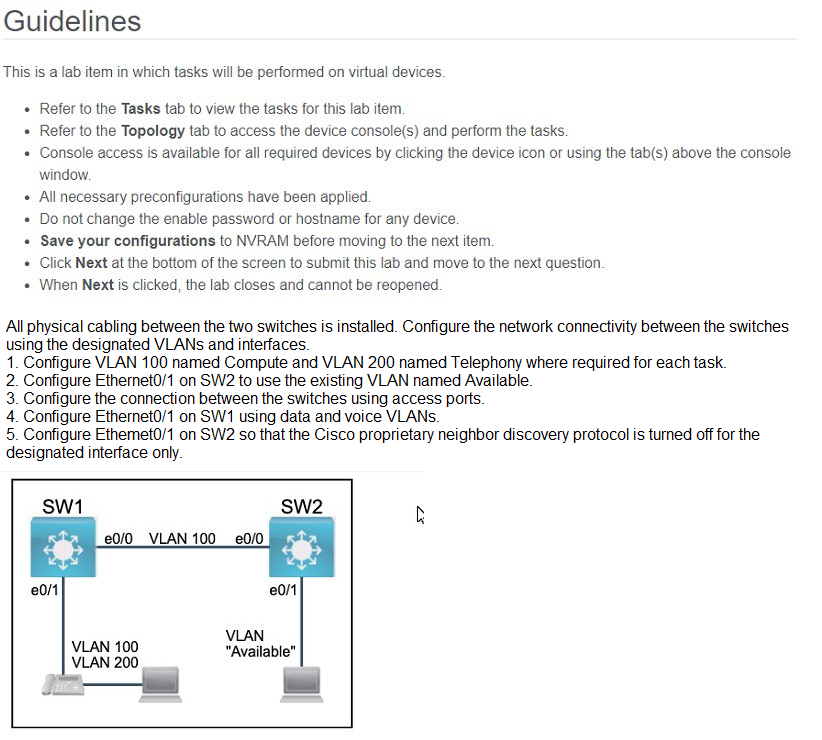
Question 1
Question 2
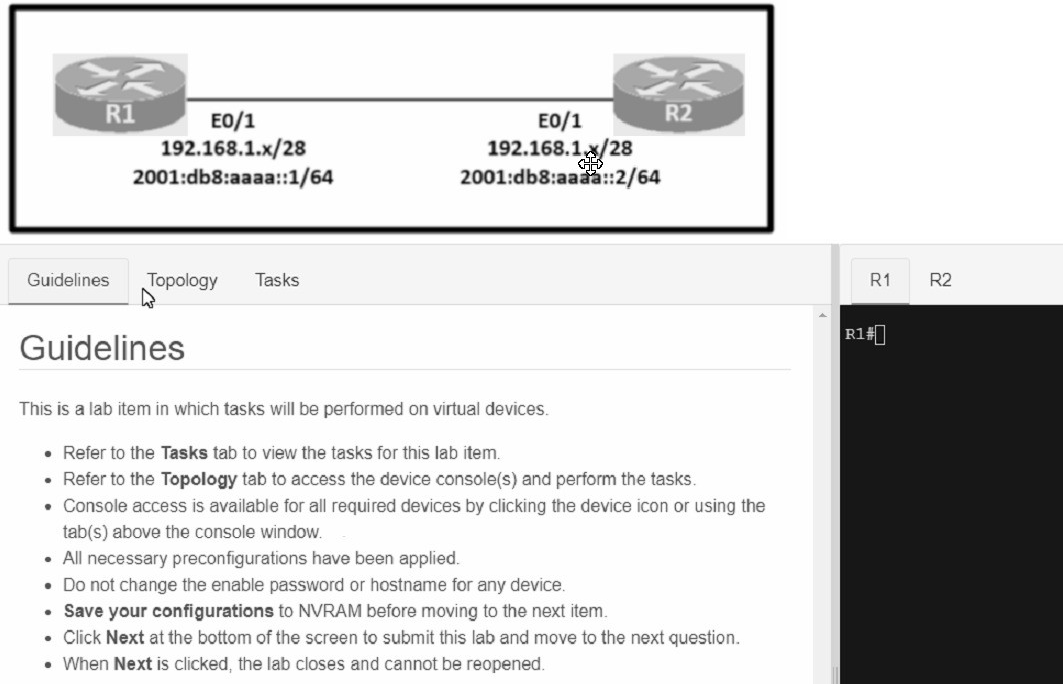
Configure IPv4 and IPv6 connectivity between two routers. For IPv4, use a /28 network
from the 192.168.1.0/24 private range. For IPv6, use the first /64 subnet from the
2001:0db8:aaaa::/48 subnet.
1. Using Ethernet0/1 on routers R1 and R2, configure the next usable/28 from the
192.168.1.0/24 range. The network 192.168.1.0/28 is unavailable.
2. For the IPv4 /28 subnet, router R1 must be configured with the first usable host address.
3. For the IPv4 /28 subnet, router R2 must be configured with the last usable host address.
4. For the IPv6 /64 subnet, configure the routers with the IP addressing provided from the
topology.
5. A ping must work between the routers on the IPv4 and IPv6 address ranges.

Question 3

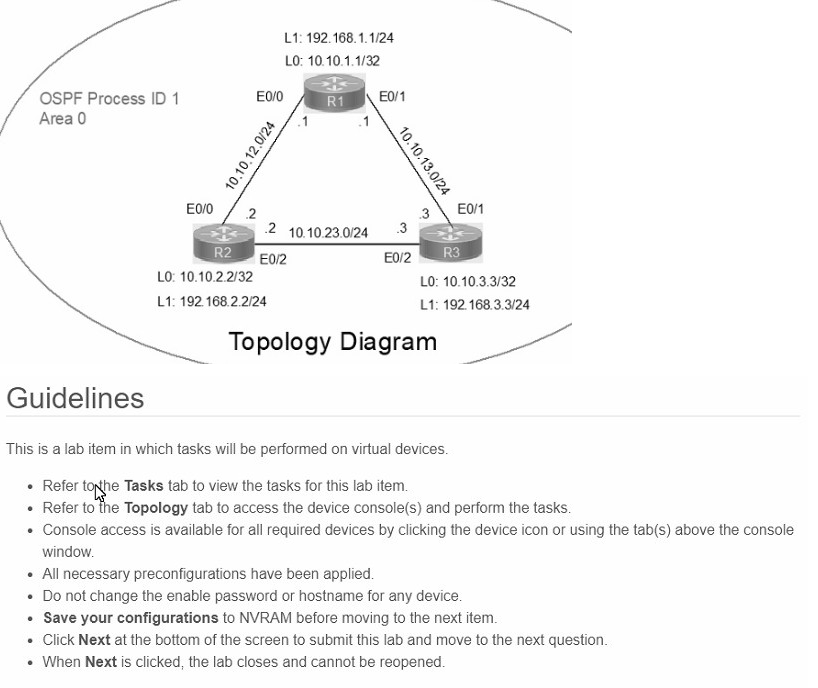
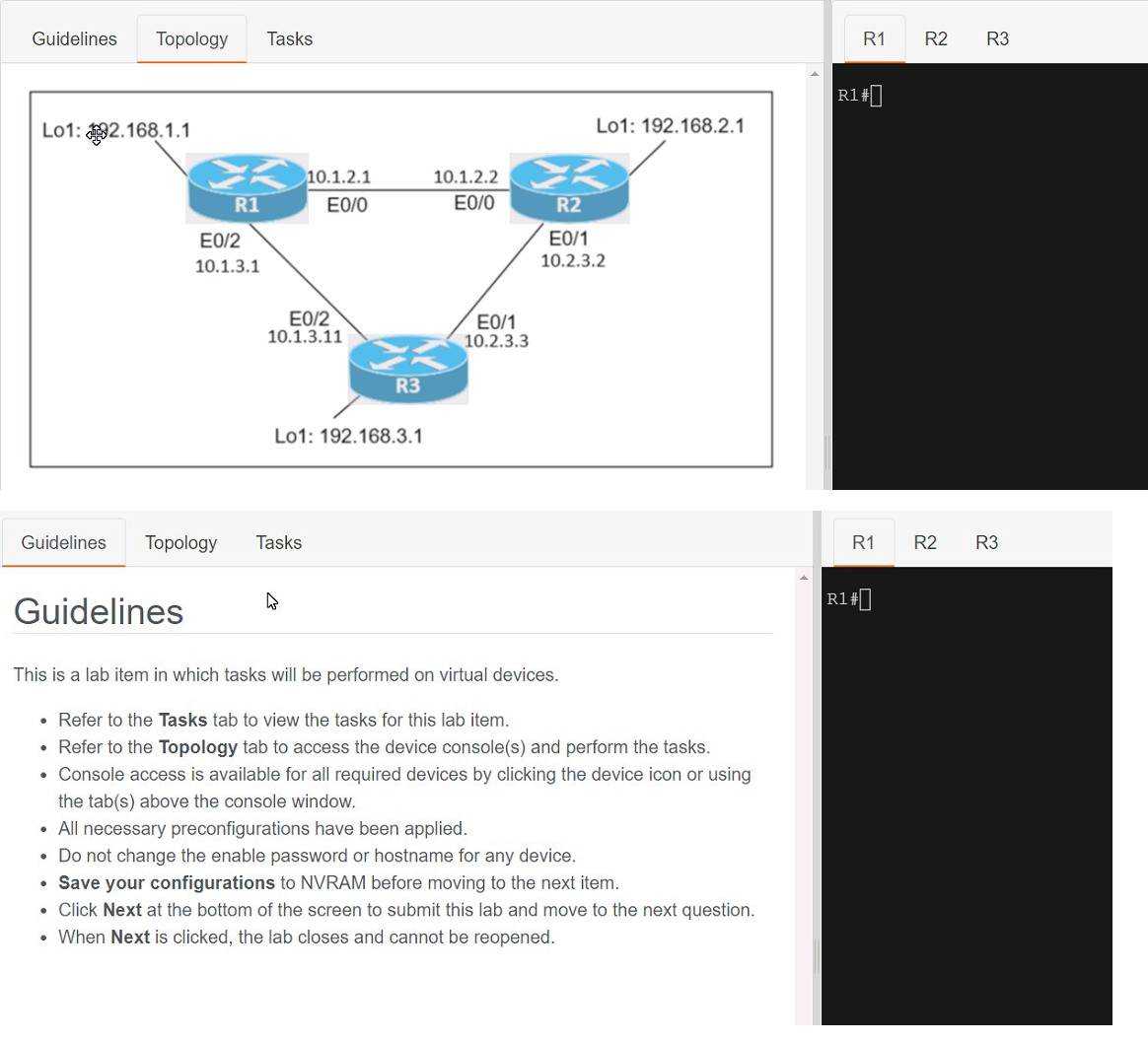
IP connectivity between the three routers is configured. OSPF adjacencies must be
established.
1. Configure R1 and R2 Router IDs using the interface IP addresses from the link that is
shared between them.
2. Configure the R2 links with a max value facing R1 and R3. R2 must become the DR. R1
and R3 links facing R2 must remain with the default OSPF configuration for DR election.
Verify the configuration after clearing the OSPF process.
3. Using a host wildcard mask, configure all three routers to advertise their respective Loopback1 networks.
4. Configure the link between R1 and R3 to disable their ability to add other OSPF routers.

Question 4
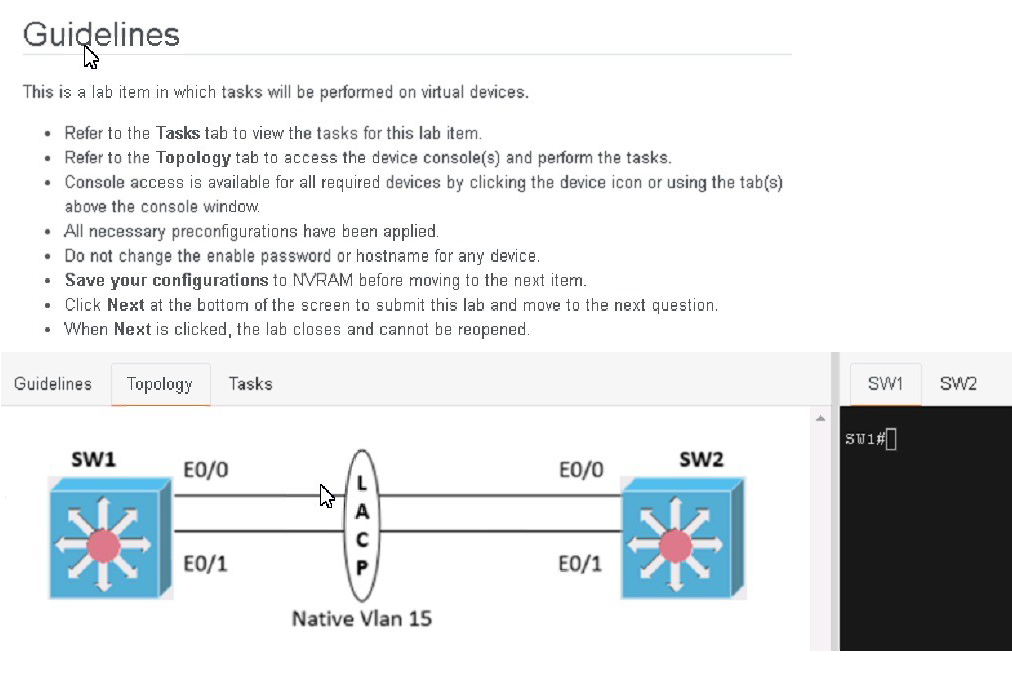
Physical connectivity is implemented between the two Layer 2 switches, and the network connectivity between them must be configured
1. Configure an LACP EtherChannel and number it as 1; configure it between switches
SW1 and SVV2 using interfaces Ethernet0/0 and Ethernet0/1 on both sides. The LACP mode must match on both ends
2 Configure the EtherChannel as a trunk link.
3. Configure the trunk link with 802.1 q tags.
4. Configure the native VLAN of the EtherChannel as VLAN 15.

Question 5
Question 6

Connectivity between three routers has been established, and IP services must be
configured jn the order presented to complete the implementation Tasks assigned include
configuration of NAT, NTP, DHCP, and SSH services.
1. All traffic sent from R3 to the R1 Loopback address must be configured for NAT on R2.
All source addresses must be translated from R3 to the IP address of Ethernet0/0 on R2,
while using only a standard access list named NAT To verify, a ping must be successful to
the R1 Loopback address sourced from R3. Do not use NVI NAT configuration.
2. Configure R1 as an NTP server and R2 as a client, not as a peer, using the IP address
of the R1 Ethernet0/2 interface. Set the clock on the NTP server for midnight on January 1,
2019.
3. Configure R1 as a DHCP server for the network 10.1.3.0/24 in a pool named TEST.
Using a single command, exclude addresses 1-10 from the range. Interface Ethernet0/2 on
R3 must be issued the IP address of 10.1.3.11 via DHCP.
4. Configure SSH connectivity from R1 to R3, while excluding access via other remote
connection protocols. Access for user root and password Cisco must be set on router R3
using RSA and 1024 bits. Verify connectivity using an SSH session from router R1 using a
destination address of 10.1.3.11. Do NOT modify console access or line numbers to
accomplish this task.

Question 7
Connectivity between four routers has been established. IP connectivity must be configured in the order presented to complete the implementation. No dynamic routing protocols are included.
1. Configure static routing using host routes to establish connectivity from router R3 to the router R1 Loopback address using the source IP of 209.165.200.230.
2. Configure an IPv4 default route on router R2 destined for router R4.
3. Configure an IPv6 default router on router R2 destined for router R4.

Question 8

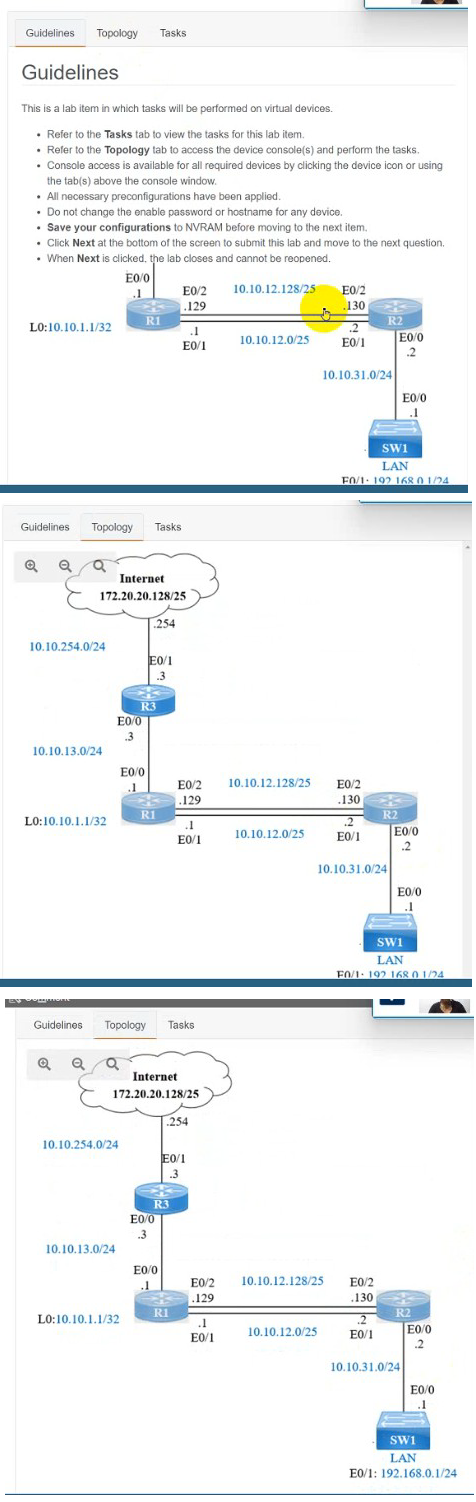
IP connectivity and OSPF are preconfigured on all devices where necessary. Do not make any changes to the IP addressing or OSPF. The company policy uses connected interfaces and next hops when configuring static routes except for load balancing or redundancy without floating static. Connectivity must be established between subnet 172.20.20.128/25 on the Internet and the LAN at 192.168.0.0/24 connected to SW1:
1. Configure reachability to the switch SW1 LAN subnet in router R2.
2. Configure default reachability to the Internet subnet in router R1.
3. Configure a single static route in router R2 to reach to the Internet subnet considering
both redundant links between routers R1 and R2. A default route is NOT allowed in router
R2.
4. Configure a static route in router R1 toward the switch SW1 LAN subnet where the
primary link must be through Ethernet0/1. and the backup link must be through Ethernet0/2
using a floating route. Use the minimal administrative distance value when required.

Question 9 Choose 1
What is a characteristic of a Layer 2 switch?
Question 10 Choose 1
Which switch port configuration must be configured when connected to an AP running in FlexConnect mode, and the WLANs use flex local switching?
Timed mock exam

Experience the real exam before you take it

Our timed 200 301 mock exam mirrors the format, number of questions and time limit of the official exam, so you can build speed and stamina.

Take the 200 301 mock exam
  • Build exam stamina Stay focused for the full exam time.
  • Master time management Learn to pace yourself so you never rush.
  • A new test every time Random questions from the full pool.
  • Unlimited attempts Practise until you're confident.

How to Prepare for the Cisco CCNA 200-301 Exam

Preparing for the Cisco Certified Network Associate (CCNA) 200-301 exam requires a clear understanding of networking concepts, practical configurations, and troubleshooting.

The current CCNA v1.1 exam is 120 minutes long and covers six major networking domains.

1. CCNA Exam Blueprint & Weightage

Understand how Cisco distributes the exam content:

Exam DomainWeightage
Network Fundamentals20%
Network Access20%
IP Connectivity25%
IP Services10%
Security Fundamentals15%
Automation & Programmability10%

Study Tip: Give extra attention to IP Connectivity because it carries the highest weightage. However, prepare all six domains.

2. Important Topics to Prepare

Focus on these areas while studying:

  • Network Fundamentals: OSI and TCP/IP models, IPv4/IPv6 addressing, subnetting, network devices, and wireless basics.

  • Network Access: VLANs, trunking, inter-VLAN routing, STP, EtherChannel, and wireless architectures.

  • IP Connectivity: Routing tables, static routing, OSPF, default routes, and routing decisions.

  • IP Services: DHCP, DNS, NAT, NTP, SNMP, Syslog, SSH, and QoS.

  • Security Fundamentals: ACLs, port security, VPNs, authentication, and wireless security.

  • Automation & Programmability: APIs, JSON, controller-based networking, AI, machine learning, and network automation.

3. What Should You Focus on More?

Do not rely on memorization alone. Prioritize:

  • Understanding networking concepts and protocols.

  • Practicing subnetting and IP addressing regularly.

  • Learning Cisco IOS configuration commands.

  • Understanding routing and switching operations.

  • Practicing network troubleshooting scenarios.

  • Reviewing automation and security fundamentals.

4. Prepare with Cistified Practice Tests

Test your knowledge with Cistified's CCNA preparation resources.

  • Free Practice Questions: Review important concepts and identify knowledge gaps.

  • Paid Mock Tests: Practice under timed conditions, evaluate your preparation, and identify topics that need improvement.

Use your practice results to guide revision rather than simply memorizing answers.

5. Final Preparation Advice

Follow the official Cisco exam blueprint, practice configurations, revise weak topics, and take regular mock tests. Consistent preparation and practical understanding will help you approach the CCNA exam with greater confidence.

Important Exam Update: Cisco CCNA v1.1 testing ends February 2, 2027. The updated v2.0 exam begins February 3, 2027. Check the applicable blueprint before booking your exam.

CCNA 200-301 v2.0 Exam Topics and Weightage

The Cisco CCNA 200-301 v2.0 exam introduces an updated syllabus focused on network troubleshooting, switching, routing, security, and AI-assisted network operations. The updated exam takes effect on February 3, 2027, replacing version 1.1.

Cisco divides the CCNA v2.0 exam into five domains, each with a specific percentage of the total exam.

CCNA v2.0 Exam DomainWeightage
Network Infrastructure and Connectivity25%
Switching and Network Access25%
IP Routing20%
Network Services and Security20%
AI, and Network Operations and Management10%
Total100%

Which CCNA v2.0 Topics Should You Focus On?

Network Infrastructure and Connectivity (25%): Practice IPv4 and IPv6 troubleshooting, subnetting, cable and interface errors, wireless connectivity, DHCP issues, and virtualization fundamentals.

Switching and Network Access (25%): Focus on VLANs, trunk configuration, EtherChannel, switch virtual interfaces, Rapid PVST+, port security-related operations, and Layer 2 troubleshooting.

IP Routing (20%): Learn routing table interpretation, IPv4 and IPv6 static routes, single-area OSPFv2 and OSPFv3 configuration, and first-hop redundancy protocols.

Network Services and Security (20%): Prepare for NAT/PAT, access control lists, AAA authentication, DNS troubleshooting, VPN fundamentals, DHCP snooping, and Dynamic ARP Inspection.

AI, and Network Operations and Management (10%): Understand agentic AI, generative AI prompts for network operations, network management approaches, SNMP, Ansible configuration management, and syslog analysis.

How to Prepare for the Updated CCNA Exam

Start with Network Infrastructure and Switching, which together account for 50% of the exam blueprint. Strengthen your routing and security knowledge through configuration exercises and troubleshooting scenarios.

Use CCNA 200-301 practice questions to identify weak topics, review explanations, and reinforce technical concepts. Combine these questions with hands-on Cisco networking labs before attempting a timed CCNA mock exam.

Official Source: Cisco CCNA 200-301 v2.0 Exam Topics (PDF)