Answer: See the solution below in Explanation.
Explanation:
Solution:
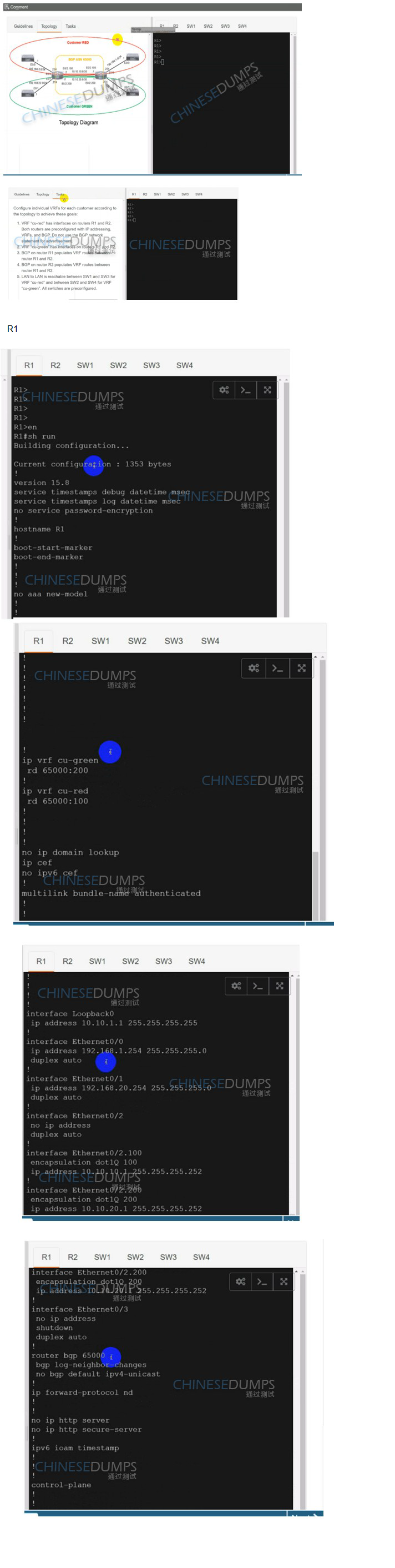
Use cu-red under interfaces facing SW1 & SW3:
On R1:
interface Ethernet0/0
ip vrf forwarding cu-red
ip address 192.168.1.254 255.255.255.0
Check reachability to SW1:
R1#ping vrf cu-red 192.168.1.1
Type escape sequence to abort.
Sending 5, 100-byte ICMP Echos to 192.168.2.1, timeout is 2 seconds:
!!!!!
Success rate is 100 percent (5/5), round-trip min/avg/max = 1/1/1 ms
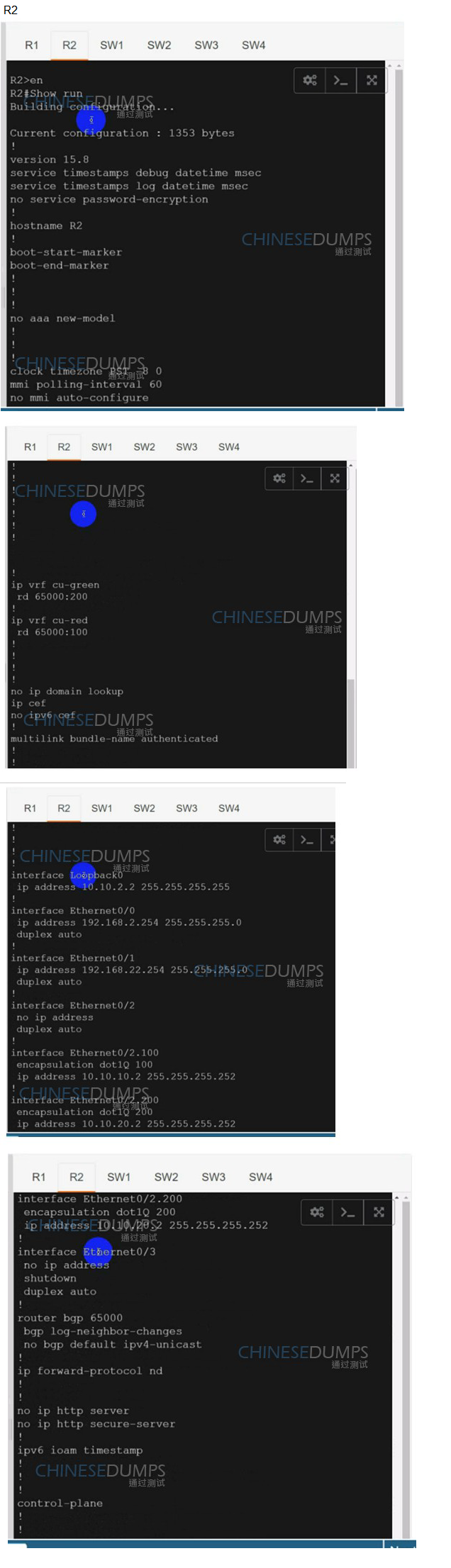
On R2:
interface Ethernet0/0
ip vrf forwarding cu-red
ip address 192.168.2.254 255.255.255.0
Check reachability to SW3:
R2#ping vrf cu-red 192.168.2.1
Type escape sequence to abort.
Sending 5, 100-byte ICMP Echos to 192.168.1.1, timeout is 2 seconds:
!!!!!
On R1:
interface Ethernet0/1
ip vrf forwarding cu-green
ip address 192.168.20.254 255.255.255.0
Test reachability to SW2:
R1#ping vrf cu-green 192.168.20.1
Type escape sequence to abort.
Sending 5, 100-byte ICMP Echos to 192.168.22.1, timeout is 2 seconds:
!!!!!
Success rate is 100 percent (5/5), round-trip min/avg/max = 1/1/1 ms
On R2:
interface Ethernet0/1
ip vrf forwarding cu-green
ip address 192.168.22.254 255.255.255.0
Test reachability to SW4:
R2#ping vrf cu-green 192.168.22.1
Type escape sequence to abort.
Sending 5, 100-byte ICMP Echos to 192.168.20.1, timeout is 2 seconds:
!!!!!
Success rate is 100 percent (5/5), round-trip min/avg/max = 1/1/1 ms
On R1:
interface Ethernet0/2.100
mpls ip
!
interface Ethernet0/2.200
mpls ip
!
Configure BGP:
router bgp 65000
neighbor 10.10.10.2 remote-as 65000
neighbor 10.10.20.2 remote-as 65000
!
address-family vpnv4
neighbor 10.10.10.2 activate
neighbor 10.10.20.2 activate
exit-address-family
!
address-family ipv4 vrf cu-green
redistribute connected
exit-address-family
!
address-family ipv4 vrf cu-red
redistribute connected
exit-address-family
!
R1(config)#ip vrf cu-red
R1(config-vrf)#route-target both 65000:100
!
R1(config)#ip vrf cu-green
R1(config-vrf)#route-target both 65000:200
On R2:
interface Ethernet0/2.100
mpls ip
!
interface Ethernet0/2.200
mpls ip
!
router bgp 65000
neighbor 10.10.10.1 remote-as 65000
neighbor 10.10.20.1 remote-as 65000
!
address-family vpnv4
neighbor 10.10.10.1 activate
neighbor 10.10.20.1 activate
exit-address-family
!
address-family ipv4 vrf cu-green
redistribute connected
exit-address-family
!
address-family ipv4 vrf cu-red
redistribute connected
exit-address-family
R2(config)#ip vrf cu-red
R2(config-vrf)#route-target both 65000:100
!
R2(config)#ip vrf cu-green
R2(config-vrf)#route-target both 65000:200
Verification:
From SW1 to SW3:
SW1#ping 192.168.1.1
Type escape sequence to abort.
Sending 5, 100-byte ICMP Echos to 192.168.1.1, timeout is 2 seconds:
!!!!!
Success rate is 100 percent (5/5), round-trip min/avg/max = 1/1/1 ms
But can’t Reach SW2 or SW4 in VRF cu-green:
SW1#ping 192.168.22.1
Type escape sequence to abort.
Sending 5, 100-byte ICMP Echos to 192.168.22.1, timeout is 2 seconds:
U.U.U
Success rate is 0 percent (0/5)
SW1#ping 192.168.20.1
Type escape sequence to abort.
Sending 5, 100-byte ICMP Echos to 192.168.20.1, timeout is 2 seconds:
U.U.U
Success rate is 0 percent (0/5)
Same Test for SW2:
From SW2 to SW4:
SW2#ping 192.168.20.1
Type escape sequence to abort.
Sending 5, 100-byte ICMP Echos to 192.168.20.1, timeout is 2 seconds:
!!!!!
Success rate is 100 percent (5/5), round-trip min/avg/max = 1/1/1 ms
But can’t Reach SW3 or SW1 in VRF cu-red:
SW2#ping 192.168.1.1
Type escape sequence to abort.
Sending 5, 100-byte ICMP Echos to 192.168.1.1, timeout is 2 seconds:
U.U.U
Success rate is 0 percent (0/5)
SW2#ping 192.168.2.1
Type escape sequence to abort.
Sending 5, 100-byte ICMP Echos to 192.168.2.1, timeout is 2 seconds:
U.U.U
Success rate is 0 percent (0/5)
Both R1 & R2 has separate tables for VRFs cu-red and cu-green.