- 4.9/5.0
- 277 Questions
- Updated on: 27-Aug-2026
- Implementing Cisco Enterprise Wireless Networks (ENWLSI)
- 22775 Prepared
Free Cisco 300-430 Practice Questions 2026 | Implementing Cisco Enterprise Wireless Networks (ENWLSI)
Prepare smarter for your Implementing Cisco Enterprise Wireless Networks (ENWLSI) certification. Our carefully curated free Cisco 300-430 350-401 practice questions 2026 mirror the actual exam format and difficulty level. Each 300-430 practice test question includes detailed explanations to help you understand the 'why' behind every answer. Start your journey to becoming Implementing Cisco Enterprise Wireless Networks (ENWLSI) certified today.
When configuring a Cisco WLC, which CLI command adds a VLAN with VLAN ID of 30 to a FlexConnect group named BranchA-FCG?
A. config flexconnect BranchA-FCG vlan 30 add
B. config flexconnect group BranchA-FCG vlan add 30
C. config flexconnect group BranchA-FCG vlan 30 add
D. config flexconnect BranchA-FCG vlan add 30
Explanation:
In Cisco AireOS Wireless LAN Controllers, the CLI command to add a VLAN to a FlexConnect group follows strict positional syntax. The correct command is config flexconnect group BranchA-FCG vlan 30 add. This command adds VLAN 30 to the FlexConnect group named BranchA-FCG, enabling all APs within that group to use VLAN 30 for client traffic mapping and WLAN-to-VLAN segmentation. The VLAN ID must first exist on the switch trunk ports connected to each FlexConnect AP in the group; otherwise, client traffic will fail. The command structure requires the group keyword to distinguish group-level operations from AP-specific FlexConnect commands, followed by the group name, then the vlan keyword with the numeric ID, and finally the add action. This precise order is mandatory for the CLI parser to accept the command.
Why the others are wrong:
A (config flexconnect BranchA-FCG vlan 30 add):
Omits the mandatory group keyword. The CLI parser cannot differentiate between a group-level command and an AP-specific command, causing a syntax error. The group keyword is non-negotiable for group-level VLAN configuration.
B (config flexconnect group BranchA-FCG vlan add 30):
Reverses the order of the VLAN ID and the add action. The CLI expects the numeric VLAN ID to immediately follow the vlan keyword, with the action keyword last. Placing add before the VLAN ID violates positional argument rules.
D (config flexconnect BranchA-FCG vlan add 30):
Combines both errors—missing group keyword and incorrect argument order (action before VLAN ID). This command fails on two counts and would be rejected outright by the controller.
References:
Cisco Wireless Controller Command Reference (AireOS 8.5+) – "config flexconnect group vlan add" syntax: config flexconnect group group_name vlan vlan_id {add | delete}.
Cisco 300-430 ENWLSI Official Certification Guide, Chapter on FlexConnect Groups and VLAN mapping.
A wireless engineer must implement a corporate wireless network for a large company in the most efficient way possible. The wireless network must support 32 VLANs for 300 employees in different departments. Which solution must the engineer choose?
A. Configure a second WLC to support half of the APs in the deployment.
B. Configure one single SSID and implement Cisco ISE for VLAN assignment according to different user roles.
C. Configure different AP groups to support different VLANs, so that all of the WLANs can be broadcast on both radios.
D. Configure 16 WLANs to be broadcast on the 2.4-GHz band and 16 WLANs to be broadcast on the 5.0-GHz band.
Explanation:
In enterprise wireless deployments, broadcasting multiple SSIDs consumes significant airtime overhead due to beacon frames. Each additional SSID increases beacon transmission frequency, which reduces available client data throughput and degrades overall network performance. Cisco recommends limiting SSIDs to 3–5 per radio to maintain optimal efficiency. Since the requirement is 32 VLANs for 300 employees across different departments, configuring 16 or 32 separate SSIDs would cause severe beacon overhead, channel utilization issues, and poor client roaming performance.
The most efficient solution is to use a single SSID with Cisco Identity Services Engine (ISE) for dynamic VLAN assignment. When a client authenticates, ISE evaluates the user's role, department, or policy attributes (via RADIUS) and returns a VLAN ID in the Access-Accept message using vendor-specific attributes (VSAs). The WLC then places the client into the appropriate VLAN based on the ISE response. This approach minimizes SSID broadcast overhead, simplifies WLAN management, supports unlimited VLANs, and enables granular access control without multiple WLAN configurations.
Why the others are wrong:
A (Configure a second WLC to support half of the APs):
Adding a second WLC addresses AP capacity or redundancy, not VLAN segmentation. This solution does not solve the problem of supporting 32 VLANs; it merely scales the infrastructure horizontally without reducing SSID count.
C (Configure different AP groups to support different VLANs on both radios):
AP groups allow VLAN mapping per WLAN on specific APs, but this still requires multiple WLANs (one per VLAN) to be broadcast. This approach does not reduce SSID overhead and would require 32 separate WLAN configurations, which is inefficient and non-scalable.
D (Broadcast 16 WLANs on 2.4 GHz and 16 on 5 GHz):
This splits VLANs across bands, but each WLAN must still be configured and broadcast. 2.4 GHz is especially sensitive to beacon overhead; broadcasting 16 SSIDs on 2.4 GHz would severely degrade performance. Additionally, clients may not connect to the correct band, and roaming across VLANs would be problematic.
References:
Cisco 300-430 ENWLSI Official Certification Guide – Chapter on WLAN Configuration and SSID Design Best Practices.
Cisco ISE Wireless Integration Guide – Dynamic VLAN assignment using RADIUS VSAs (Attribute 64/65, Tunnel-Private-Group-ID).
An engineer must implement intrusion protection the WLAN. The AP coverage is adequate and on-channel attacks are the primary concern. The building is historic, which makes adding APs difficult. Which Ap mode and submode must be implemented?
A. Ap mode: local, Ap submode: WIPS
B. Ap mode: monitor, Ap submode: WIPS
C. Ap mode: monitor, Ap submode: none
D. Ap mode: local, Ap submode: none
Explanation:
The engineer's goal is to implement intrusion protection. Since the primary concern is on-channel attacks, the AP must be capable of detecting malicious activity on the same channel it is using for client service. The constraint is that adding APs is difficult due to the historic building.
In this context, the solution is to configure an AP in Monitor mode with the wIPS submode enabled . An AP in Monitor mode dedicates its radio to security scanning and does not serve clients . While this would typically remove an AP from client-serving duties, it is the best option because the AP coverage is already stated to be adequate, meaning the loss of this AP for client service can be tolerated. The wIPS submode activates the specialized intrusion detection signature processing .
Why the others are wrong
A (AP mode: local, AP submode: WIPS):
This combination does not exist in the standard AP mode/submode hierarchy for this dedicated scanning purpose. The WIPS submode is a valid configuration parameter for Monitor mode APs, not as a submode of Local mode .
C (AP mode: monitor, AP submode: none):
Enabling Monitor mode without the WIPS submode would put the AP into basic monitoring (e.g., for rogue access point detection) but would not fully activate the dedicated wIPS scanning and signature detection capabilities required for comprehensive intrusion protection .
D (AP mode: local, AP submode: none):
This is the standard client-serving mode. While Local mode APs can scan for attacks, they are primarily "on-channel" serving clients, making it difficult to detect off-channel attacks . This is insufficient because the primary concern is on-channel attacks.
References
Cisco Adaptive wIPS Deployment Guide – Modes of deployment (Local, Monitor, WSM) .
Cisco Wireless Controller Command Reference – ap name ap-name mode monitor submode wips configuration .
For security purposes, an engineer enables CPU ACL and chooses an ACL on the Security > Access Control Lists > CPU Access Control Lists menu. Which kind of traffic does this change apply to, as soon as the change is made?
A. wireless traffic only
B. wired traffic only
C. VPN traffic
D. wireless and wired traffic
Explanation:
When a CPU ACL is enabled and applied through the GUI menu (Security > Access Control Lists > CPU Access Control Lists), the change affects traffic to the controller's CPU. According to Cisco's documentation for the Wireless LAN Controller, the key behavior is that when CPU ACL is enabled via the GUI, it applies to both wireless and wired traffic by default .
The Cisco configuration guides explicitly state this default behavior: "When CPU ACL is enabled, it is applicable to both wireless and wired traffic" . This design ensures comprehensive protection for the controller's CPU, as it filters all packets destined for the CPU regardless of their source interface.
Why the others are wrong
A (wireless traffic only):
Incorrect because the CPU ACL is not restricted to wireless traffic. The controller applies the same filtering rules to packets coming from both wired and wireless interfaces when configured through the GUI.
B (wired traffic only):
Incorrect for the same reason. The CPU ACL does not exclusively apply to wired traffic; it operates across both traffic types.
C (VPN traffic):
Incorrect. VPN traffic is not a separate category in this context. The controller applies the CPU ACL to all traffic, regardless of whether it originates from wireless, wired, or VPN sources.
References
Cisco Wireless Controller Configuration Guide, Release 8.1 and 7.4 – CPU Access Control Lists configuration
Cisco Wireless Controller Configuration Guide, Release 7.5 – CLI command for CPU ACL: config acl cpu acl_name {wired | wireless | both}
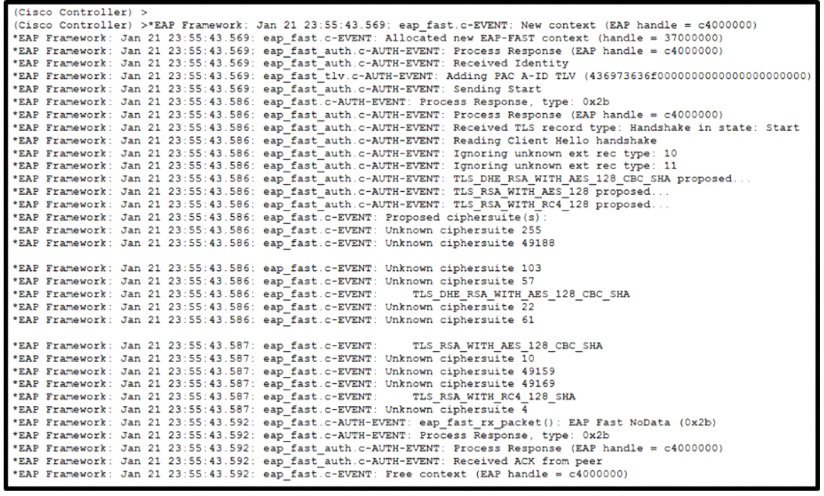
Refer to the exhibit
An engineer deployed a Cisco WLC using local EAP. Users who are configured for EAPPEAP
cannot connect to the network. Based on the local EAP debug controller provided,
why is the client unable to connect?
A. The client is falling to accept certificate.
B. The Cisco WLC is configured for the incorrect date.
C. The user is using invalid credentials
Explanation:
Failure Point in the Handshake:
The debug trace captures the Phase 1 TLS outer tunnel setup (Reading Client Hello handshake, TLS_DHE_RSA... proposed). Right after negotiating ciphers, the controller receives eap_fast_rx_packet(): EAP Fast NoData (0x2b) and an ACK from the peer before immediately terminating (Free context). This indicates the client rejected the SSL/TLS server certificate presented by the WLC during negotiation and tore down the connection before transmitting user credentials.
Why Other Options Are Incorrect
B. The Cisco WLC is configured for the incorrect date:
If the WLC system clock were severely out of sync, certificate validity checks (NotBefore/NotAfter) would fail on the controller side or throw explicit NTP/clock skew errors in the EAP logs. The debug trace shows no system clock mismatch or CA validity failures generated by the WLC.
C. The user is using invalid credentials:
In EAP-PEAP and EAP-FAST, user credentials (such as MSCHAPv2) are transmitted inside the encrypted TLS inner tunnel (Phase 2). Because the outer TLS handshake failed during cipher/certificate exchange, the session closed before reaching the inner credential validation phase.
References
Cisco Local EAP Documentation: Under Local EAP, the WLC acts as the EAP server. For PEAP/FAST outer tunnel establishment, the client must trust the Certificate Authority (CA) that signed the WLC’s local EAP certificate. If the root CA is missing from the client's local trust store, the client drops the TLS handshake via an empty EAP response (NoData).
Cisco Guide: Configuring Local EAP Authentication on Wireless LAN Controllers (AireOS / Catalyst 9800) – Phase 1 TLS exchange and certificate trust store requirements.
Which two events are outcomes of a successful RF jamming attack? (Choose two.)
A. disruption of WLAN services
B. unauthentication association
C. deauthentication broadcast
D. deauthentication multicast
E. physical damage to AP hardware
B. unauthentication association
Explanation
Disruption of WLAN Services (Option A):
RF jamming continuously emits noise/energy on the operational wireless frequencies (2.4 GHz, 5 GHz, or 6 GHz), driving the Signal-to-Noise Ratio (SNR) down to unusable levels. Wireless clients and APs observe a medium that is perpetually busy or corrupted, leading to severe packet loss, excessive retries, high latency, and complete failure of wireless communications across the affected channel.
Unauthentication Association (Option B):
When excessive RF interference disrupts frame delivery, active client connections drop due to missed keepalives and corrupted control frames. As a result, client stations repeatedly enter an unauthenticated/unassociated state and attempt to rediscover and re-authenticate to nearby APs, repeatedly triggering association state transitions.
Why Other Options Are Incorrect
C. deauthentication broadcast & D. deauthentication multicast:
Deauthentication frames (broadcast or multicast) are intentional 802.11 management frames sent by an attacker performing a Layer 2 Wireless Denial of Service (DoS) spoofing attack. RF jamming operates strictly at Layer 1 (Physical Layer) by flooding raw radio energy onto the RF spectrum, rather than transmitting valid 802.11 management frames.
E. physical damage to AP hardware:
Standard commercial RF jamming devices emit radio waves intended to disrupt signal processing; they do not generate sufficient high-frequency electromagnetic pulse (EMP) energy to permanently damage the physical components or circuitry of an Access Point.
Reference:
Cisco Adaptive wIPS / CleanAir Architecture: According to Cisco's Wireless Intrusion Prevention System (wIPS) attack signatures, an RF Jamming attack is classified as a physical Layer 1 DoS event that degrades network capacity and triggers client state dropouts (unauthentication/unassociation) without utilizing 802.11 frame structures.
Which two configurations are applied on the WLC to enable multicast, check multicast stream subscriptions, and stream content only to subscribed clients? (Choose two)
A. Enable IGMP snooping
B. Set the IGMP timeout to 180 seconds
C. Enable broadcast forwarding
D. Enable 802.3x flow control mode.
E. Set the AP multicast to 238.255.255.255
Explanation:
AP Multicast Address Configuration (Option E / Multicast-Multicast Mode):
To stream multicast content across the wireless infrastructure efficiently, the WLC must be configured in Multicast-Multicast mode by setting a global AP Multicast IP Address (e.g., 238.255.255.255). This allows the controller to encapsulate client-bound multicast packets inside a single CAPWAP multicast packet forwarded directly to APs, preventing the WLC from replicating unicast packets to every single AP.
IGMP Snooping (Option A):
Enabling IGMP Snooping on the controller forces the WLC to inspect IGMP membership reports sent by wireless clients. By tracking active group subscriptions, the WLC ensures multicast traffic is forwarded only to APs that have subscribed clients attached, rather than flooding the multicast stream to all APs across the deployment.
Why Other Options Are Incorrect
B. Set the IGMP timeout to 180 seconds:
Adjusting the IGMP query or membership timeout changes the timer interval for query/response cycles, but it does not enable multicast distribution or constrain delivery exclusively to active subscribers.
C. Enable broadcast forwarding:
Broadcast forwarding enables Layer 2 broadcast frames (such as ARP or DHCP) to pass across wireless interfaces. While broadcast and multicast share some underlying behaviors, enabling broadcast forwarding is not required for client-specific IGMP multicast stream distribution.
D. Enable 802.3x flow control mode:
802.3x Ethernet flow control is a Layer 2 physical-link mechanism used to pause frame transmission between network switches/NICs during congestion; it has no function in managing IP multicast group subscriptions.
References
Cisco Wireless Controller Configuration Guide (Multicast Chapter): To enable efficient multicast delivery over CAPWAP, configure Multicast-Multicast mode by assigning an AP Multicast Group IP address.
An engineer is implementing a FlexConnect group for access points at a remote location using local switching but central DHCP. Which client feature becomes available only if this configuration is changed?
A. multicast
B. static IP
C. fast roaming
D. mDNS
Explanation:
This question tests your knowledge of feature compatibility within FlexConnect deployments. In the scenario, the engineer is using local switching but central DHCP for FlexConnect APs at a remote site.
The feature that becomes available only if this configuration is changed is mDNS (Multicast Domain Name System) . For FlexConnect APs in local switching mode, mDNS Gateway operation requires a specific configuration change to function properly. The AP must be configured to act as the mDNS Gateway for service discovery (e.g., Apple Bonjour, AirPlay, printers) . This is accomplished by enabling the mDNS Gateway globally and configuring the WLAN with mDNS in Gateway mode rather than the default Bridging mode . The mDNS Flex Profile must also be applied to the FlexConnect policy . The configuration is considered changed because the default bridging mode does not provide the mDNS gateway functionality needed for cross-VLAN service advertisement in local switching environments .
Why the others are wrong:
A (multicast):
Multicast support is not dependent on changing local switching or central DHCP. Multicast modes (Multicast-Multicast or Multicast-Unicast) can be configured globally and applied to WLANs regardless of the FlexConnect switching mode . The restriction mentioned in some references is specific to IPv6 support requiring multicast-unicast mode for central switching, not the described scenario.
B (static IP):
Static IP client mobility support is generally available on centrally switched WLANs and does not depend on changing the described FlexConnect local switching/central DHCP configuration.
C (fast roaming):
Fast roaming (PKC/OKC/FT) operates independently of the FlexConnect data plane (local vs central switching) and DHCP handling. These protocols handle key management and mobility, not data switching or DHCP methods.
References:
Cisco Catalyst 9800 Series Configuration Guide – mDNS FlexConnect Local Switching configuration
Cisco 300-430 ENWLSI Exam Blueprint – Section 3.4: Implement mDNS
What is the maximum time range that can be viewed on the Cisco DNA Center issues and alarms page?
A. 3 hours
B. 24 hours
C. 3 days
D. 7 days
Explanation:
On the Cisco DNA Center (Catalyst Center) issues and alarms page, the time range selector offers preset options to filter the data displayed. The available presets include 3 hours, 24 hours, and 7 days . While the default selection is 24 hours, the maximum preset time range that can be viewed on this specific page is 7 days. Selecting this range provides a comprehensive view of historical issues and alarms over the past week.
Why the others are wrong:
A. 3 hours:
This is the shortest available preset and is used for immediate, real-time troubleshooting, not the maximum range.
B. 24 hours:
While this is the default view, it is not the maximum allowable range. The interface explicitly provides a 7-day option.
C. 3 days:
This is not one of the standard preset time ranges available for the issues and alarms page. The presets are specifically 3 hours, 24 hours, and 7 days .
References:
Cisco DNA Center and Rogue Management Documentation, which specifies the time range presets (3 hours, 24 hours, or 7 days) available in the monitoring dashboards .
Exam discussions confirming that the maximum viewable range on this page is 7 days .
Which two statements about the requirements for a Cisco Hyperlocation deployment are true? (Choose two.)
A. After enabling Cisco Hyperlocation on Cisco CMX, the APs and the wireless LAN controller must be restarted.
B. NTP can be configured, but that is not recommended.
C. The Cisco Hyperlocation feature must be enabled on the wireless LAN controller and Cisco CMX.
D. The Cisco Hyperlocation feature must be enabled only on the wireless LAN controller.
E. If the Cisco CMX server is a VM, a high-end VM is needed for Cisco Hyperlocation deployments.
Explanation:
Dual Configuration Requirement (Option C):
Cisco Hyperlocation is an end-to-end architecture that relies on coordination between the controller infrastructure and the location analytics engine. To activate it, the feature must be globally enabled on the WLC (to instruct APs to collect and forward Angle of Arrival/AoA data) and on the Cisco Connected Mobile Experiences (CMX) server (to process the influx of advanced location data). Configuring only one side will result in a failure to generate high-accuracy coordinates.
VM Compute Constraints (Option E):
Processing Advanced Location metrics, specifically Angle of Arrival (AoA) and Time Difference of Arrival (TDoA) calculations from Hyperlocation modules, generates an immense computational load. A standard or low-end CMX virtual machine lacks the vCPU and memory resources required to process this telemetry at scale. Cisco strictly mandates deploying the "High-End" CMX VM node size to support Hyperlocation capabilities.
Why Other Options Are Incorrect
A. After enabling Cisco Hyperlocation on Cisco CMX, the APs and the wireless LAN controller must be restarted:
While enabling the hyperlocation service on CMX requires restarting the CMX services (via cmxctl), and APs may reboot when downloading the hyperlocation profile, the Wireless LAN Controller itself does not require a system restart.
B. NTP can be configured, but that is not recommended:
This is the exact opposite of Cisco's best practices. Network Time Protocol (NTP) synchronization is strictly required across the WLC, APs, and CMX server. Microsecond-level timing discrepancies will completely break TDoA/AoA location calculations.
D. The Cisco Hyperlocation feature must be enabled only on the wireless LAN controller:
Enabling it strictly on the WLC only commands the APs to gather data. Without the Advanced Location/Hyperlocation service enabled on CMX, the WLC has no engine to process the collected AoA metrics.
References:
Cisco CMX Location Limitations and Hardware Requirements Guide:
Outlines the software limitations of Low, Standard, and High-end nodes, explicitly marking "Hyperlocation support" as available only on the High-end VM architecture.
Cisco Hyperlocation Deployment Guide:
Details the step-by-step initialization process, verifying that NTP is a mandatory prerequisite and that hyperlocation parameters must be enabled on both the controller GUI and CMX analytics dashboards.
| Page 1 out of 28 Pages |
Why Prepare with Our Cisco 300-430 Practice Test?
Our 300-430 practice tests are designed to closely match the real Implementing Cisco Enterprise Wireless Networks (ENWLSI) exam format and difficulty. Each question helps you understand the key concepts. With regularly updated content, detailed Implementing Cisco Enterprise Wireless Networks (ENWLSI) exam questions explanations, and a user-friendly interface, you can confidently assess your knowledge and improve your Cisco exam readiness.
Cisco 300-430 Exam Details
Exam Code:300-430
Exam Name: Implementing Cisco Enterprise Wireless Networks (ENWLSI)
Certification Name: CCNP Enterprise
Certification Provider: Cisco
Exam Questions: 55–65 questions
Exam Time: 90 minutes
Passing Score: Variable (750-850 / 1000 Approx)