Topic · 178 of 510 questions freeTopic 4: Exam Pool D
Question 361
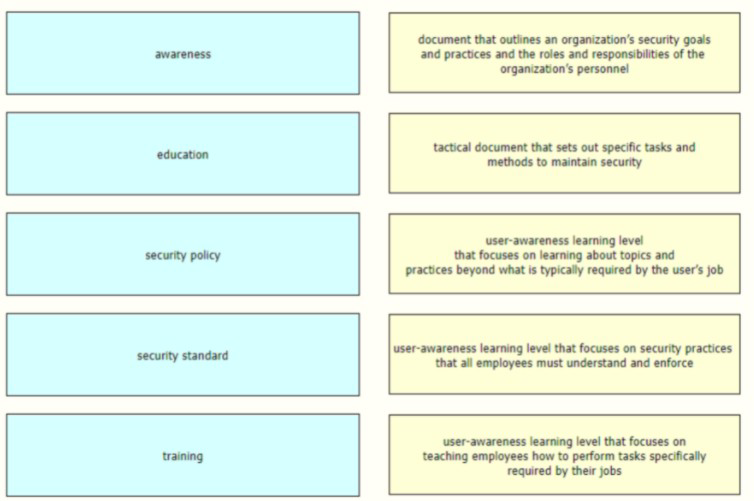
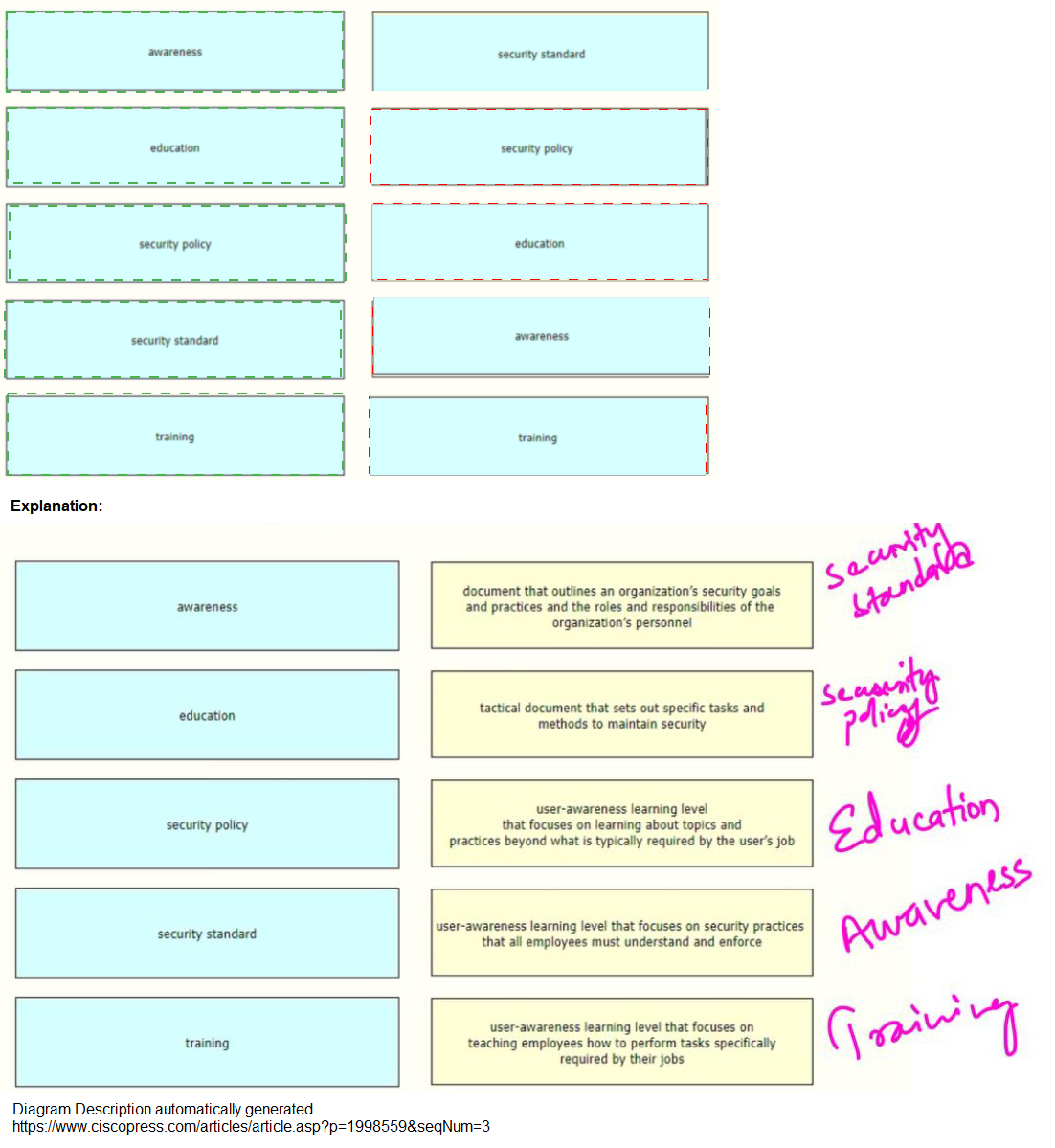
Drag and drop the elements of a security program from the left onto the corresponding descriptions on the right.
Question 362Choose 1
Refer to the exhibit.
When router R1 is sending traffic to IP address 10.56.192 1, which interface or next hop address does it use to route the packet?
Correct answer:
B. 10.56.0.1
Question 363Choose 1
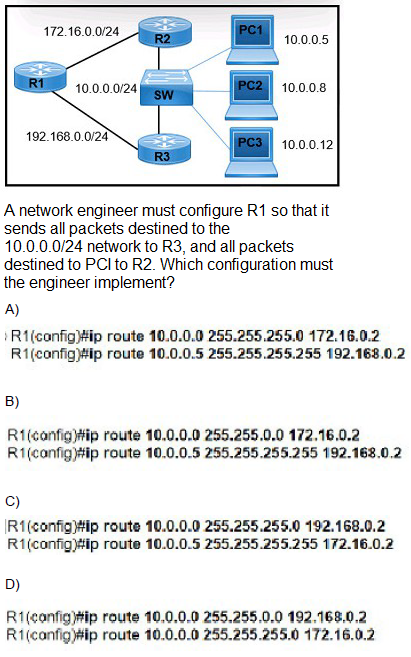
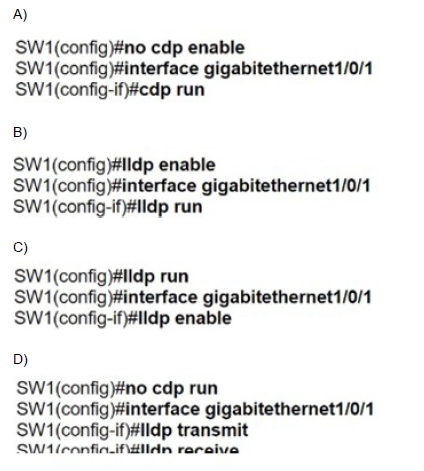
Refer to the exhibit.
Correct answer:
C. Option C
Question 364Choose 1
Refer to the exhibit. User traffic originating within site 0 is failing to reach an application hosted on IP address 192.168 0 10. Which is located within site A What is determined by the routing table?
Correct answer:
B. The lack of a default route prevents delivery of the traffic
Question 365Choose 1
What is a purpose of traffic shaping?
Correct answer:
A. It enables dynamic flow identification.
Question 366Choose 1
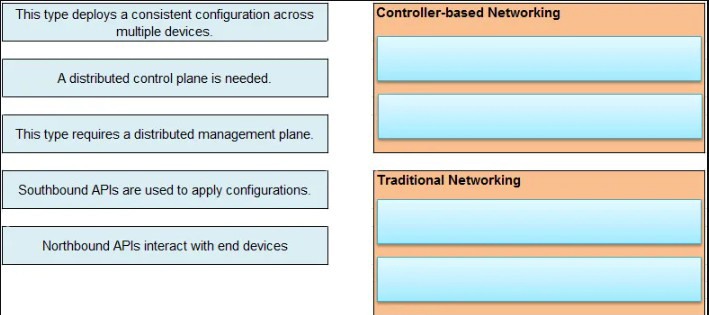
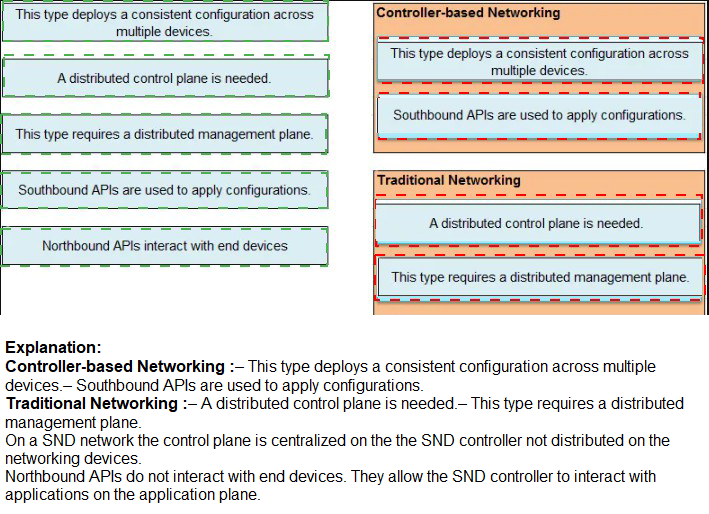
Drag and drop the statements about networking from the left onto the corresponding networking types on the right. Not all statements are used.
Question 367Choose 1
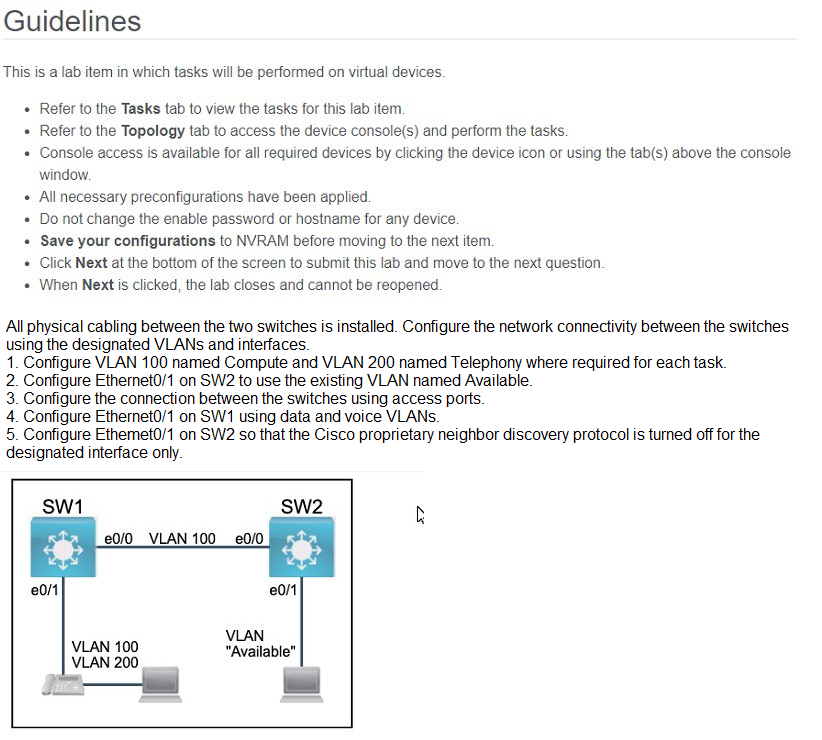
Refer to the exhibit. A multivendor network exists and the company is implementing VoIP over the network for the first time.
Answer as below configuration: on sw1 enable conf t vlan 100 name Compute vlan 200 name Telephony int e0/1 switchport voice vlan 200 switchport access vlan 100 int e0/0 switchport mode access do wr on sw2 Vlan 99 Name Available Int e0/1 Switchport access vlan 99 do w
Question 369
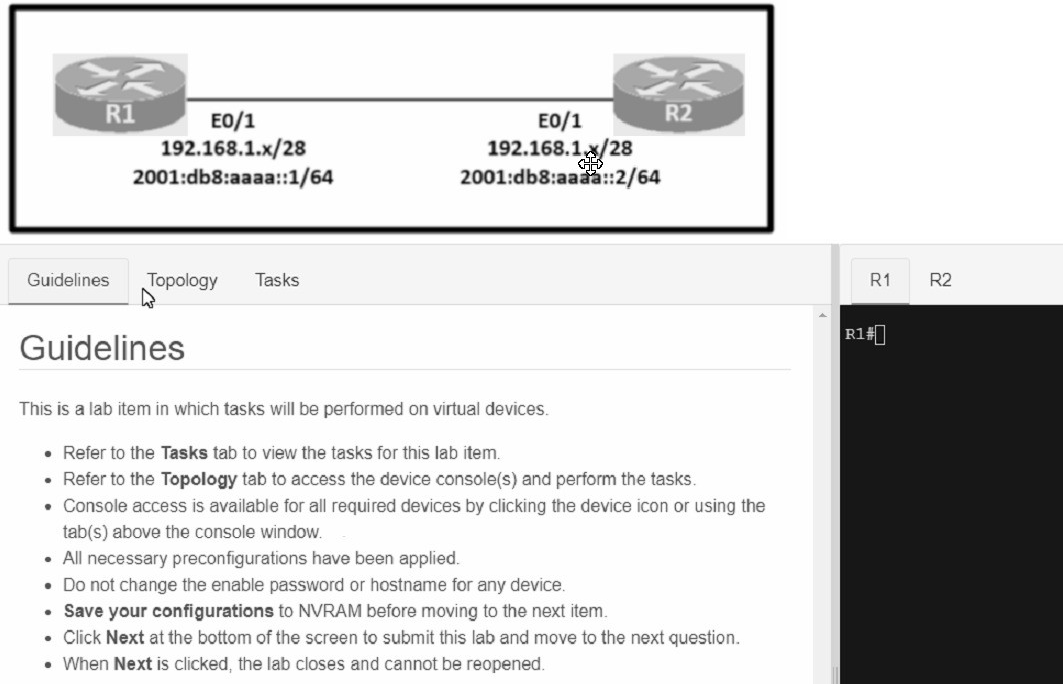
Configure IPv4 and IPv6 connectivity between two routers. For IPv4, use a /28 network from the 192.168.1.0/24 private range. For IPv6, use the first /64 subnet from the 2001:0db8:aaaa::/48 subnet. 1. Using Ethernet0/1 on routers R1 and R2, configure the next usable/28 from the 192.168.1.0/24 range. The network 192.168.1.0/28 is unavailable. 2. For the IPv4 /28 subnet, router R1 must be configured with the first usable host address. 3. For the IPv4 /28 subnet, router R2 must be configured with the last usable host address. 4. For the IPv6 /64 subnet, configure the routers with the IP addressing provided from the topology. 5. A ping must work between the routers on the IPv4 and IPv6 address ranges.
Explanation:
Answer as below configuration: on R1 config terminal ipv6 unicast-routing inter eth0/1 ip addre 192.168.1.1 255.255.255.240 ipv6 addre 2001:db8:aaaa::1/64 not shut end copy running start on R2 config terminal ipv6 unicast-routing inter eth0/1 ip address 192.168.1.14 255.255.255.240 ipv6 address 2001:db8:aaaa::2/64 not shut end copy running start ----------- for test from R1 ping ipv6 2001:db8:aaaa::1 for test from R2 ping ipv6 2001:db8:aaaa::2
Question 370
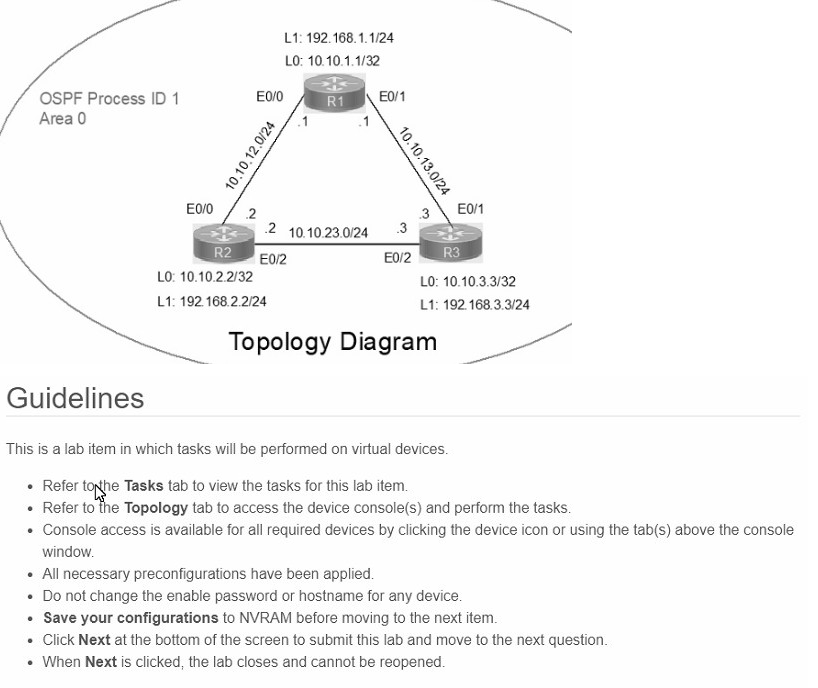
IP connectivity between the three routers is configured. OSPF adjacencies must be established. 1. Configure R1 and R2 Router IDs using the interface IP addresses from the link that is shared between them. 2. Configure the R2 links with a max value facing R1 and R3. R2 must become the DR. R1 and R3 links facing R2 must remain with the default OSPF configuration for DR election. Verify the configuration after clearing the OSPF process. 3. Using a host wildcard mask, configure all three routers to advertise their respective Loopback1 networks. 4. Configure the link between R1 and R3 to disable their ability to add other OSPF routers.
Explanation:
Answer as below configuration:
on R1 conf terminal interface Loopback0 ip address 10.10.1.1 255.255.255.255 ! interface Loopback1 ip address 192.168.1.1 255.255.255.0 ! interface Ethernet0/0 no shut ip address 10.10.12.1 255.255.255.0 ip ospf 1 area 0 duplex auto ! interface Ethernet0/1 no shut ip address 10.10.13.1 255.255.255.0 ip ospf 1 area 0 duplex auto ! router ospf 1 router-id 10.10.12.1 network 10.10.1.1 0.0.0.0 area 0 network 192.168.1.0 0.0.0.255 area 0 ! copy run star -------------------- On R2 conf terminal interface Loopback0 ip address 10.10.2.2 255.255.255.255 ! interface Loopback1 ip address 192.168.2.2 255.255.255.0 ! interface Ethernet0/0
no shut ip address 10.10.12.2 255.255.255.0 ip ospf priority 255 ip ospf 1 area 0 duplex auto ! interface Ethernet0/2 no shut ip address 10.10.23.2 255.255.255.0 ip ospf priority 255 ip ospf 1 area 0 duplex auto ! router ospf 1 network 10.10.2.2 0.0.0.0 area 0 network 192.168.2.0 0.0.0.255 area 0 ! copy runs start ------------ On R3 conf ter interface Loopback0 ip address 10.10.3.3 255.255.255.255 ! interface Loopback1 ip address 192.168.3.3 255.255.255.0 ! interface Ethernet0/1 no shut ip address 10.10.13.3 255.255.255.0 ip ospf 1 area 0 duplex auto ! interface Ethernet0/2 no shut ip address 10.10.23.3 255.255.255.0 ip ospf 1 area 0 duplex auto ! router ospf 1 network 10.10.3.3 0.0.0.0 area 0 network 192.168.3.0 0.0.0.255 area 0 ! copy run start
Timed mock exam
Experience the real exam before you take it
Our timed 200 301 mock exam mirrors the format, number of questions and time limit of the official exam, so you can build speed and stamina.